

WP_Meteo3D Widget
With WP_Meteo3D Widget you can display weather near real time conditions for over 200 cities in a 3D earth environment.
Plugin info
Maintenance & Compatibility
Maintenance score
Possibly abandoned • Last updated 6074 days ago
Is WP_Meteo3D Widget abandoned?
Possibly abandoned (last update 6074 days ago).
Compatibility
Similar & Alternatives
Explore plugins with similar tags, and compare key metrics like downloads, ratings, updates, support, and WP/PHP compatibility.
Description
With WP_Meteo3D Widget you can display weather near real time conditions for over 200 cities in a 3D earth environment.
You can customize the widget with the widget options (width, height, maps, earth rotation, etc.)
The widget currently support the following languages: English, Danish, Dutch, Finnish, French, German, Hungarian, Italian, Polish, Portuguese, Romanian, Russian, Slovak, Spanish, Swedish.
Options
The options page allows you to change the he following parameters.
Width
The width of the widget
Height
The height of the widget
Map
The map texture of the widget
Language
The language of the weather message
Temperature
The temperature (Celsius or Fahrenheit)
Earth Rotation
If the earth must rotate or not
Installation
- Download the zip file and extract the contents.
- Make sure you’re running WordPress version 2.3 or better. It won’t work with older versions.
- Upload the ‘wp-meteo3d-widget’ folder to your plugins directory (plugins/wp-meteo3d-widget).
- Activate the plugin through the ‘plugins’ page in WP.
- Goto Appearence/Widgets, add the widget and see widget options to adjust things like display size, map, earth rotation, etc…
Frequently Asked Questions
My theme/site appears not to like this plugin. It’s not displaying correctly.
- In 99% of all cases where this happens the issue is caused by markup errors in the page where the plugin is used. Please validate your blog using validator.w3.org and fix any errors you may encounter.
- The plugin requires Flash Player 9 or better and javascript. Please make sure you have both.
How I can change the map texture?
*You can change the map texture from widget options.
How I can change the weather messages language?
*You can change the weather messages language from widget options.
What if my own language is missing from widget options?
*In wp-meteo3d-widget\flash\lang there are all currently supported languages, make a copy of the file en.xml, rename it with the 2 letter iso code of your country (for the list of country is code http://www.iso.org/), make the translation and send the file by email to [email protected], we will add the language asap.
Review feed
Screenshots
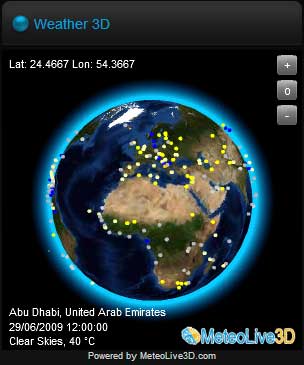
Widget

Widget options

Maps texture
Changelog
Version 1.0
- Initial release version.