

WP MLM SOFTWARE PLUGIN
The plugin enables you to run a WP MLM network with WordPress website. This is the ideal plugin to keep track of expenditure, income, downline member …
Plugin info
Maintenance & Compatibility
Maintenance score
Possibly abandoned • Last updated 887 days ago • Support resolved 0% • 9 reviews
Is WP MLM SOFTWARE PLUGIN abandoned?
Possibly abandoned (last update 887 days ago).
Compatibility
Similar & Alternatives
Explore plugins with similar tags, and compare key metrics like downloads, ratings, updates, support, and WP/PHP compatibility.
Description
The plugin enables you to run a MLM network with WordPress website
Features:
- New members can register to the wordpress back end using sponsor name.
- Existing members can register new members by using the wordpress default registration form.
- Specify payplan (Bonus + depth level) details in the admin.
- Downline Graphical View (Genealogy Tree)
- Paypal payment gateway integrated with registration.
- Each member is able to see complete details for commission and bonus earned.
Admin side:
- MLM Admin Dashboard
- General Settings
- Package Settings
- Commission Settings
- Payment Option
- Genealogy Tree
- User Details
- E-wallet Management
- Reports
- Transaction Password
User Side:
- MLM User Dashboard
- User Profile
- Genealogy Tree
- E-wallet Management
- Bonus Details
- Referral Details
Features available in Pro Version:
- Admin can add custom packages for registration
- Admin can view and download reports like profile,joining and bonus
Demo
Try Affiliate Excel Software Plugin Demo – Demo Link
Admin Login:
Username: admindemo
Password: 12345678
User Login:
Username: userdemo
Password: 12345678
Try out our Standard MLM Software Demo for the following MLM Compensation Plans:
- Binary Plan
- Matrix Plan
- Unilevel Plan
- Stair Step Plan
- Generation Plan
- Donation Plan
- Party Plan and more
Installation
Automatic Installation
Automatic installation is the easiest option where you can directly search for the plugin and You can view the details about Affiliate Excel Software such as the point release, rating and description.
.
Follow the steps for automatic installation
– Log in to your WordPress dashboard
– Navigate to the Plugins menu and click Add New
– In the search field type WP MLM Plugin and click Search Plugins
– Once you’ve found our plugin, click on Install Now
– After installation, click on activate
You are done 🙂
Manual Installation
Place the wp-mlm folder in your /wp-content/plugins/ directory.
Activate Affiliate Excel Software.
A new menu item would be created in the admin menu called Affiliate Excel MLM.
Frequently Asked Questions
Registration process is very simple. User can register by filling username and email to the default wordpress registration form. Registration confirmation with user id will be sent to the registered email id. User will be provided a link to set the password. Now user can login using user id and password. After login, user can join to the MLM network by selecting a sponsor and package (if available).
Yes.Paypal is integrated.
Yes, You can try demo here – Demo Link
Admin Login:
Username: admindemo
Password: 12345678
User Login:
Username: userdemo
Password: 12345678
Try out our Standard MLM Software Demo for the following MLM Compensation Plans:
- Binary Plan
- Matrix Plan
- Unilevel Plan
- Stair Step Plan
- Generation Plan
- Donation Plan
- Party Plan and more
Facing any difficulty in using plugin? Click on “View support forum” and post your query. We will answer to your query.
Review feed
Screenshots

Dashboard
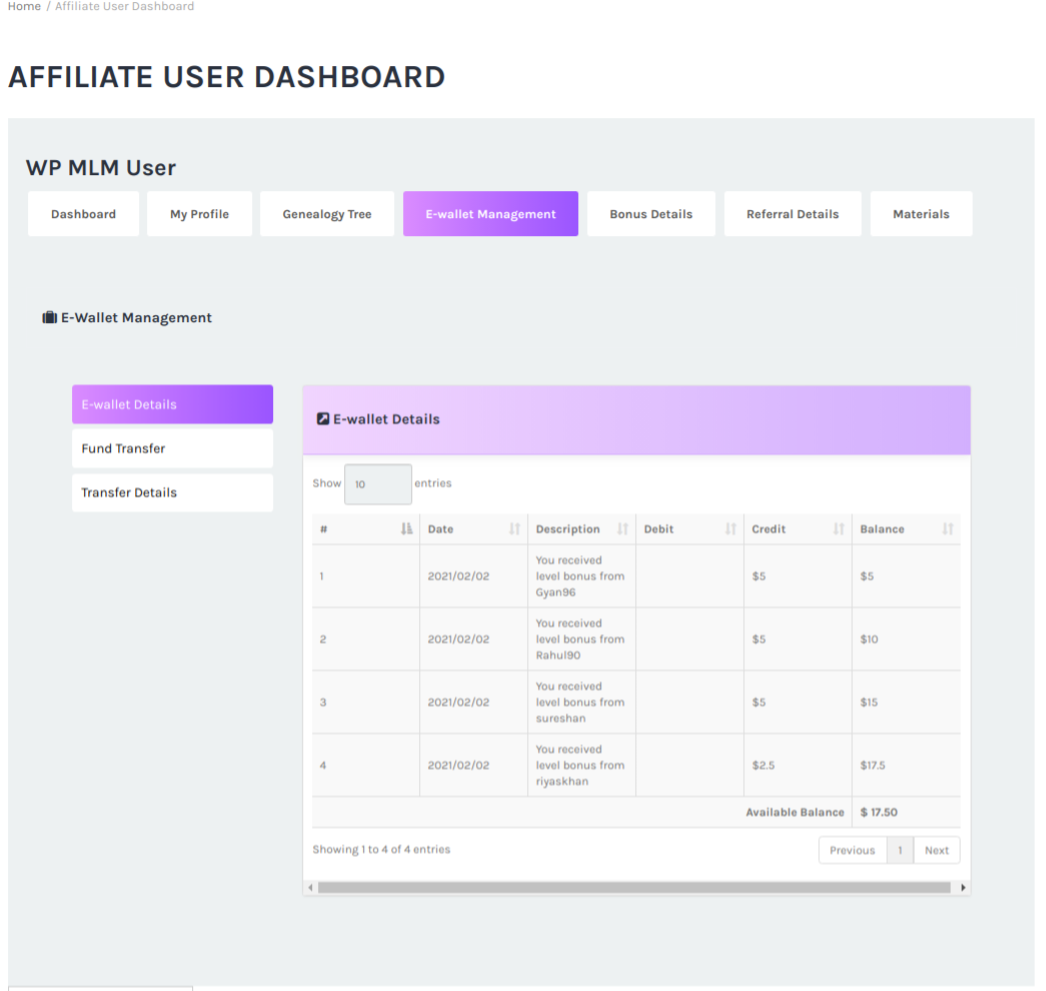
User Details

Genealogy Tree

General Settings

Password settings

Bonus Report

Profile Report

Changelog
No information currently