

WP Mp3 Player
WP Mp3 Player is a widgetized audio player for your sidebar. It's easy to setup, and works with any broswer or device.
Plugin info
Maintenance & Compatibility
Maintenance score
Possibly abandoned • Last updated 3754 days ago • 1 reviews
Is WP Mp3 Player abandoned?
Possibly abandoned (last update 3754 days ago).
Compatibility
Similar & Alternatives
Explore plugins with similar tags, and compare key metrics like downloads, ratings, updates, support, and WP/PHP compatibility.
Description
Are you looking for an easy to setup, robust audio player for your sidebar?
WP Mp3 Player requires no technical knowledge to install, and was built using Anthony Kolber’s “audio.js” library so it will work with pretty much any browser or device. It uses html5 native audio wherever supported, and falls back on an invisible flash player anywhere else. It supports .mp3 playlists of up to 50 tracks, and can be styled using standard CSS.
It has been tested with:
- Mobile Safari (iOS 3+)
- Android (2.2+, w/Flash)
- Safari (4+)
- Chrome (7+)
- Firefox (3+, w/ Flash)
- Opera (10+, w/ Flash)
- IE (6, 7, 8, w/ Flash)
New tracks can be uploaded via your WordPress Media library, and then added via the Widget Admin page.
The HTML is responsive, and will resize to fit any wordpress theme.
If you like this plugin, please rate it (on the right side of this page). Thanks a lot! 🙂
Related Links:
Installation
- Upload the whole
wp-mp3-playerdirectory, (including theassetssub-directory), to your/wp-content/plugins/directory - Activate the plugin through the
Pluginsmenu in WordPress - Go to
Appearance=>Widgets - Drag and drop the
Mps Playerwidget to the desired sidebar (or, if using Accesibility mode, click theAddlink) - Upload your desired mp3 audio file via the
Mediamenu in WordPress - Copy and Paste the .mp3 files’ absolute URLs, (http://…), from your
Media Library, into theWidgetadmin form. - Enter the desired title too, (tracks will not save without a title)!
- Click the
Savebutton in theWidgetadmin form, and you’re done! - Repeat for each track, (the widget will support up to 50x tracks).
Frequently Asked Questions
Are there any copyright issues when using this mp3 player?
Yes, usual copyright laws apply. It is illegal to share copyrighted music without the permission of the copyright owner. The music industry in recent years has taken an aggressive approach to illegal file sharing, and consequences can be severe. There are plenty of resources for Royalty Free music, or songs covered by the Creative Commons License (CCL) available on the internet, so please only share music that doesn’t infringement copyright.
For information about copyright in your country, try your local copyright office.
For information on copyright laws around the world, try the World Intellectual Property Office database.
For sources of Royalty Free music, (in no particular order), try:
Review feed
Screenshots
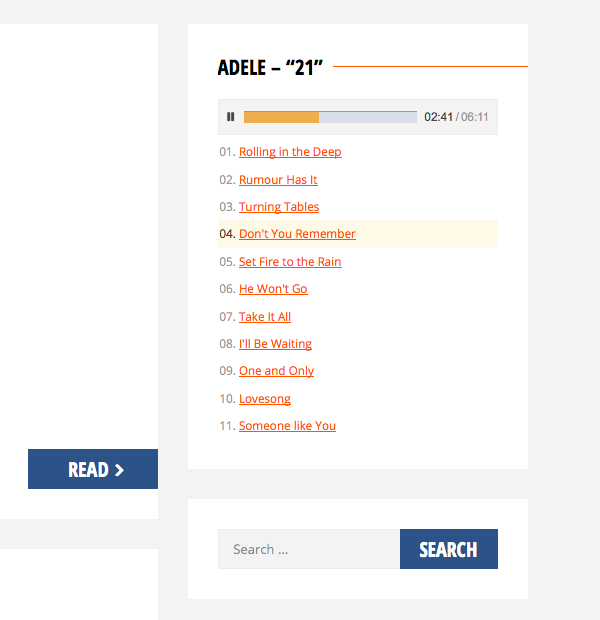
The Mp3 Player widget in a sidebar. Your theme's colors are styles are respected.

A user-friendly Widget Admin form for adding and removing tracks within your Dashboard.

Uses fluid layout, mobile-responsive CSS, that adjusts to your screen size.
Changelog
1.0: November 6, 2015
- Initial release