

WP-Note 2019
Beautiful design of notes in posts. The plugin fully supports the old version of the WP-Note plugin from Luke.
Maintenance 40/100343d since update
Active installs
300
Downloads
5,448
Reviews
1
Age
7.2y
Plugin info
Total downloads: 5,448
Active installs: 300
Total reviews: 1
Average rating: 5
Support threads opened: 0
Support threads resolved: 0 (0%)
Available in: 2 language(s)
Contributors: 1
Last updated: 4/24/2025 (343 days ago)
Added to WordPress: 2/7/2019 (7 years old)
Minimum WordPress version: 5.0
Tested up to WordPress version: 6.8.3
Minimum PHP version: 5.6
Maintenance & Compatibility
Maintenance score
Stale • Last updated 343 days ago • 1 reviews
40/100
Is WP-Note 2019 abandoned?
Likely maintained (last update 343 days ago).
Compatibility
Requires WordPress: 5.0
Tested up to: 6.8.3
Requires PHP: 5.6
Similar & Alternatives
Explore plugins with similar tags, and compare key metrics like downloads, ratings, updates, support, and WP/PHP compatibility.
AddQuicktag
Rating 4.7/5 (44 reviews) • Active installs 100,000
TCD Classic Editor
Rating 0.0/5 (0 reviews) • Active installs 2,000
Automatically Paginate Posts
Rating 4.4/5 (18 reviews) • Active installs 1,000
Jayj Quicktag
Rating 5.0/5 (2 reviews) • Active installs 200
Bambuser for WordPress
Rating 0.0/5 (0 reviews) • Active installs 10
TinyMCE Backslash Button
Rating 0.0/5 (0 reviews) • Active installs 10
Description
Beautiful design of notes in posts. The plugin fully supports the old version of the WP-Note plugin from Luke.
Installation
- Extract the contents of the archive
- Upload the contents of the wp-note-2019 folder to your \’wp-content/plugins\’ folder
- Log in to your WordPress admin and got to the \’Plugins\’ section. You should now see WP-Note-2019 in the list of available plugins
- Activate the plugin by clicking the \’activate\’ link
- Now you add quicktags such as note, important, tip, warning, help in your post.
Frequently Asked Questions
No FAQ available
Review feed
No reviews available
Screenshots
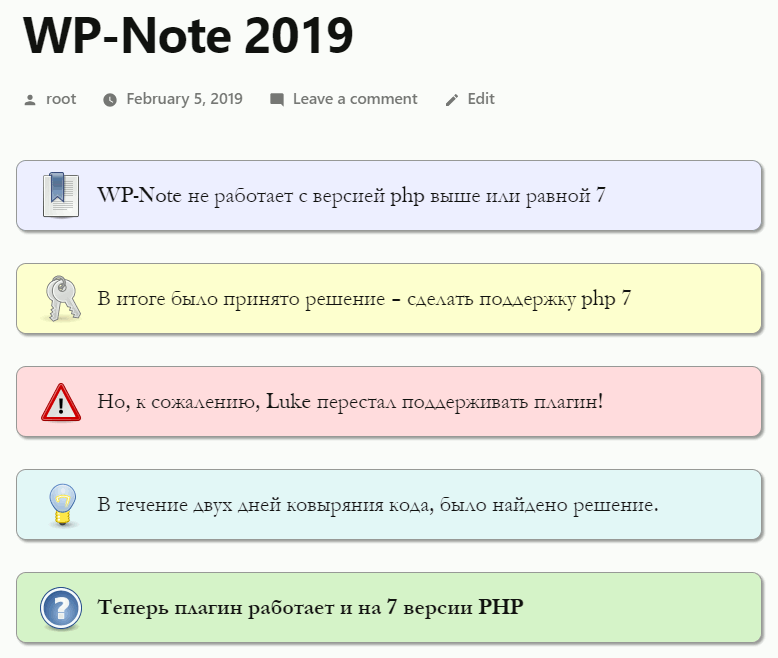
Wordpress Note in content
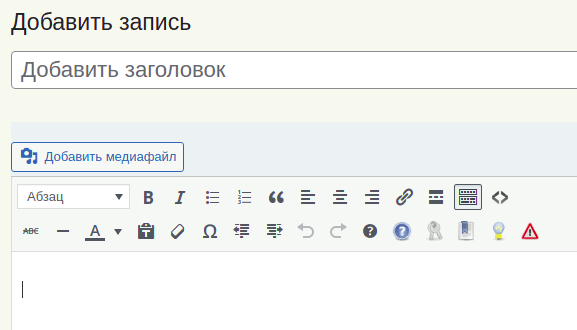
Buttons on the panel
Changelog
1.2
- Tested up 5.9 version
- Added buttons to the editor panel Classic Editor
1.1.1
- Tested up 5.5 version
- Remove file – css-test.html
- Change css style – change right alignment, value = -6px
1.1
- Bug fixed – Warning: call_user_func_array(). The error did not appear for all users.
1.0
- Initial release.