

WP Options Editor
More easily view, edit, add, and delete all of your WP Options from the dashboard
Maintenance 22/1003658d since update
Active installs
200
Downloads
8,841
Reviews
8
Age
11.5y
Plugin info
Total downloads: 8,841
Active installs: 200
Total reviews: 8
Average rating: 3.4
Support threads opened: 0
Support threads resolved: 0 (0%)
Available in: 1 language(s)
Contributors: 1
Last updated: 3/26/2016 (3658 days ago)
Added to WordPress: 10/19/2014 (11 years old)
Minimum WordPress version: 3.4
Tested up to WordPress version: 4.4.33
Minimum PHP version: f
Maintenance & Compatibility
Maintenance score
Possibly abandoned • Last updated 3658 days ago • 8 reviews
22/100
Is WP Options Editor abandoned?
Possibly abandoned (last update 3658 days ago).
Compatibility
Requires WordPress: 3.4
Tested up to: 4.4.33
Requires PHP: f
Similar & Alternatives
Explore plugins with similar tags, and compare key metrics like downloads, ratings, updates, support, and WP/PHP compatibility.
NHR Options Table Manager
Rating 5.0/5 (2 reviews) • Active installs 80
Blog Settings
Rating 0.0/5 (0 reviews) • Active installs 10
Description
WP Options Editor allows you to easily view, edit, delete, and add options in your WP options table. The easy interface allows you to search for a particular option, edit it or delete it all within the same WP admin page.
Please be careful when using this plugin! You can easily delete an option that is crucial to your site operating. In addition, this plugin does not autocorrect for serialized data.
Installation
- Upload
WP Options Editorfolder to the/wp-content/plugins/directory - Activate the plugin through the
Pluginsmenu in WordPress - Go to Tools->Manage wp_options to see and edit your options
Frequently Asked Questions
No FAQ available
Review feed
drinkmaker
Great plugin. Often very helpful when debugging.
Author, please do not give up development! This is a useful tool.
Ricardo Martins (PagBank Integrações)
It's just a view of wp_options table
The annoying part of editing wp_option values is unserializing and serializing arrays values.
It would be much better is this plugin allow us to edit the serialized data in fields, not like a phpMyAdmin.
Screenshots
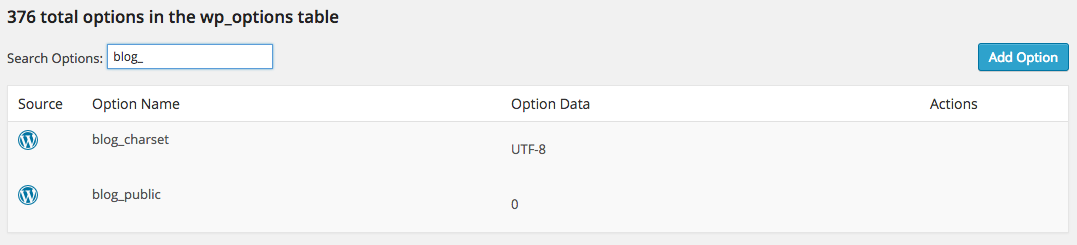
Search Your Options

Editing Options
Changelog
1.1
- Cleanup Release
- Fixed all WP_DEBUG-triggered errors
- General code audit/cleanup
- Fixed GF con & added Yoast SEO icon
- Fixed wording in search & replace sections
- Added several security checks on all admin functions
1.0.0
- Initial release