

Plugin info
Maintenance & Compatibility
Maintenance score
Possibly abandoned • Last updated 3873 days ago • 4 reviews
Is WP Outdated Browser abandoned?
Possibly abandoned (last update 3873 days ago).
Compatibility
Similar & Alternatives
Explore plugins with similar tags, and compare key metrics like downloads, ratings, updates, support, and WP/PHP compatibility.
Description
So, you’re tired of people visiting your modern website with an outdated browser and not doing anything about it. Maybe they aren’t “power” users, maybe it’s your auntie running a last century browser trying to see awesome CSS3 animations and transforms. Let the user know that’s an outdated browser, and advise them on a better one.
With this solution you can check if the user’s browser can handle your website. If not, it will show a cool looking notice advising the user to update the browser. It\’ll be up to him/her to decide if he upgrades or not. Don’t force the user!
This plugin is a version of Outdated Browser Projetct created by Bürocratik
Installation
- Upload the “WP Outdated Browser” directory to the “/wp-content/plugins/” directory
- Activate the plugin through the “Plugins” menu in WordPress
Frequently Asked Questions
Whats happened if my user is using a updated browser?
Nothing! This plugin just works if your using an outdated browser.
What are the languages officially supported?
Actually the alert message can be show in English, Portuguese, Finnish, Italian and Dutch
How can I change the language of the message?
The plugin get the language default of your WordPress installation. If you want use this plugin in another language you need install some plugin of translation.
Review feed
Screenshots
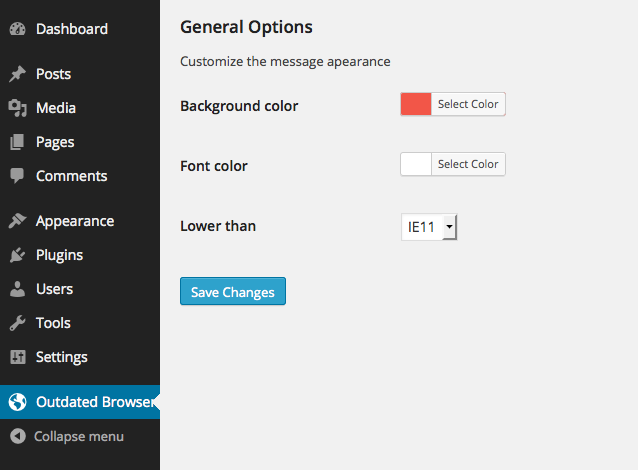
WP Outdated Browser Options Page
Changelog
2.1.0 – 24/08/2015
* Updated Outdated to version 1.1.1
* Added Danish lang
2.0.0 – 06/07/2014
* Adding multi language support
* Enable custom options via admin panel
* Core updated to v1.0.2
1.0.0 – 28/06/2014
* First version