
WP Paint – WordPress Image Editor
WP Paint - WordPress Image Editor is a browser based Image Editor for WordPress media images.
Plugin info
Maintenance & Compatibility
Maintenance score
Possibly abandoned • Last updated 1531 days ago • 81 reviews
Is WP Paint – WordPress Image Editor abandoned?
Possibly abandoned (last update 1531 days ago).
Compatibility
Languages
Similar & Alternatives
Explore plugins with similar tags, and compare key metrics like downloads, ratings, updates, support, and WP/PHP compatibility.
Description
WP Paint – WordPress Image Editor is a browser based HTML5 Image Editor for WordPress media images. It has an intuitive interface resembling most common Desktop based Photo Editors with an extensive array of Image Editing, Photo Manipulation and Photo Editing Features.
Features
- Image editor with an intuitive desktop Photo Editor like interface
- Ability to Manage Layers
- Flip, Rotate or Resize images
- Add Custom Text to images
- Crop images
- Apply Blur effects to images
- Turn images to Grayscale
- Change Hue of images
- Adjust image brightness contrast
- Add shapes on top of images
Installation and Overview Video Demo
Pro Version
The Pro version of this plugin has some really cool features.
Upgrade to WP Paint Pro version for an extensive set of advanced tools and features.
Pro Features
-
Stickers
Add cool stickers to your image and make your images look interesting & attractive. -
Watermark
You can add a Watermark to your pictures and keep these safe from copying. -
Clone Tool
This tool is used to copy regions of pixels from one location to another. The source and destination can be on the same layer or different layers within the same image. -
Revisions
WP Paint Pro offers easy access to older image revisions and the ability to restore to any of them as required. -
Search and Insert Images
Want to add more images to your image, You can easily do that with WP Paint. Link your Pixabay account, search and add as many images as you want. -
Non Admin User Access
With WP Paint Pro non-admin users can access the WP Paint Pro Editor. Any user with upload files permission can use WP Paint Pro to edit their images.
And many more…
Installation
- Login to your WordPress dashboard and navigate to Plugins > Add New
- Search for “WP Paint”.
- Click “Install”.
- Click “Activate”.
- Once the plugin is activated, you can see “Edit Image using WP Paint” link next to the “Edit Image” link on all your media browsers.
Frequently Asked Questions
Yes, you can edit the images like a desktop Photo Editor, but with browser level limitations.
Yes, absolutely the plugin should work with your theme without any issue.
Yes, the plugin has been tested to work with the Gutenberg editor without any issue.
Yes, the plugin should work with all types of Page Builder without any issue.
Yes, absolutely we have the pro version of this plugin with extended features. You can purchase the pro version right from here.
We are always looking for feedback from you. Whether it’s a completely new plugin or adding some custom functionality to any existing plugin, we are always ready to do that. You can contact us at [email protected]
Review feed
Screenshots
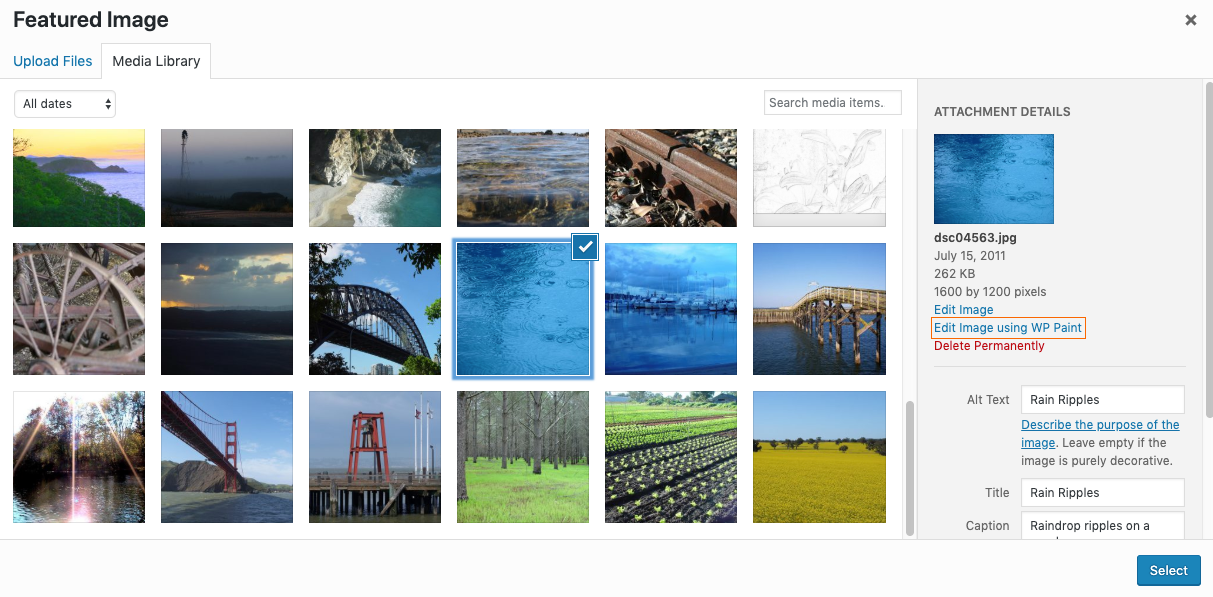
Edit Images from the Post/Page Section.
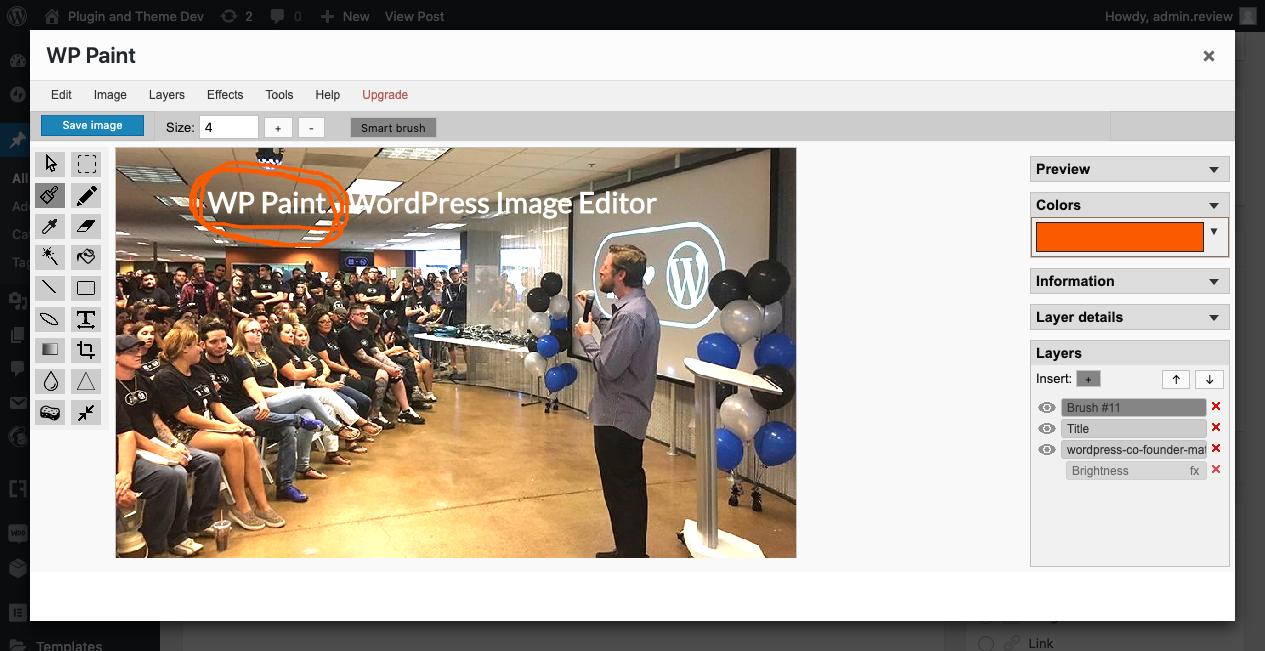
WP Paint editor window.

Edited image in frontend
Changelog
0.5.2
- Tested with WordPress 5.8.1
- Added Documentation
0.5.1
- Tested with WordPress 5.7
0.5.0
- Tested with WordPress 5.6.2
0.4.6
- Tested with WordPress 5.5
0.4.5
- Resolving Image Format Issue (https://wordpress.org/support/topic/turns-image-format-to-png-without-changing-extension/)
0.4.4
- Fixing Right sidebar scroll
0.4.3
- Protecting against accidental image corruption
0.4.2
- Handling errors
0.4.1
- Updating WordPress compatibility
0.3.8
- Resolving deprecated code issues and updating WordPress compatibility
0.3.7
- WordPress 5.3 Compatibility Check
0.3.6
- Fixing minor bugs.
0.3.5
- Minor changes and WordPress 5.2.4 check.
0.3.4
- Fixing minor bugs.
0.3.3
- Fixing heading.
0.3.2
- Adding Brightness/Contrast.
0.3.1
- Adding Missing Files.
0.3.0
- Fixing menu button appearance for WordPress 5.2.3.
0.2.9
- Bug fixes.
0.2.8
- Minor CSS Fix.
0.2.7
- Fixing version.
0.2.6
- Fixing CSS.
0.2.5
- Fixing bugs.
0.2.4
- Added plugin activation check.
0.2.3
- Fixing code issues.
0.2.2
- Adding contributors.
0.2.1
- Fixing ReadMe.
0.2.0
- Making adjustments.
0.1.0
- Initial public release.