

WP PayMobile Content Locker
WP PayMobile is a new monetization method for your website. Get payments by SMS / Phone Call for revealing content.
Maintenance 22/1003921d since update
Active installs
10
Downloads
2,598
Reviews
5
Age
13.0y
Plugin info
Total downloads: 2,598
Active installs: 10
Total reviews: 5
Average rating: 5
Support threads opened: 0
Support threads resolved: 0 (0%)
Available in: 1 language(s)
Contributors: 1
Last updated: 7/9/2015 (3921 days ago)
Added to WordPress: 4/23/2013 (12 years old)
Minimum WordPress version: 3.0
Tested up to WordPress version: 4.2.39
Minimum PHP version: f
Maintenance & Compatibility
Maintenance score
Possibly abandoned • Last updated 3921 days ago • 5 reviews
22/100
Is WP PayMobile Content Locker abandoned?
Possibly abandoned (last update 3921 days ago).
Compatibility
Requires WordPress: 3.0
Tested up to: 4.2.39
Requires PHP: f
Similar & Alternatives
Explore plugins with similar tags, and compare key metrics like downloads, ratings, updates, support, and WP/PHP compatibility.
No similar plugins found yet.
Description
WP PayMobile is a new monetization method for your website. Get payments by SMS / Phone Call for revealing content.
- Monetize your website by taking mobile micropayments
- Uses PayGol micropayments gateway : completely free to signup and no monthly fees applied
- Easy to configure the message your visitors will see to encourage them to convert into payers
- Easy to configure the button they will click : custom, standard red,blue,yellow(default)
Arbitrary section 1
Installation
- Upload
WP-PayMobilefolder to the/wp-content/plugins/directory - Activate the plugin through the ‘Plugins’ menu in WordPress
- The shortcode contains a start tag [wp_paymobile_popup] and an end tag [/wp_paymobile_popup].
The content between the shortcode will not be shown unless they pay by mobile.
Example: [wp_paymobile_popup] this content will be shown to paying visitors [/wp_paymobile_popup]
For detailed installation instructions open “documentation.html” with any browser (Chrome/FF/etc) inside the plugin folder.
Frequently Asked Questions
All FAQ
For detailed installation instructions open “documentation.html”
Review feed
No reviews available
Screenshots

presentation
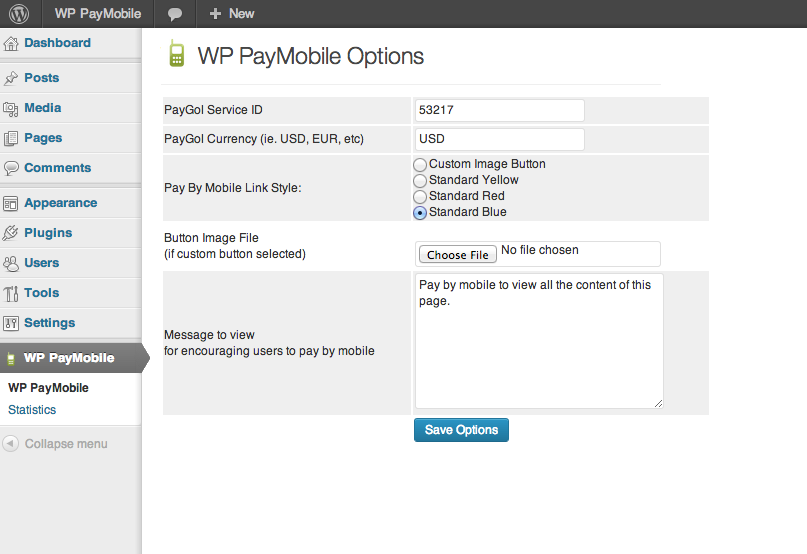
configuration

payment popup
Changelog
No changelog available