

WP Post Page Clone
Clone Post or Page with it's contents and settings in just one click.
Maintenance 40/100313d since update
Active installs
80,000
Downloads
442,343
Reviews
6
Age
9.2y
Plugin info
Total downloads: 442,343
Active installs: 80,000
Total reviews: 6
Average rating: 4.3
Support threads opened: 0
Support threads resolved: 0 (0%)
Available in: 16 language(s)
Contributors: 1
Last updated: 5/24/2025 (313 days ago)
Added to WordPress: 2/9/2017 (9 years old)
Minimum WordPress version: 4.5
Tested up to WordPress version: 6.8.3
Minimum PHP version: 5.6.20
Maintenance & Compatibility
Maintenance score
Stale • Last updated 313 days ago • 6 reviews
40/100
Is WP Post Page Clone abandoned?
Likely maintained (last update 313 days ago).
Compatibility
Requires WordPress: 4.5
Tested up to: 6.8.3
Requires PHP: 5.6.20
Developers
Similar & Alternatives
Explore plugins with similar tags, and compare key metrics like downloads, ratings, updates, support, and WP/PHP compatibility.
No similar plugins found yet.
Description
WP Post Page Clone is a WordPress plugin that allows you to easily duplicate or clone post/page in just one click.
WP Post Page Clone Plugin Features
- Clone post with it’s contents and settings in just one click.
- Clone page with it’s contents and settings in just one click.
- Cross Browsers Support ( Firefox, Chrome, Safari, Opera, etc. )
Installation
- Upload the wp-post-page-clone.zip file Via WordPress Admin > Plugins > Add New,
- Alternately, upload wp-post-page-clone folder to the /wp-content/plugins/ directory via FTP,
- Activate the WP Post Page Clone plugin from Admin > Plugins.
- Now go to the all posts or all pages from your dashboard
- Just Hover your cursor on any post or page then you will see a “Click To Clone” link
- Click on this link to clone your post/page with it’s all settings of your previous page.
Frequently Asked Questions
- Activate the plugin from the ‘Plugins’ menu in Dashboard
- Now go to all posts on your dashboard
- Hover your cursor over any post you will see a “Click To Clone” link
- Click on this link to clone your post with it’s all settings of your previous post.
- Activate the plugin from the ‘Plugins’ menu in Dashboard
- Now go to all pages on your dashboard
- Hover your cursor over any page you will see a “Click To Clone” link
- Click on this link to clone your page with it’s all settings of your previous page.
Review feed
Aleksandar Urošević
Great support
We have a client project where custom role user should be allowed to clone posts. Following our feature request (allow Shop Manager role with edit_posts permission to clone posts), Gaurang implemented it.
Keep up good work!Aleksandar
Screenshots
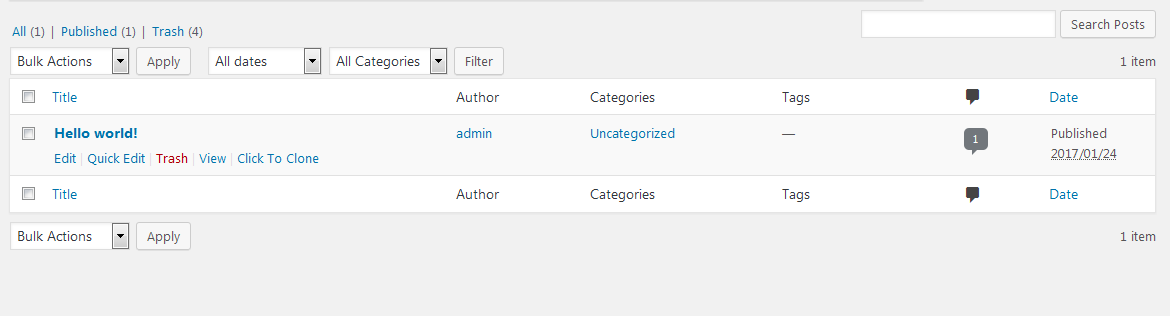
screenshot-1.png
Changelog
1.1 (10th May, 2020)
- Security issues fixes addressed by Securi
1.2 (5th Dec, 2021)
- Security issues fixes for user role contributor and author given by WordPress Plugin Review Team.
1.3 (24th May, 2025)
- Custom user role support.
- Security improvements.
- added i18n support.