

Unlock Digital (No Passwords)
Log into your WordPress site using a smartphone... No typing and no passwords! (almost)
Plugin info
Maintenance & Compatibility
Maintenance score
Possibly abandoned • Last updated 3932 days ago • 7 reviews
Is Unlock Digital (No Passwords) abandoned?
Possibly abandoned (last update 3932 days ago).
Compatibility
Similar & Alternatives
Explore plugins with similar tags, and compare key metrics like downloads, ratings, updates, support, and WP/PHP compatibility.
Description
With this plugin you can make passwords a thing of the past. All you need is your trusty smartphone with a QR Code reading app.
(Coming soon, iOS companion app that will negate your need for a separate QR Code reading app!)
Disclaimer: A website is only as secure as the least secure component on it. This plugin aims to be more secure than using the default login page.
Installation
- Upload plugin to the
/wp-content/plugins/directory - Activate the plugin through the ‘Plugins’ menu in WordPress
- That’s it
Usage
- Scan QR code on login screen of your site. (Coming soon, iOS companion app!)
- Open link scanned in your mobile browser.
- That’s it! (If you don’t have a cookie on your mobile browser recognizing you, the first time you try this you’ll have to log in on your phone. After that you should be home free)
Frequently Asked Questions
Why do I need to log in on my phone?
You wouldn’t want just ANYONE being able to access your site. Verification is still necessary.
So what’s this plugin good for?
Once you log in once, you won’t have to again until your phone cookie runs out (every two weeks or so). That should save you SOME hassle.
What about foo bar?
I have no answer to foo bar dilemma.
Review feed
Screenshots
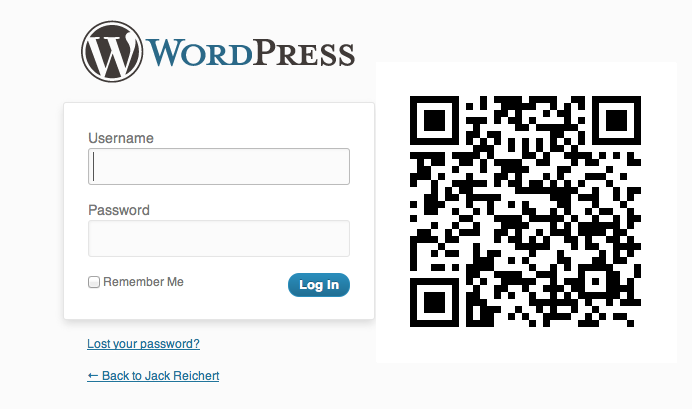
This is how your login page will look all pimped out with it's QR code.
Changelog
1.4.3
- removed [] array for better compatibility. Some QR codes weren’t loading due to forced SSL.
1.4.2
- Made homeurl variable scheme relative
1.4.1
- Created ajax homeurl variable for more accurate QR creation.
1.4
- Enabled ability for administrator to disconnect app via site dashboard.
- Added better logs.
- When hash expires login page no longer reloads.
- Fixed issue where page stopped working after being open for a while.
1.3.5
- Bugfix.
1.3.4
- Removed extra function.
1.3.3
- Now works with WordPress installed in subfolders.
1.3.2
- Mcrypt implemented in encrypting the TOTP hash.
1.3.1
- TOTP lengthened to 8 length and 60 seconds.
1.3
- Updated to be used with soon to arrive companion app.
- QR code generation happens on your server, not via a google api.
- Code refactored, restructured.
1.2.1
- Fixed querystring bug
1.2
- Updated code to work with WordPress 4.1
1.1
- All POST/GET variables have been properly sanitized against XSS attacks. Special thanks to Julio from Boiteaweb.fr for his security analysis and recommendations
1.0
- Out of Beta.
- IP confirmation fixed.
0.6
- XSS fix. Special thanks to Julio from Boiteaweb.fr for his security analysis and recommendations
0.5
- Delay added to prevent dDos attack
0.4
- CSRF fix. Special thanks to Julio from Boiteaweb.fr for his security analysis and recommendations
- AJAX, Cron jobs optimized
0.3
- $wpdb->prepare added to db queries. Special thanks to scribu
0.2
- nonce added.
- get_userdatabylogin updated to get_user_by. Special thanks to ericktedeschi
0.1.1
- Fixed to work in subdirectory installs of wp. Special thanks to hlcws.
0.1
- First attempt