

WP Roadmap – Product Feedback Board
WP Roadmap plugin is a perfect feedback and roadmap plugin tool that make adding roadmap and feedback easily to your WordPress website.
Plugin info
Maintenance & Compatibility
Maintenance score
Stale • Last updated 292 days ago • 7 reviews
Is WP Roadmap – Product Feedback Board abandoned?
Likely maintained (last update 292 days ago).
Compatibility
Similar & Alternatives
Explore plugins with similar tags, and compare key metrics like downloads, ratings, updates, support, and WP/PHP compatibility.
Description
WP Roadmap plugin is a perfect feedback and roadmap plugin tool that make adding roadmap and feedback easily to your WordPress website.
Easiest WordPress Roadmap Plugin
WP Roadmap plugin is a perfect feedback and roadmap plugin tool that make adding roadmap and feedback easily to your WordPress website.
Add a product roadmap for your users on your website or blog. You can also use Roadmap plugin to display content in an interesting design.
Show your products, events, in-process developments, concerts, future happenings by using WP Roadmap & Feedback plugin on your website.
Collect and create feedback boards from your users in one place. The settings of this tool lets you change the content and order based on your own criteria.
Track what features are most useful for customers. If you’re looking for simplicity and top tier support – look no further.
Check out live demo | Documentation
Supports:
- Elementor Widget
- Easy to use Shortcode:
[rmpf_roadmap_widget board_id=2]
What you benefit:
- Intuitive interface of plugin
- Works with any WordPress theme
- Responsive layout that looks beautiful on any device
- Admin can add new features from backend
- KANBAN for change status
- User can upvote and downvote for features
Where can you use this plugin:
- Showcase company product developments
- Exhibit process/tutorial steps
- Create event/appointment line-up
- Achievements and awards and so on…
A wordpress alternative for Nolt, Upvoty etc Feedback platform
Installation
- Upload the plugin and activate it (alternatively, install through the WP admin console)
- Edit any page/post using edit with elementor option or use shortcode
[rmpf_roadmap_widget board_id=2] - On elementor widget menu, search/scroll and find the WP roadmap Addon
- Drag and drop this addon or place the shortcode
[rmpf_roadmap_widget board_id=2]where you want the section - Hurray! in a minute you have added the Image Hover Section
Frequently Asked Questions
Yes. You can use the plugin without Elementor by adding the shortcode [rmpf_roadmap_widget board_id=2] to any page/post. Replace “2” with your specific board ID.
Of course, you can use it with any theme which supports Elementor.
Yes, we will love to hear from you at [email protected].
Review feed
Very Promising
Not working and updated at all
Screenshots
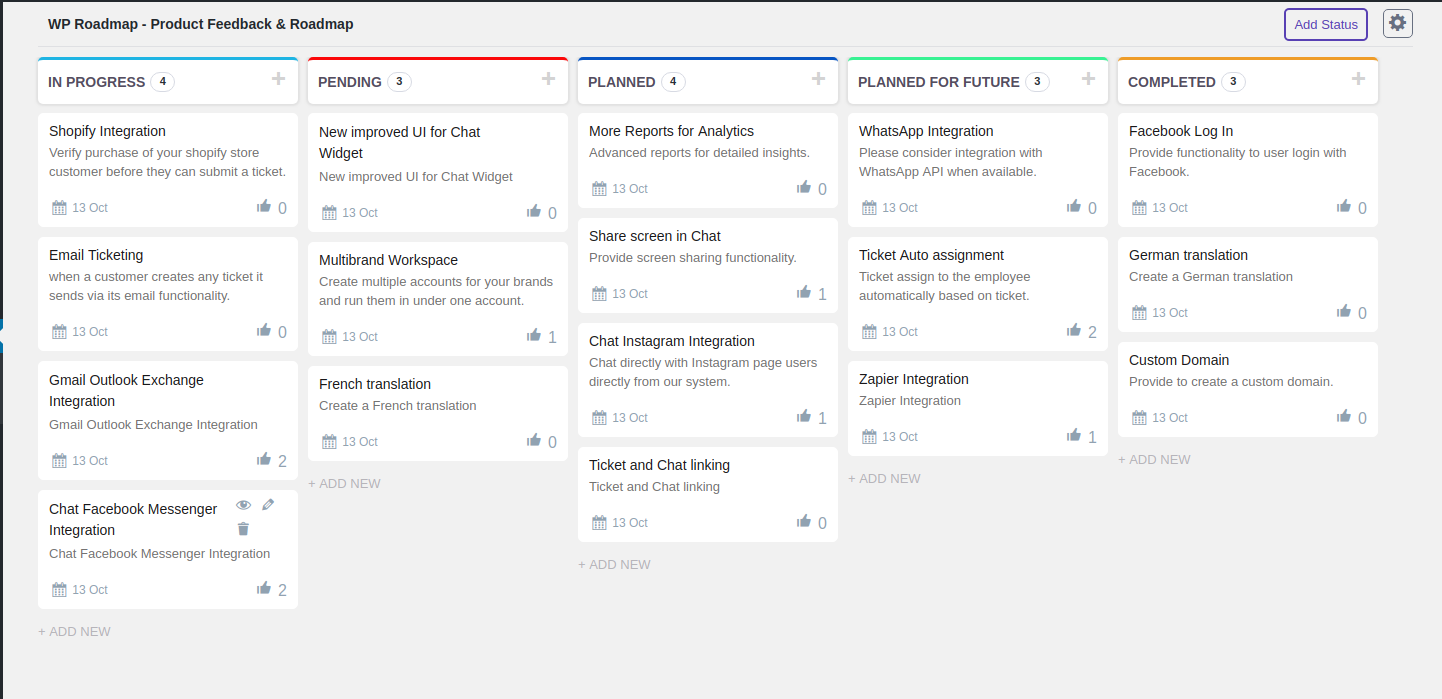
Feedback Kanban

Feature Roadmap Widget

Status Changes

Gutenberg blocks
Changelog
=2.1.3 – 24/12/2024 =
* Compatibility: with the latest version of Elementor v3.26.3.
=2.1.2 – 09/12/2024 =
* WordPress Stable Update
* Minor fixes
=2.1.1 – 19/09/2024 =
* Add: Typography & Margin Controls on View More Button.
* Add: Margin Controls on Most Voted And Newest List.
* Minor fixes
=2.1.0 – 18/09/2024
* New: Enhanced frontend design of roadmap tabs.
* New: Added background option for the roadmap header.
* New: Added option for gap between roadmap tab.
* New: Added option for roadmap tabs button typography and padding.
* New: Added text-align option for the header title and description.
* New: Added size and padding options for the vote button.
* Fix: Resolved typography issue in roadmap tabs.
* Fix: Enhanced UI and options for Elementor widget.
* Fix: Now you can use multiple roadmaps on a single page.
=2.0.0 – 15/07/2024 =
- [New] Multiple Board
- [Add] More Controls in Elementor Widget
- WordPress Compatible 6.5
- Bug Fixes
=1.0.9 – 20/10/2023 =
- Security Fixes
- Minor fixes
=1.0.8 – 02/02/2023 =
- Minor fixes
=1.0.7 – 25/04/2022 =
- Minor fixes
=1.0.6 – 18/04/2022 =
- Minor fixes
=1.0.5 – 10/12/2021 =
- Minor fixes
- Add Request Feature button
=1.0.4 – 11/11/2021 =
- Bug fix
- Added page setting for load shortcode
=1.0.3- 16/06/2021 =
- Bug fix
=1.0.2 – 16/06/2021 =
- Bug fix
=1.0.1 – 01/06/2021 =
- Bug fix
1.0.0 – 15/10/2020
- Initial stable release