

WP Robots Txt
WP Robots Txt Allows you to edit the content of your robots.txt file.
Plugin info
Maintenance & Compatibility
Maintenance score
Stale • Last updated 278 days ago • 21 reviews
Is WP Robots Txt abandoned?
Likely maintained (last update 278 days ago).
Compatibility
Languages
Similar & Alternatives
Explore plugins with similar tags, and compare key metrics like downloads, ratings, updates, support, and WP/PHP compatibility.
Description
WordPress, by default, includes a simple robots.txt file that’s dynamically generated from within the WP application. This is great, but how do you easily change the content?
Enter WP Robots Txt, a plugin that adds an additional field to the “Reading” admin page where you can do just that. No manual coding or file editing required!
Simply visit https://your-site.com/wp-admin/options-reading.php and you can control the contents of your https://your-site.com/robots.txt
Installation
- Download the plugin
- Unzip it
- Upload the unzipped folder to
wp-content/pluginsdirectory - Activate and enjoy!
Or you can simply install it through the admin area plugin installer.
Frequently Asked Questions
Delete all the content from the Robots.txt Content field and save the privacy options.
Yes. Be careful! That said, robots.txt files are suggestions. They don’t really block bots as much as they suggest that bots don’t crawl portions of a site. That’s why the options on the Privacy Settings page say “Ask search engines not to index this site.”
Here is a general guide by Google and here is the WordPress SEO documentation.
Review feed
Screenshots
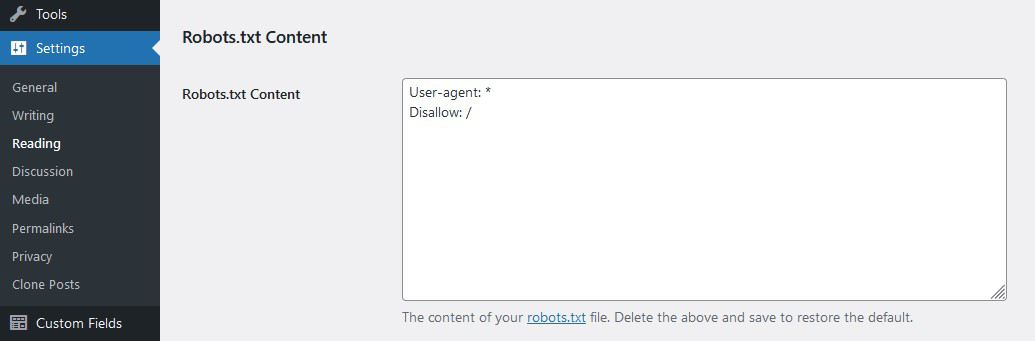
A view of the admin option
Changelog
1.3.5
- Compatibility with WordPress 6.8
1.3.4
- Compatibility with WordPress 6.7
1.3.3
- Add Line Break to allow appending more rules. Thanks @flberger
1.3.2
- Add translation template
1.3.1
- Compatibility with WordPress 6.4
- WP Coding Standards compliant
1.3
- Ensure Compatibility with WP v6.3
- Increase PHP minimum required version
1.2
- Update the default robots.txt content
- Include sitemap reference
- Resolve code warnings/errors
- WP Coding Standards compliant
- Ensure Compatibility with WP v6
1.1
- Moved the settings field “officially” to the reading page
- General code clean up
1.0
- Initial version