

WP Secure Maintenance
Want to lock your site for Maintenance or Development? Then this is the right Plugin
Plugin info
Maintenance & Compatibility
Maintenance score
Possibly abandoned • Last updated 651 days ago • 5 reviews
Is WP Secure Maintenance abandoned?
Possibly abandoned (last update 651 days ago).
Compatibility
Similar & Alternatives
Explore plugins with similar tags, and compare key metrics like downloads, ratings, updates, support, and WP/PHP compatibility.
Description
Want to lock your site for Maintenance or Development? Then this is the right Plugin. Using WP Secure Maintenance you can lock the whole site with a seceret PIN.
Features:
- Set password to protect your site for maintenance or development
- Set your own logo or use default logo
- Change placeholder text for WP Secure Maintenance login form
- Change Submit button label for WP Secure Maintenance’s login form
- Change Error text for WP Secure Maintenance’s login form
Docs & Support
Will be available soon.
If you are looking for WordPress Admin Security, use our Free WP SECURE ADMIN plugin.
WP SECURE ADMIN
Interested in contributing to WP Secure Maintenance
Head over to the WP Secure Maintenance GitHub Repository to find out how you can pitch in 😉
Installation
- Go to Plugins > Add New.
- Under Search, type WP Secure Maintenance
- Find WP Secure Maintenance and click Install Now to install it
- If successful, click Activate Plugin to activate it and you are ready to go.
Frequently Asked Questions
Just after activting set password from WP Secure Maintenance Settings tab and enable it and you are done.
Review feed
Simple & Easy For Every one
Screenshots
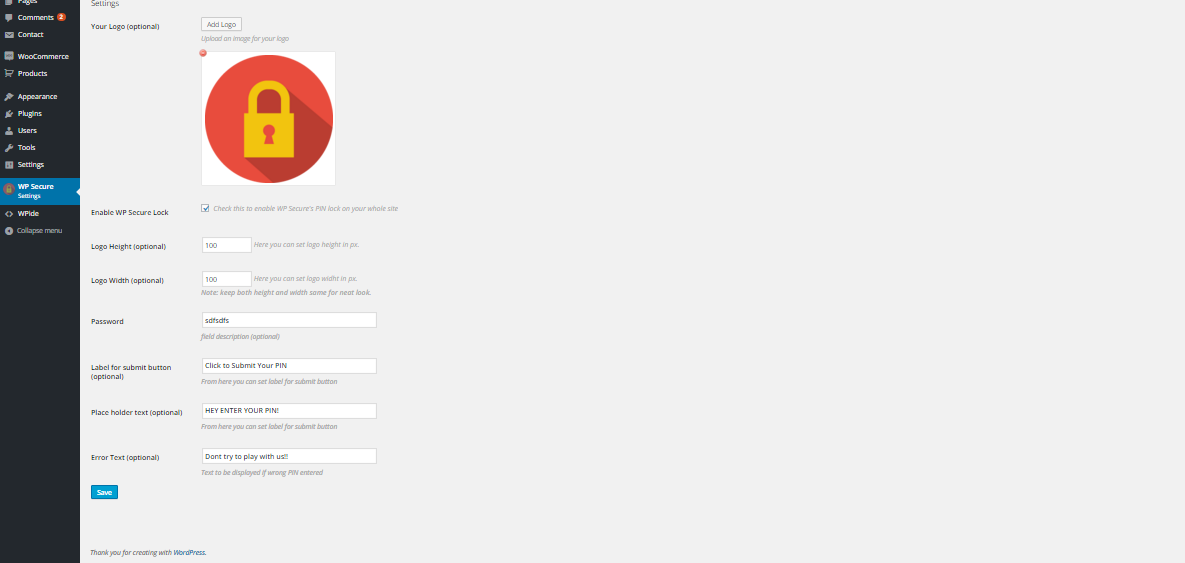
Screenshot of WP Secure Maintenance Settings

Screenshot of WP Secure Maintenance's form asking for PIN.
Changelog
1.7
- New – Improved Backend Interface
- Fix – Minor Bug fixes
1.6
- Fixed logo not being removed when we delete it from attachment.
1.5
- Added Custom CSS field
- Replaced carbon fields library with default wordpress settings api
1.4.1
- Added compatibility with WordPress 5.0.3
1.4
- Minor Bug Fixes and improvements
1.3
- Added compatibility with 4.9.2
1.2
- Add Carbon Fields.
1.1
21/3/2016
* Fixed Bugs issues in back-end Settings area.
1.0
2/3/2016
* Initial release.