
![WP URLs Shortener 2015 + Social icons + Analytics[goo.gl]](https://ps.w.org/wp-shortify/assets/icon-128x128.png?rev=1127285)
WP URLs Shortener 2015 + Social icons + Analytics[goo.gl]
Shortify allows you to track, in real-time, the clicks and referrers on any shortened URL Within Wordpress dashboard.
Plugin info
Maintenance & Compatibility
Maintenance score
Possibly abandoned • Last updated 4014 days ago • 3 reviews
Is WP URLs Shortener 2015 + Social icons + Analytics[goo.gl] abandoned?
Possibly abandoned (last update 4014 days ago).
Compatibility
Similar & Alternatives
Explore plugins with similar tags, and compare key metrics like downloads, ratings, updates, support, and WP/PHP compatibility.
Description
WP shortify – Shortify allows you to track, in real-time, the clicks and referrers on any shortened URL – a perfect tool to help you understand what appeals to your audience and to help you optimize your social, email, and other click-through Within WordPress.
You can read the guide here for adding your google client information.
[PRO Version] Would you like to see new features? Email me at [email protected].
Features:
- Generate Short URL with goo.gl when you add any post.
- View short URL, Status,Created date,QR for every post
- Country wise Stats.
- Referrer Stats (which site referrer and how many clicks).
- All time clicks,Monthly clicks,weekly Clicks,Daily clicks and last two hours clicks.
- Browser stats with clicks.
- Plateform Stats with clicks.
- Styled with Bootstrap.
- Share link under edit post,front end, dashboard to share more and more.
- Exclude any post.
- Set custom post types for creating short URL
- One click Shor URL generating i-e you have 200 posts and want to create short url for all go to dashboard and click to create.
Live preview
- Username : demo
- Password : demo
Donation
You may buy the premium version to support the development.
http://khubbaib.com/
Installation
This section describes how to install the plugin and get it working.
1) Install
Modern Way:
- Go to the WordPress Dashboard “Add New Plugin” section.
- Search For “WP URLs Shortener 2015”.
- Install, then Activate it.
Old Way:
- Unzip (if it is zipped) and Upload
wp-shortifyfolder to the/wp-content/plugins/directory - Activate the plugin through the ‘Plugins’ menu in WordPress
2) Configure
- Reach out to the shortify-> Settings Page
- Connect with google and paste the code and save it.
Frequently Asked Questions
Why connect with google?
This plugin generate the url with goo.gl so you must be connect with google to generate and track the url stats.
Review feed
Screenshots
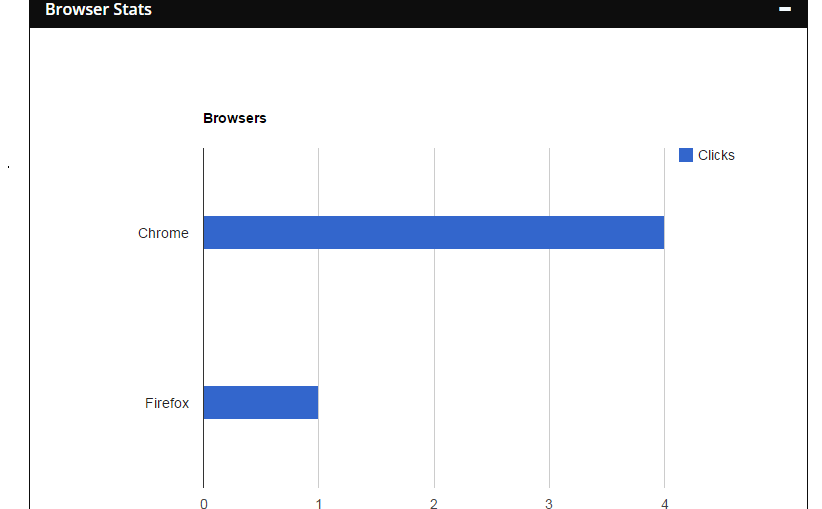
Under post edit screen stats (Browser).

Under post edit screen stats (Country).

Dashboard All short URLS.

Under post edit screen Short URL info.

Under post edit screen stats (over all Clicks).

Under post edit screen stats (Platform stats).

Connect with google copy the code.

Connect with google paste code.

Connect with google allow.
Changelog
1.0.0 – 2015-04-03
- Initial Release.
1.0.1 – 2015-04-03
- Bug fixes