

WP Sitemap Control
WP Sitemap Control allow choosing which public post types or taxonomies should be able in the /wp-sitemap.xml
Plugin info
Maintenance & Compatibility
Maintenance score
Maintained • Last updated 168 days ago • Support resolved 0% • 6 reviews
Is WP Sitemap Control abandoned?
Likely maintained (last update 168 days ago).
Compatibility
Languages
Similar & Alternatives
Explore plugins with similar tags, and compare key metrics like downloads, ratings, updates, support, and WP/PHP compatibility.
Description
WP Sitemap Control allows you to easily manage which post types and taxonomies are included in your WordPress site’s built-in sitemap. By default, all public post types and taxonomies appear in the sitemap, but with this plugin, you can include or exclude specific content types to better control your site’s SEO and indexing.
Key Features:
– Include or exclude selected post types and taxonomies from your sitemap.
– Exclude individual taxonomy terms from the sitemap.
– Exclude individual entries, such as the Privacy Policy page, from the sitemap.
– Simple configuration via the WordPress admin menu.
– Compatible with WordPress 6.0+ and PHP 8.0+.
– Supports translation and is open source.
This plugin is ideal for site owners who want more granular control over their sitemap and wish to prevent certain content from being indexed or archived by search engines. [Learn more about sitemaps][].
The configuration allows you to turn off individual content from the sitemap – an example is “Privacy Policy”, which we do not need to have in our sitemap, and by combining the plugin capabilities Simple SEO Improvements we can also avoid indexing and archiving it.
See room for improvement?
Great! There are several ways you can get involved to help make WP Sitemap Control better:
- Report Bugs: If you find a bug, error or other problem, please report it! You can do this by creating a new topic in the plugin forum. Once a developer can verify the bug by reproducing it, they will create an official bug report in GitHub where the bug will be worked on.
- Suggest New Features: Have an awesome idea? Please share it! Simply create a new topic in the plugin forum to express your thoughts on why the feature should be included and get a discussion going around your idea.
- Issue Pull Requests: If you’re a developer, the easiest way to get involved is to help out on issues already reported in GitHub. Be sure to check out the contributing guide for developers.
Thank you for wanting to make WP Sitemap Control better for everyone!
Installation
There are 3 ways to install this plugin:
The super-easy way
- Login to your WordPress Admin panel.
- Go to Plugins > Add New.
- Type ‘WP Sitemap Control’ into the Search Plugins field and hit Enter. Once found, you can view details such as the point release, rating, and description.
- Click Install Now. After clicking the link, you’ll be asked if you’re sure you want to install the plugin.
- Click Yes, and WordPress completes the installation.
- Activate the plugin.
- A new menu
SitemapinSettingswill appear in your Admin Menu.
The easy way
- Download the plugin (.zip file) on the right column of this page.
- In your Admin, go to menu Plugins > Add.
- Select button
Upload Plugin. - Upload the .zip file you just downloaded.
- Activate the plugin.
- A new menu
SitemapinSettingswill appear in your Admin Menu.
The old and reliable way (FTP)
- Upload
WP Sitemap Controlfolder to the/wp-content/plugins/directory. - Activate the plugin through the ‘Plugins’ menu in WordPress.
- A new menu
SitemapinSettingswill appear in your Admin Menu.
Frequently Asked Questions
The site needs to be public. If you ask for no indexing, then a sitemap is not available.
A sitemap is a file where you provide information about the pages, videos, and other files on your site. Search engines read this file to more intelligently crawl your site.
Review feed
Screenshots

Global configuration - post types settings.

Global configuration - taxonomies settings.

Global configuration - misc settings.
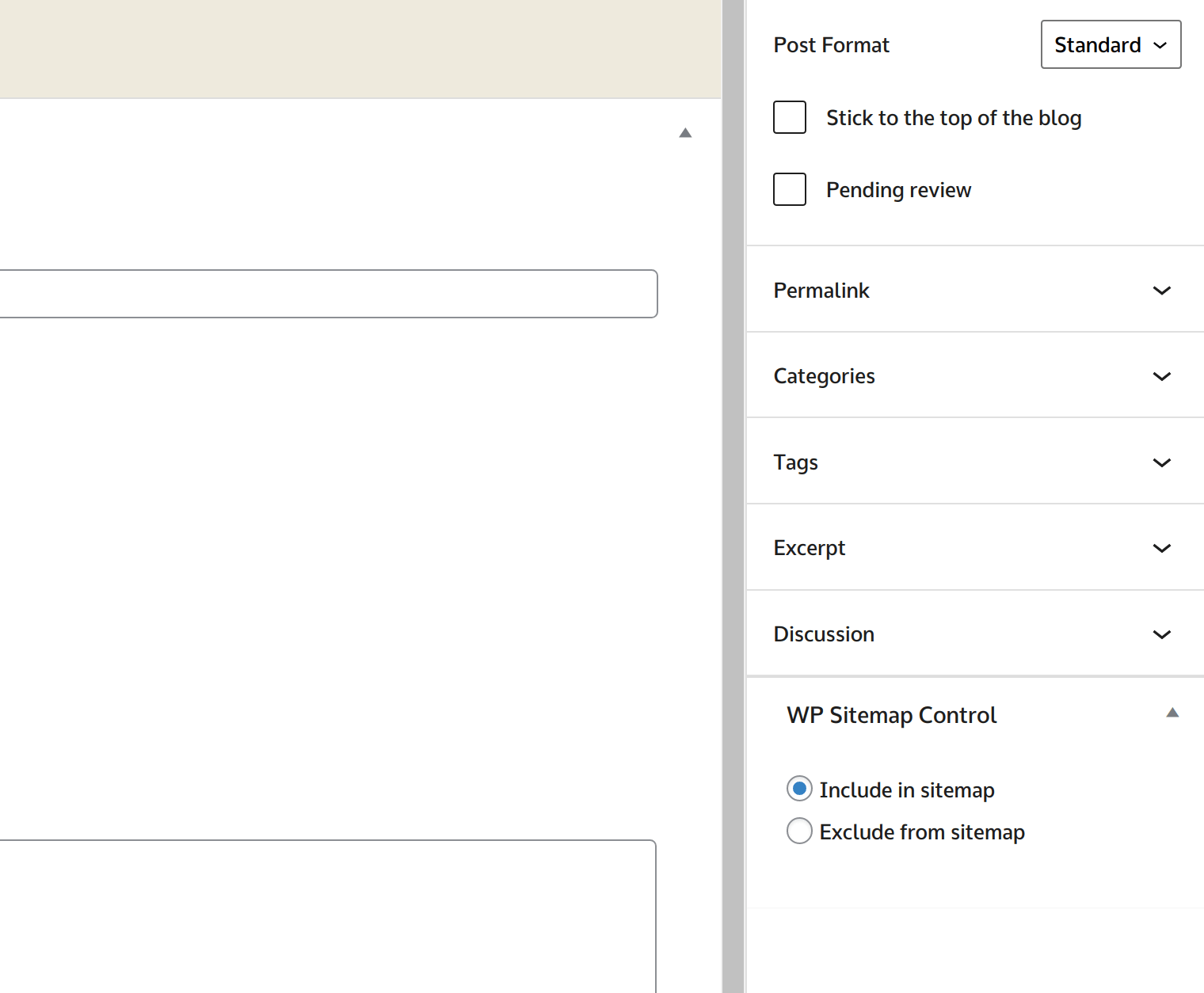
Post edit screen - exclude from sitemap.xml
Changelog
Project maintained on github at iworks/wp-sitemap-control.
1.2.1 (2025-10-16)
- Fixed an issue with the option object not being initialized. #5. Props for Katarzyna Janoska.
- Updated the iWorks Rate module to version 2.3.2.
- Updated the iWorks Options module to version 3.0.8.
1.2.0 (2025-07-05)
- Exclude taxonomies from sitemap #1.
- Updated the iWorks Rate module to version 2.3.1.
- Updated the iWorks Options module to version 3.0.7.
- Added sitemap.xml links for debugging.
1.1.2 (2025-03-28)
- Updated the iWorks Options module to version 2.9.9.
1.1.1 (2025-03-12)
- Added translation support to GitHub releases.
- Enhanced plugin update mechanism for smoother updates from GitHub releases.
- Updated the iWorks Options module to version 2.9.8.
1.1.0 (2025-02-13)
- Updated the iWorks Options module to version 2.9.4.
- Updated the iWorks Rate module to version 2.2.3.
- The
_load_textdomain_just_in_time()notice has been fixed. #3. Props for nestle49. - Improved build process for better performance and efficiency.
1.0.7 (2024-02-16)
- Missing translation domain names have been added.
- The function
date()has been replaced by the functiongmdate(). - The iWorks Options module has been updated to 2.9.1.
- The iWorks Rate module has been updated to 2.1.8.
- The minimum PHP version has been bumped up from 7.2 to 8.0.
- The minimum WordPress version has been bumped up from 5.0 to 6.0.
1.0.6 (2022-02-16)
- Cleaned plugin headers.
- Updated development tools.
- Updated iWorks Options to 2.8.1.
1.0.5 (2022-01-21)
- Updated iWorks Options to 2.8.0.
1.0.4 (2022-01-20)
- Fixed problem with
set_pluginmethod.
1.0.3 (2022-01-20)
- Added ability to exclude single entry from sitemap.xml.
- Added ability to select/deselect all post types.
- Added ability to select/deselect all taxonomies.
- Renamed directory
vendorintoincludes. - Updated iWorks Options to 2.7.3.
- Updated iWorks Rate to 2.0.6.
1.0.2 (2021-02-01)
- Fixed wrong date format for
lastmodtag.
1.0.1 (2020-12-02)
- Fixed wrong method call. Props for Maciej Kuchnik.
1.0.0
- Init version. Props for Sebastian Miśniakiewicz for inspiration.