

Express Payment For Stripe
Shipping with a variety of standalone Stripe payment widgets and woocommerce addon, including options for credit cards, Alipay and WeChat pay, and ACH …
Plugin info
Maintenance & Compatibility
Maintenance score
Actively maintained • Last updated 72 days ago • 3 reviews
Is Express Payment For Stripe abandoned?
Likely maintained (last update 72 days ago).
Compatibility
Similar & Alternatives
Explore plugins with similar tags, and compare key metrics like downloads, ratings, updates, support, and WP/PHP compatibility.
Description
Accept a wide range of payment methods, including Visa, MasterCard, Alipay, WeChat, Apple Pay, Google Pay, Microsoft Pay, Bancontact, FPX, EPS, SEPA, Giropay, Sofort, iDeal, and more, to build your payment page or woocommerce checkout page in minutes without any coding knowledge.
We provide a variety of built-in payment widgets, called ‘Elements’, for you to easily choose and add as shortcodes. These widgets can be used for customers from countries such as Europe, China, and Japan.
Important Note
To integrate Stripe with specific platforms, please use our dedicated plugins:
👉 WooCommerce Integration: WooCommerce Stripe Payment
👉 Elementor Integration: Elementor Stripe Payment
👉 Contact Form 7 Integration: Contact Form 7 Stripe Payment
If none of these apply to your needs, you may proceed with evaluating this plugin.
Features
- Payment methods include Credit Card (Visa, MasterCard), SEPA, Sofort, iDeal, Giropay, FPX, P24, Alipay, and WeChat Pay.
- Variety of standalone built-in free widgets for one-time payments, including options for buttons, donations, custom amounts, products, and CF7 redirections.
- Automatically collect tax on Checkout based on customer location.
- Multi currencies support for more payment methods like WeChat pay, Alipay, etc.
- Use URL parameters to set custom values for such as amount, currency, metadata.
- Customize confirmation page.
- Elementor integration.
- 9 built-in themes.
- One-Click import demos.
- [Premium] Woocommerce stripe express checkout. (All payment methods are merged into one by using Stripe Payment Elements)
- [Premium] Standalone built-in widgets for digital wallet and form: Payment Form, Alipay, WeChat and Apple Pay, Google Pay, Microsoft Pay, and more.
- [Premium] Payment link for one-time and subscription.
- [Premium] Tax collect, coupon code support.
- [Premium] Payment success&failed email notifications and customer invoice email.
- [Premium] One-To-One email support for our users.
- [Premium] Woocommerce integration addon with over 30+ payment methods supported 🎉
Highlight Features For Free
Common usages
As a website owner:
* If you want to put a payment button on any pages or posts, choose one-time => fixed amount button. Online Demo
* If you want your customer to pay as they want on any pages or posts, choose one-time => custom amount button. Online Demo
* If you want to collect any donations on any pages or posts, choose one-time => donation button. Online Demo
* If you are looking for a complex payment form like booking an event, choose one-time => CF7 redirection. Online Demo
* If your customers are coming from china, choose Digital Wallet => WeChat/Alipay. Online Demo
Highlight Features For Premium
Our team aims to provide regular support for this plugin on the WordPress.org forums. But please understand that we do prioritize our premium support. This one-on-one email support is available to people who bought Premium.
Woocommerce Support (Premium only 🎉)
Note: You can still purchase this premium plugin for this feature, however we recommend trying our dedicated woocommerce plugin WooCommerce Stripe Payment
- Stripe Elements
We utilize Stripe Elements, a collection of pre-designed UI components that streamline the checkout process. Unlike other Stripe plugins for WooCommerce, our solution eliminates the need to configure each payment method individually. Instead, you can easily enable supported payment methods based on your currency and select a visually appealing UI, such as Tab or Card style, Stripe or Night mode, Flat mode, and more.
Setup Woocommerce Stripe Elements Checkout
- Stripe Checkout Redirect
Redirect to a secure Stripe Checkout page to complete transactions. This PCI-compliant hosted checkout meets industry security standards and supports numerous payment methods on one screen, providing a streamlined payment experience for your customers.
Setup Woocommerce Stripe Redirect
This way the checkout would look a lot more trustworthy to customers when being redirected to stripes own checkout page than giving their credit card details to “some random” site.
- Add WooCommerce Subscriptions support for Stripe Checkout Redirect.
Collect Dynamic Fields from URL Parameters
This plugin feature allows you to collect dynamic fields from URL parameters. To use this feature, follow these steps:
1. Enable the “Enable Url Params” option when creating an element short-code.
2. Append the override URL parameters to the page that includes the element.
The following parameters are currently supported to override element settings:
currency: Choose from usd, eur, aud, cad, cny, gbp, hkd, jpy, myr
amount: Enter any digital number.
quantity: Set the quantity for one-time type elements.
[name]: Set the product name for one-time type elements. Note that the brackets are required for this term.
metadata: Add metadata for the element.
price: Use only for price IDs created in the Stripe dashboard. Format the price as "price_xxx_xx".
Here are some examples of how to use these parameters:
https://example.com/checkout?currency=eur&amount=199

https://example.com/checkout?currency=eur&amount=199&quantity=2&[name]=myproduct&metadata.order=1234&metadata.note=xxx
Payment Links
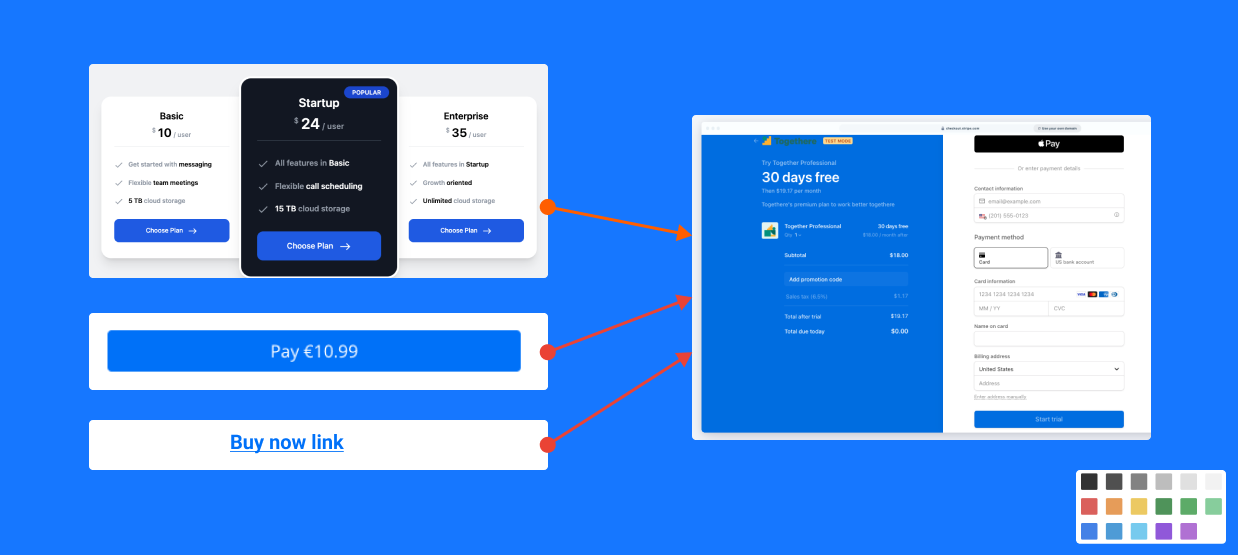
With Payment Links, you can create a payment page and share a link to it with your customers. You can share the link as many times as you want on social media, in emails, or through any other channel. Also, you can use them as an image link button or even insert them into any pricing table.
Payment Links supports over 20 payment methods—including credit and debit cards, Apple Pay, and Google Pay. The payment page is translated into over 30 languages and automatically matches your customer’s preferred browser language.
Links Demo | Pricing Table Demo
Contact Form 7 Stripe Integration (Free)
The above standalone payment widgets might be not enough to customize fields, people always want to attach more fields or information shipping with the payment, no matter if these fields are static or collected by customers.
As #1 form builder plugin with over 5 million installations, we do like Contact Form 7, not just popular, but simple, flexible, etc…
Now, we provide a CF7 Redirection virtual button to link into a cf7 form. When customers submit the form, the CF7 original sending email submission does its own job, once its success, the payment workflow will be triggered then. After the payment, you should see these fields information in your payment details’ metadata, never miss them.
Note: we have a dedicated plugin for CF7 right now. Comparing the stripe checkout redirection only in this plugin, that plugin supports both credit card field and also multiple payment methods field as well. please check it out on https://wordpress.org/plugins/accept-stripe-for-contact-form-7
Customize email notifications
You can turn on/off three kinds of email notifications for each transfer: payment success, failed, customer invoice. You can design your email templates with built-in placeholder fields like amount, currency, customer email, address, etc…
China digital payment: Alipay & WeChat
Both Alipay & WeChat Pay are digital wallet in China that has more than a billion active users worldwide. If your business is in China, then good for you, from a simple payment button to a complex form, we provide multiple elements for your customer to finish the payment easily.
Form Demo | Simple Button Demo | Documentation
External services
This plugin connects to external services to provide payment processing and template functionality.
Stripe Payment Processing
The plugin connects to Stripe’s API (https://api.stripe.com/v1/) to process payments and manage transactions. – JavaScript library: https://js.stripe.com/v3. Service provider: Stripe, Inc.
No personal data is transmitted to these services without user consent during payment processing or template requests.
Development GitHub Community, please refer to here
ABOUT US
We provide professional Stripe payment solutions for WordPress, with the following core products:
-
Elementor Stripe Payment
Seamlessly integrate customized Stripe-powered payment forms into your Elementor site. Sell products, services, accept donations, and more through intuitive checkout experiences. Elementor Stripe Payment -
Contact form 7 Stripe Payment
Seamlessly integrate customized Stripe-powered payment forms into your Contact Form 7. Sell products, services, accept donations, and more through intuitive checkout experiences. Contact Form 7 Stripe Payment -
WooCommerce Stripe Payment
WooCommerce Stripe addon is a payment gateway for WooCommerce. With just a single configuration, unlock access to over 30 secure and globally recognized payment methods, including Credit Cards, Google Pay, ApplePay, WeChat Pay, Alipay, Afterpay, ACH, Klarna, iDEAL, FPX, Grabpay, OXXO, Multibanco, Bancontact, EPS, P24, Giropay, Affirm, and more. WooCommerce Stripe Payment -
Stripe Express Payment
Embed standalone variety of built-in stripe payment widgets, forms anywhere on your site using easy shortcodes, No store required to collect instant payments. Stripe Express
Installation
Frequently Asked Questions
You don’t need an entire eCommerce store to accept payments on your site and you have a product or service to offer and simply want to automate sales.
Yes! In Live Mode, an SSL certificate must be installed on your site to use Stripe. In addition to SSL encryption, Stripe provides an extra JavaScript method to secure card data using Stripe Elements.
Yes, it does – production and Test (sandbox) mode is driven by the API keys you use with a checkbox in the admin settings to toggle between both.
No, this plugin is using WP REST API. So please make sure it is opening or just add stripe-express API into the whitelist by some plugins like disable-json-api.
Review feed
Hope you will like this plugin
Screenshots

payment elements
payment link

woocommerce gateway

setting
Changelog
1.16.0
- feat: split line items and add tax codes support.
- feat: create customer for checkout redirect.
1.13.10
- feat: add woocommerce payment method order.
- fix: woocommerce bug fix.
1.13.0
- feat: add woocommerce stripe checkout redirection.
1.12.0
- feat: add woocommerce checkout addon.
1.11.0
- feat: add dynamic amount, currency, metadata, etc based on URL parameters.
1.10.7
- feat: add ACH, klarna, affirm, afterpay methods in checkout page.
1.10.6
- feat: add custom amount for payment element form.
- feat: change currency symbol as left side.
- feat: add multi payment methods support for subscription.
1.10.2
- fix: add auto payment methods for subscription.
- fix: theme color fix.
1.10.1
- feat: add element button preview.
- feat: add single element theme support.
1.10.0
- chore: banner & screenshot change.
- bug fix.
1.9.0
- feat: add thank you/receipt shortcode
- feat: add terms of service support..
- feat: elementor integration.
- bug fix.
1.8.0
- feat: one-click import demo.
- bug fix.
1.7.8
- feat: add payment links.
1.7.5
- feat: add stripe tax collect for one-time & subscription checkout.
- feat: add coupon codes support for one-time & subscription checkout.
- feat: add global events for advanced usages.
- fix: fix subscription submitType issues.
1.7.0
- feat: add multi-currencies support.
- feat: add WeChat pay support for checkout one-time pay.
- feat: enhance WeChat pay scan behavior.
- feat: support to use price/product created from stripe dashboard for one-time payments.
- feat: integrate stripe’s self-design payment-element form (including multi pre-defined UI, more payment methods).
- refactor: permission enhancement.
1.6.2
- fix: fix components background color issue.
- fix: minor fix on ACH.
1.6.0
- feat: add ACH transfer with Plaid Link
1.5.6
- feat: add cf7 redirection plugin for free.
1.5.5
- feat: add more themes, sizes option for alipay&wechat pay.
- fix: minor bug fix.
1.5.0
- feat: Add recurring pay.
- feat: Add payment report page.
- fix: default button label missing.
1.4.1
- feat: Add custom amount field & phone field for both WeChat, Alipay, and checkout form elements.
- feat: Add more fields for email notification.
- feat: Add Ideal method for checkout form.