

WP Subscribe
WP Subscribe is a simple but powerful subscription plugin which supports MailChimp, Aweber and Feedburner.
Plugin info
Maintenance & Compatibility
Maintenance score
Possibly abandoned • Last updated 1423 days ago • 26 reviews
Is WP Subscribe abandoned?
Possibly abandoned (last update 1423 days ago).
Compatibility
Developers
Similar & Alternatives
Explore plugins with similar tags, and compare key metrics like downloads, ratings, updates, support, and WP/PHP compatibility.
Description
If you aren’t building an email list, you’re missing out on the most powerful and consistent way to drive repeat visitors and customers to your website or blog. With an email list, you become less and less dependent on external sources of traffic, and gain more ability to interact with your blog’s audience.
We at MyThemeShop understand your need, and have developed a unique, cleanly coded, premium subscription plugin. We are now distributing it for FREE to give back to the WordPress community. We have been given so much by the WordPress community, it’s time to give back.
WP Subscribe is the only plugin you need to get the perfect subscription forms on your website. With optimized code, it loads before you can even blink your eye. If you’re a website owner, you can make a lot more money than regular blogs, which is why so many marketers focus on creating email lists. With the WP Subscribe plugin, you can do it in a simple yet effective way. Install the plugin, configure the widget and convert visitors into loyal email subscribers.
Live demos:
See the WP Subscribe Plugin in action on our demo page: http://demo.mythemeshop.com/sociallyviral/
Why choose WP Subscribe from MyThemeShop:
- It’s the only free all-in-one plugin which offers Aweber, Mailchimp and FeedBurner.
- Choose between Mailchimp, Aweber or FeedBurner.
- Options to change text showing in subscription box.
- Fully responsive.
- Can be easily customized using custom CSS.
- Can be used more than once in different sidebars.
- Super lightweight.
- Compatible with caching and SEO plugins.
- Eye-catching design.
- Position it anywhere where a widget is configured in your theme.
Support
All support for this plugin is provided through our forums. If you have not registered yet, you can do so here for FREE
https://mythemeshop.com/#signup
If after checking our Free WordPress video tutorials here:
https://mythemeshop.com/wordpress-101/
&
https://community.mythemeshop.com/tutorials/category/2-free-video-tutorials/
you are still stuck, please feel free to open a new thread, and a member of our support team will be happy to help.
Support link:
https://community.mythemeshop.com/forum/11-free-plugin-support/
Help to make it better
MyThemeShop is a premium WordPress theme provider, and we develop premium plugins in our free time and distribute them for free to give back to the community. Though we take a lot of care while developing anything, we might have missed something useful or important. Please help us make it better by submitting your bug/suggestions/feedback on GitHub.
GitHub link: https://github.com/MyThemeShop/WP-Subscribe/
Feedback
If you like this plugin, then please leave us a good rating and review.
Consider following us on Google+, Twitter, and Facebook
Installation
This section describes how to install the plugin and get it working.
- Upload the
wp-subscribefolder to the to the/wp-content/plugins/directory - Activate the plugin through the ‘Plugins’ menu in WordPress
- You can see WP Subscribe widget in widgets section.
- Add it in sidebar and footer and configure as you want.
- Enjoy!
Frequently Asked Questions
Please disable all plugins and check if plugin is working properly. Then you can enable all plugins one by one to find out which plugin is conflicting with WP Subscribe.
Review feed
Good plugin
Screenshots

WP Subscribe Widget
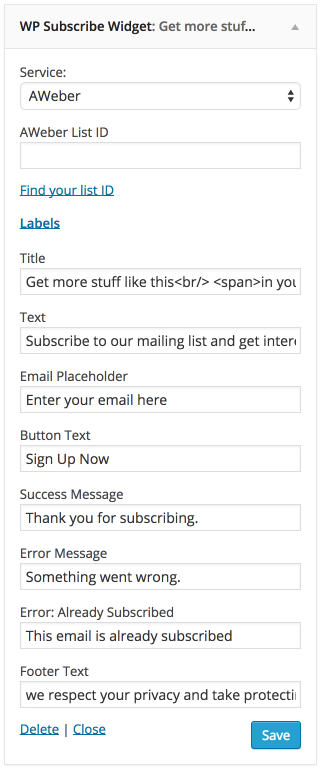
WP Subscribe Settings
Changelog
1.2.16
- More security hardening
1.2.15
- Security hardening
1.2.13
- Fixed a security issue
1.2.12
- Improved form accessibility
1.2.11
- Added validation for name and email fields
1.2.10
- Changed admin notices
1.2.9
- Updated admin notices
1.2.8
- Added consent field
1.2.7
- Fixed SVN issue
1.2.6
- Fixed PHP notices
1.2.5
- Fixed aweber list issue
1.2.4
- Fixed aweber issues
1.2.3
- Fixed some CSS issues
1.2.2
- Fixed some javascript issues
- Fixed some credentials in Aweber
- Improve Mailchimp class
- Remove notices and warnings on some places
- Change the behavior of saving mailing service lists
1.2.1
- Provided backward compatibility for CSS
- Provided backward compatibility for Scoped CSS
- Remove magnific popup classes from inline form
- Add loader when submitting form
- Fixed inline form responsiveness
- Minify the CSS File
1.2.0
- Whole plugin is re-written in OOP
- Huge performance Improvements
- Moved JS and CSS folders inside assets folder
- Enhanced: Functions are more organized in wps-helpers and wps-functions-options file.
- Fixed: Missing and in-correct textdomain
1.1.4
- Changed AWeber form URL to HTTPS
1.1.3
- Added option to enable name field
- Added MyThemeShop tab in “Add Plugins” page
1.1.2
- Removed nonce from frontend
1.1.0
- Replaced Feedburner HTTP link with HTTPS
1.0.9
- Fixed spelling mistake in Pro Notification
1.0.8
- Fixed translation and text domain issue
1.0.7
- Fixed notification closing issue
1.0.6
- Switched to PHP 5 style constructor method for the widget class
1.0.5
- Improvement – input placeholder text hides on click.
1.0.4
- Fixed AWeber signup issue
1.0.3
- Fixed add_query_arg vulnerability
1.0.2
- Added double opt-in possibility for Mailchimp
1.0.1
- Fixed Title field saving issue in newly added widget
- Fixed compatibility with other plugins using Mailchimp API
1.0
- Official plugin release.