

Maintenance 22/1003405d since update
Active installs
10
Downloads
5,710
Reviews
1
Age
13.5y
Plugin info
Total downloads: 5,710
Active installs: 10
Total reviews: 1
Average rating: 5
Support threads opened: 0
Support threads resolved: 0 (0%)
Available in: 1 language(s)
Contributors: 1
Last updated: 12/5/2016 (3405 days ago)
Added to WordPress: 9/28/2012 (13 years old)
Minimum WordPress version: 3.0
Tested up to WordPress version: 4.8.27
Minimum PHP version: f
Maintenance & Compatibility
Maintenance score
Possibly abandoned • Last updated 3405 days ago • 1 reviews
22/100
Is WP Time Slots abandoned?
Possibly abandoned (last update 3405 days ago).
Compatibility
Requires WordPress: 3.0
Tested up to: 4.8.27
Requires PHP: f
Similar & Alternatives
Explore plugins with similar tags, and compare key metrics like downloads, ratings, updates, support, and WP/PHP compatibility.
Booking / Appointment
Rating 0.0/5 (0 reviews) • Active installs 0
Description
See http://www.wptimeslots.com for more info!
- Show the availability of anything per hour per day
- Mark a time slot as free or booked, for example 08:00 – 09:00
- Generate a token to insert the calendar in a page or post or use it as a widget
- Can be translated in any language with Poedit
Features of the full version:
- Custom time slot steps! Like 12:00 – 12:05 (every 5 minutes) or every 10 minutes and so on.
- Show multiple days
- Create an unlimited number of calendars
- Show or hide the days in a drop down menu
- Only $15 (no yearly costs!)
- Download directly without registration
- Not satisfied? Money back guarantee!
- Download the full version at: http://www.wptimeslots.com
Installation
- Upload
wp-time-slots-availability-calendardirectory to the/wp-content/plugins/directory - Activate the plugin through the ‘Plugins’ menu in WordPress
- Click on ‘Add new’ which can be found under the ‘WP Time Slots’ menu and create your calendar
- Embed the calendar on any page or post using the token generator or as a widget
Frequently Asked Questions
Installation Instructions
- Upload
wp-time-slots-availability-calendardirectory to the/wp-content/plugins/directory - Activate the plugin through the ‘Plugins’ menu in WordPress
- Click on ‘Add new’ which can be found under the ‘WP Time Slots’ menu and create your calendar
- Embed the calendar on any page or post using the token generator or as a widget
How can I embed the calendar on a page or post?
Use the ‘Generate token’ field below your editor. An example of a token: [tsa id=”1″ legend=”yes” title=”yes”]. If you paste this token in a page it will show the calendar with ID 1, with legend and with title.
How can I remove the calendar title from displaying?
Edit the shortcode: title=”no”.
I have another question
Please see http://www.wptimeslots.com for more information and ask your questions there!
Review feed
No reviews available
Screenshots
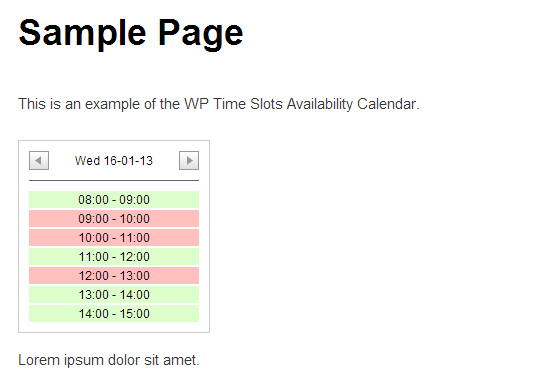
How it looks on your site

How it looks in your WordPress admin panel
Changelog
1.4
- Small tweak to support PHP 7
1.3
- Fixed a bug that was present when adding a calendar in WordPress 4.1
1.2
- Changed .live() to .on() for better compatibility with jQuery
1.1
- Edited price information of full version
- Fixed Ajax bug
1.0
- First release