

Plugin info
Maintenance & Compatibility
Maintenance score
Possibly abandoned • Last updated 4632 days ago • 1 reviews
Is WP Twitter widget by rYokiNG abandoned?
Possibly abandoned (last update 4632 days ago).
Compatibility
Similar & Alternatives
Explore plugins with similar tags, and compare key metrics like downloads, ratings, updates, support, and WP/PHP compatibility.
Description
WP Twitter widget easy to create twitter feed in your blog for settings Twitter API support display user timeline a collection recent Tweets posted by the user indicated by the screen_name or user_id parameters. Each user timeline protected, user will authenticated for use twitter api approved follower of the timeline.
Arbitrary section
Returns most recent mentions (tweets containing a users’s @screen_name) for the authenticating user.
A brief Markdown Example
Ordered list:
- Custom screen name
- Twitter header
- Support instagram, youtube, link, checkin, foursqure, etc
- Support follow
Unordered list:
- Add option footer
- support process urls
- hide retwitted and replay user_mentions
- more media support
Here’s a example link to Example
Installation
This section describes how to install the plugin and get it working.
e.g.
- Upload
plugin wp_twitter_widget_by_ryoking folderto the/wp-content/plugins/directory - Activate the plugin through the ‘Plugins’ menu in WordPress
- Setting plugin connect with twitter apis at ‘Settings menu -> WP Twitter Widget options’ Create Twitter application by click this link https://dev.twitter.com/apps/new
- Consumer key and Consumer secret paste into input box.
- Click Sign in twitter
- Drag and drop widget into sidebar
Frequently Asked Questions
Why i need to create twitter app ?
Twitter api be deprecated when version 1 is closed, now twitter timeline support version 1.1 for use timeline lastest versoin need twitter app for get access tokens.
Review feed
Screenshots
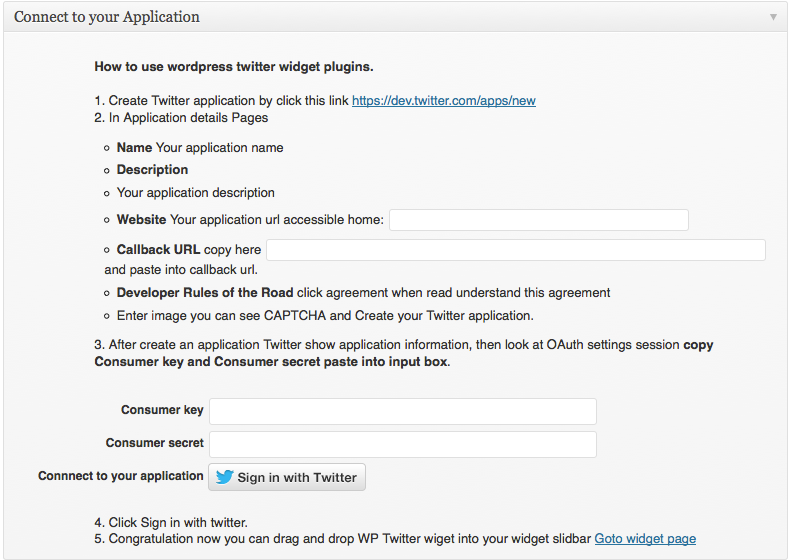
This screen display plugins setting corresponds to screenshot-1.png
/assets/screenshot-1.png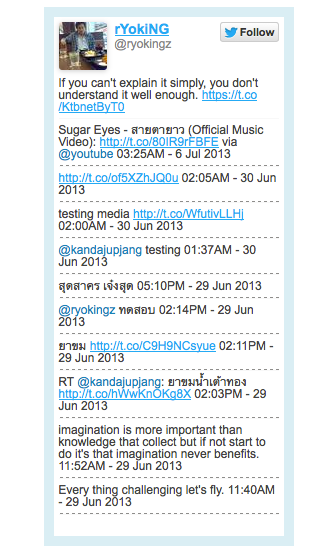
This is the second screen shot screenshot-2.png
/assets/screenshot-2.pngdisplay widget output at sidebar Note: that the screenshot is taken from the /assets directory
Changelog
1.0
- Main widget addon: addtion twitter connect widget and small options additional changes.
- Add twitter header.