

Plugin info
Maintenance & Compatibility
Maintenance score
Stale • Last updated 273 days ago
Is WPBot abandoned?
Likely maintained (last update 273 days ago).
Compatibility
Similar & Alternatives
Explore plugins with similar tags, and compare key metrics like downloads, ratings, updates, support, and WP/PHP compatibility.
Description
ChatBot WPBot
WPBot is a plugin currently under development
//-> Try our FREE ChatBot for WordPress with AI – WPBot. It is an easy to use, Native, No coding required, AI ChatBot to provide Automated Live Chat Support. Use ChatBot to answer user questions and also collect information from the users using conversational forms. It can be also be powered by DialogFlow, Tavily or OpenAI ChatGPT or simply use the built-in features to provide Live support and collect data. +++ Check out the Best ChatBot for WordPress WPBot in action.
WPBot Support, Bug Fix, Feature Request
- We welcome your feedback and new feature requests for this chat bot! This is a new plugin and we want to improve this chatbot’s features based on your feedback and suggestions. *
Let us know if you face any problem or need help with this chatbot from the comments section.
Installation
- Download the plugin zip file. Extract and upload in your wp-content/plugins folder.
- From the wp-admin panel go to plugins and activate “WPBot”
- You are done.
Frequently Asked Questions
Review feed
Screenshots
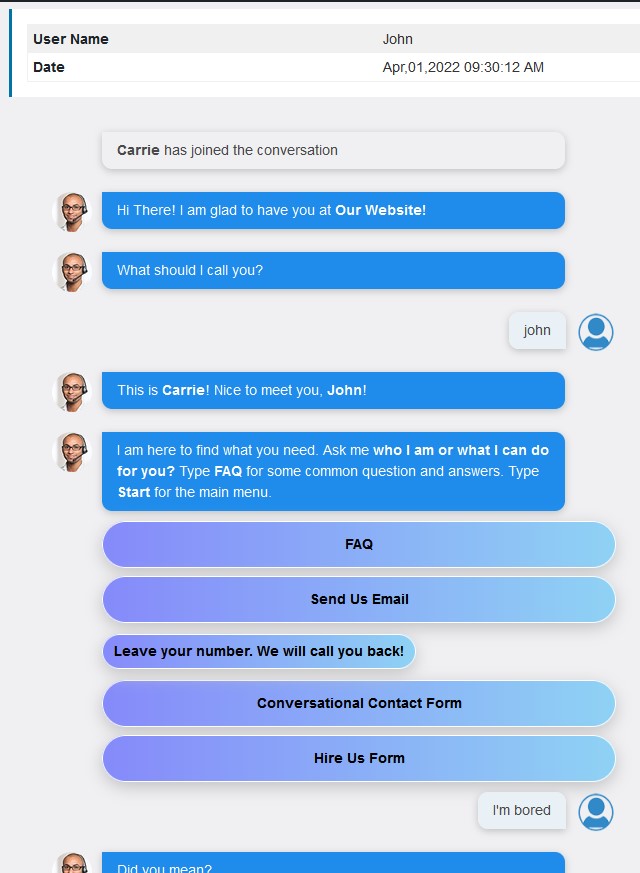
Chat Sessions
Changelog
0.9.6
Remove the need to activate ChatBot sessions from the WPBot settings
0.9.5
Removed filtering
0.9.4
Fixed enabled settings
0.9.3
- Inception