

WPC Buy Now Button for WooCommerce
WPC Buy Now Button is the ultimate time-saving plugin that helps customers skip the cart page and get redirected straight to the checkout step.
Plugin info
Maintenance & Compatibility
Maintenance score
Maintained • Last updated 127 days ago • 15 reviews
Is WPC Buy Now Button for WooCommerce abandoned?
Likely maintained (last update 127 days ago).
Compatibility
Similar & Alternatives
Explore plugins with similar tags, and compare key metrics like downloads, ratings, updates, support, and WP/PHP compatibility.
Description
In modern daily life, saving time is the key element to business success. WPC Buy Now Button for WooCommerce is the ultimate time-saving plugin that helps customers skip the cart page and get redirected right straight to the checkout step. It helps increase the sales conversion rate and reduce the bounce rate with a faster and customer-friendly checkout process for online stores.
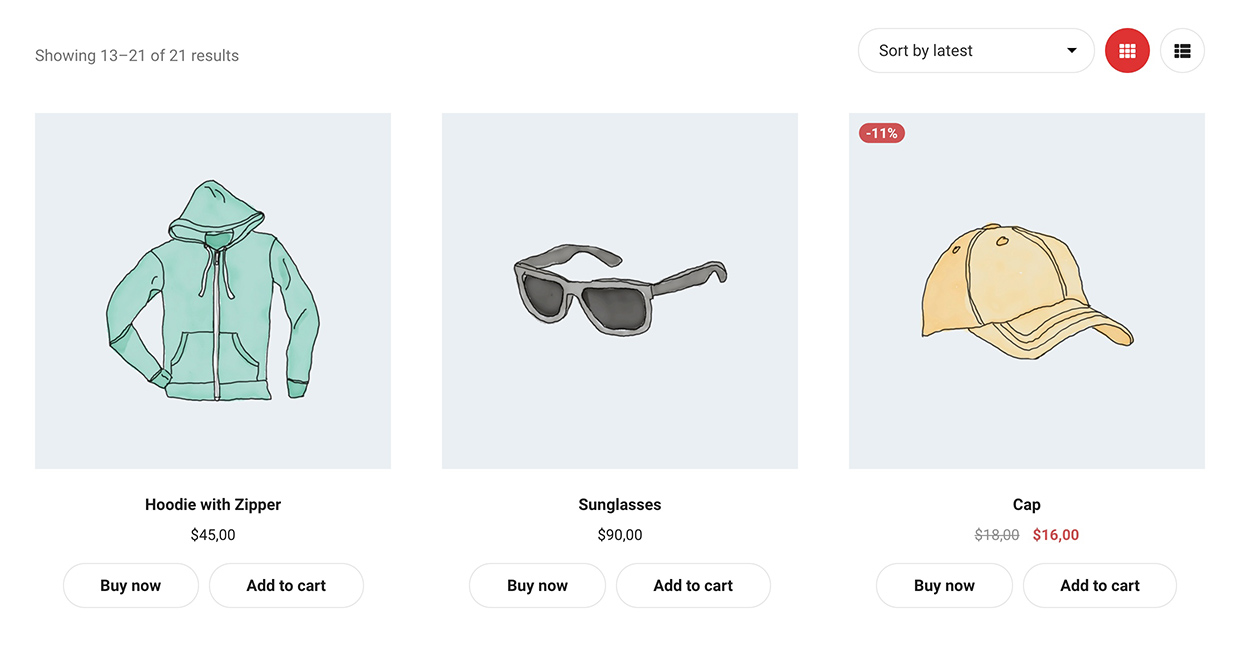
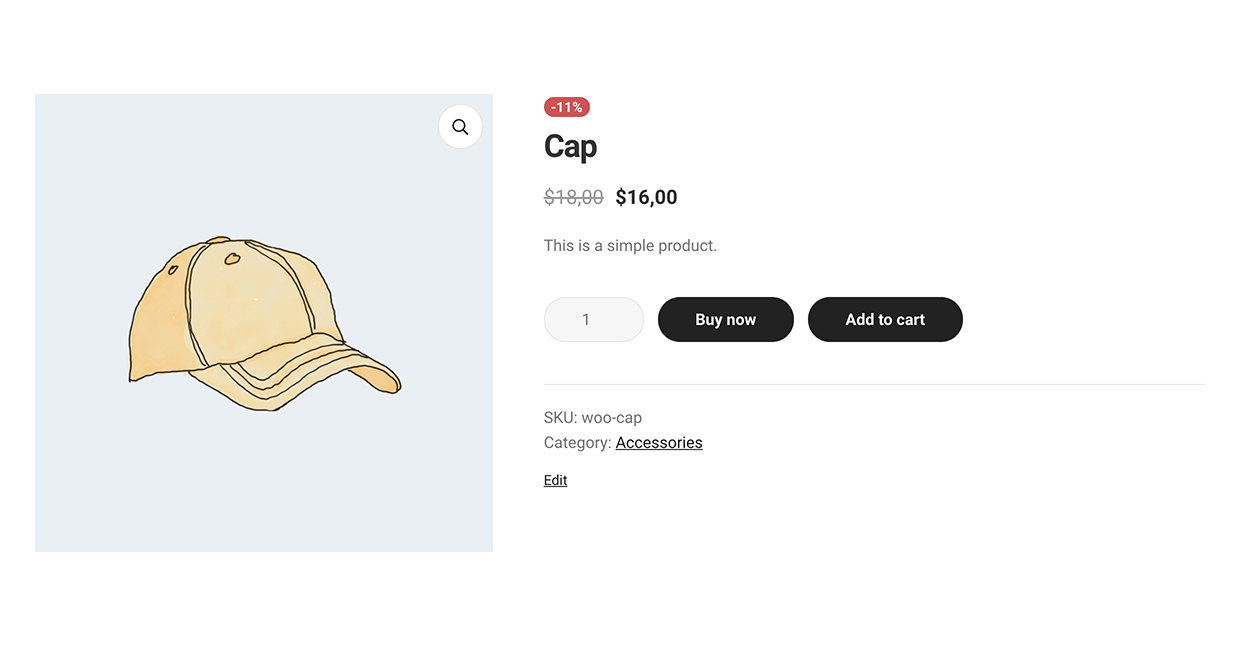
The Buy Now button can easily be added at any place you’d like to help buyers during their purchasing process on the single product page or on the shop/archive pages. It’s possible to insert at a custom position with short-code as well.
WPC Buy Now Button also has a feature to reset the cart before redirecting buyers to the checkout page to make sure the cart is properly updated. Users are able to change the wording of the button to get a better call for action effect or set up the parameter for the button as well.
Simple to use, just a one-click installation, then you’ll have a nice Buy Now button in your shop.
Live demo
Visit our live demo here to see how this plugin works.
Benefits
- Easier purchase process
- Reduce cart abandonment rate
- Convert new users into customers
- Faster checkout: skip cart or Instant Checkout (Premium)
Key Features
- Change the position on single product pages
- Change the position on shop/archive pages
- Short-code supported for adding button to any position
- Change the text for the Buy Now button
- Change the parameter for the button or link
- Select categories to enable Buy Now button
- Show/hide the default Add to Cart button besides Buy Now
- Enable/disable cart resetting before Buy Now event
- Choose which to open after Buy Now: cart, checkout, or custom page
- Localization tab: customize text phrases in plugin
- Compatible with most WordPress themes & WooCommerce plugins
- Enable Instant Checkout popup with advanced settings (Premium)
Lightning-fast Shopping Experience
Buy Now buttons can be added at different levels of your store easily: storewide >> category level >> product level (short-code). Since version 2.0.1, users can select which product category(ies) has the Buy Now button enabled, so certain product groups are excluded from the speed shopping.
What is special about the WPC Buy Now Button for WooCommerce plugin is that it can bring about a blazing-fast purchasing speed on your site at increasing levels: Hide default Add to Cart button >> Redirect to cart page >> Redirect to check out page >> Open the Instant Checkout popup
- Hiding the default Add to Cart button, so customers can only choose to Buy Now
- Redirecting to the cart page after Buy Now encourages people to be put in a mood to purchase rather than just visiting or navigating without certain purchase interest
- Redirect to the checkout page after Buy Now will make visitors decide to close the deal and place their order faster. This will also reduce the cart abandonment rate
- Leaving no time for second thoughts using the Instant Checkout popup after Buy Now.
Instant Checkout (PREMIUM)
The Instant Checkout popup can be simply triggered when buyers press on the Buy Now so they can fill the address and payment details without even leaving the current page. This should be the most ideal action to be triggered by the Buy Now button as it not only reduces cart abandonment effectively but also improves the order placement.
With the Premium version, advanced settings are enabled, so users can choose a position to display the Instant Checkout popup on the screen: left, right, center, top or bottom. Enabling the perfect-scrollbar effect will make the experience become smoother and smoother.
Widely compatible with WPC plugins
WPC Buy Now Button for WooCommerce can work with:
- Simple and variable products
- WPC Product Bundles for WooCommerce
- WPC Composite Products for WooCommerce
- WPC Frequently Bought Together for WooCommerce
- WPC Grouped Products for WooCommerce
- WPC Force Sells for WooCommerce
- WPC Smart Quick View for WooCommerce
- Most WordPress themes and WooCommerce plugins
Installation
- Please make sure that you installed WooCommerce
- Go to plugins in your dashboard and select “Add New”
- Search for “WPC Buy Now Button,” Install & Activate it
- Go to WP-admin > WPClever > Buy Now Button to configure
Frequently Asked Questions
Review feed
Works Like Charm
Screenshots
Changelog
2.1.9
- Added: Import/export settings
- Updated: Compatible with WP 6.8 & Woo 10.3
2.1.8
- Fixed: Minor CSS/JS issues in the backend
- Updated: Compatible with WP 6.8 & Woo 10.2
2.1.7
- Updated: Optimized the code
2.1.6
- Fixed: Minor CSS/JS issues in the backend
2.1.5
- Fixed: Minor CSS/JS issues in the backend
- Updated: Compatible with WP 6.8 & Woo 9.9
2.1.4
- Fixed: Error with the match function on PHP7
2.1.3
- Fixed: Hide default add-to-cart button
2.1.2
- Updated: Optimized the code
- Updated: Compatible with WP 6.7 & Woo 9.7
2.1.1
- Updated: Optimized the code
- Updated: Compatible with WP 6.7 & Woo 9.4
2.1.0
- Updated: Compatible with WP 6.6 & Woo 9.3
- Updated: Compatible with WPC AJAX Add to Cart
2.0.8
- Updated: Compatible with WP 6.6 & Woo 9.1
2.0.7
- Fixed: Minor CSS/JS issues in the backend
- Updated: Compatible with WP 6.5 & Woo 9.0
2.0.6
- Fixed: Minor CSS/JS issues in the backend
2.0.5
- Updated: Compatible with WP 6.5 & Woo 8.9
2.0.4
- Updated: Compatible with WP 6.5 & Woo 8.8
2.0.3
- Updated: Compatible with WP 6.4 & Woo 8.6
2.0.2
- Fixed: Show Buy Now button for variable products
2.0.1
- Added: Option to show the Buy Now button for products in selected categories
2.0.0
- Added: Instant Checkout (Premium)
- Updated: Optimized the code
1.3.0
- Fixed: Compatible with WPC Smart Quick View
1.2.9
- Updated: Optimized the code
1.2.8
- Fixed: Minor CSS/JS issues in the backend
1.2.7
- Updated: Compatible with WP 6.3 & Woo 8.0
1.2.6
- Updated: Optimized the code
1.2.5
- Fixed: Minor CSS/JS issues in the backend
1.2.4
- Updated: Optimized the code
1.2.3
- Fixed: Minor CSS/JS issues in the backend
1.2.2
- Added: Option to hide default add-to-cart button
1.2.1
- Added: HPOS compatibility
1.2.0
- Added: Function ‘get_settings’ & ‘get_setting’
1.1.5
- Updated: Optimized the code
1.1.4
- Fixed: Hide button for unpurchasable product
1.1.3
- Fixed: Adding variable product after empty the cart
1.1.2
- Fixed: Wrong quantity when adding variable product to the cart
1.1.1
- Fixed: Out of stock variation
1.1.0
- Updated: Optimized the code
1.0.4
- Updated: Optimized the code
1.0.3
- Fixed: Variable product
1.0.2
- Added: Option to choose redirect page
- Added: Filter hook ‘wpcbn_redirect’, ‘wpcbn_redirect_url’
1.0.1
- Updated: Optimized the code
1.0.0
- Released