

WPExperts Square For GiveWP
GiveWP Square plugin for WordPress allows users to donate from their give-donation form using Square payment gateway. Now, you can accept credit card …
Plugin info
Maintenance & Compatibility
Maintenance score
Possibly abandoned • Last updated 408 days ago • 3 reviews
Is WPExperts Square For GiveWP abandoned?
Possibly abandoned (last update 408 days ago).
Compatibility
Similar & Alternatives
Explore plugins with similar tags, and compare key metrics like downloads, ratings, updates, support, and WP/PHP compatibility.
Description
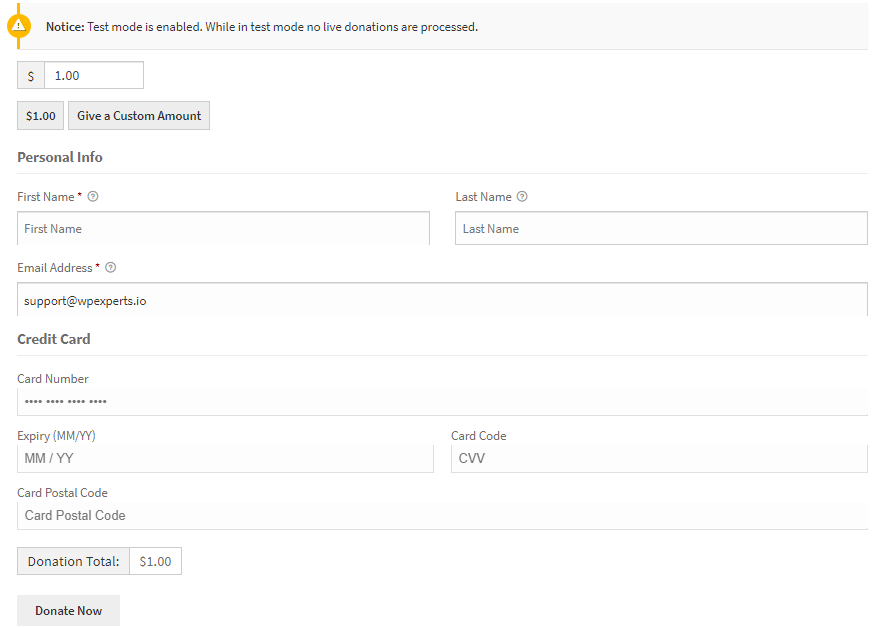
GiveWP Square plugin for WordPress allows users to donate from their give-donation form using Square payment gateway. Now, you can accept credit card donations directly on your website without letting your visitors leave your site.
The online process is quick and easy – simply add the Square payment option to your form created through GiveWP.
With GiveWP Square plugin for WordPress, you have the choice to create a legacy (simple) donation form or a custom donation form with features like multi-level donation (drop-down selectable menu), a list of fixed donation amounts, or a custom amount field.
GiveWP for Square has integrated Sandbox support with the latest version of SQUARE V2 API so you can test transactions in the Square Dashboard before going live.
Features
- Create GiveWP donation forms that are integrated with the Square payment gateway.
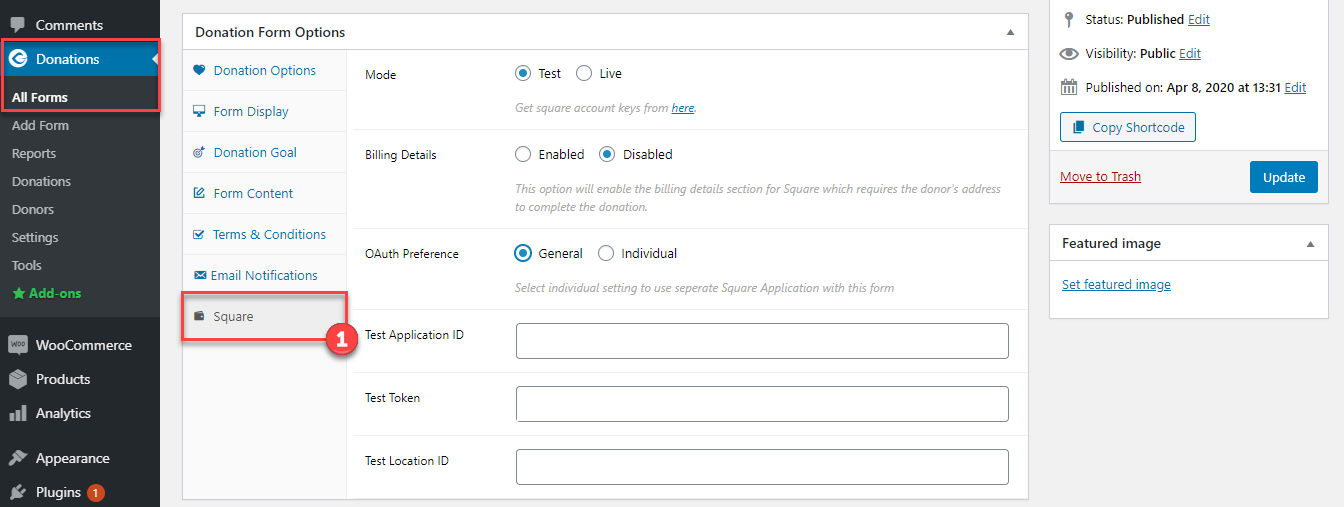
- Add different Square payment settings per each donation form. (each donation form will have their own Square payment settings)
- If no settings are added, general/global Square settings will automatically be applied.
- Display the donation form in a modal box- form appears in a pop-up window.
- Display the donation form in a multi-step box – form details are divided into steps.
- Display donation levels on the form using radio buttons or dropdown menus.
- Add Square Credit Card pricing field per selected donation form.
- Multi-level donation feature (custom dropdown menu)
- Set the minimum and maximum donations amount limits in all donation forms.
- Integrated Sandbox support with the latest version of SQUARE V2 API.
- Custom amount field for donation
- Set a fixed amount for donation
- One-click Square authorization
- Fully documented and supported
- Secure and PCI compliant
GiveWP Square Premium
GiveWP Square Premium has enhanced new features that will give you the power to add recurring donation settings to your GiveWP Donations forms. Create your own recurring subscription model and allow donors to calibrate recurring billing intervals/periods of subscription exactly as they want.
Set default donation amount options for donors who do not want to subscribe to a recurring donation schedule.
Premium Features
- Add a recurring donation module – Users will be able to pay their donation amount on a recurring basis.
- Donors can enable/disable their recurring donation subscriptions at any time.
- Donors can choose the period of their subscription in the service freely or, select from a predefined schedule.
- Create your recurring module’s billing interval by setting a period (day/week/month/year), and length of time (ongoing/2~24 months).
- Set a default donation amount, in case of disabling recurring and recurring by donor’s choice.
- Enable/Disable recurring module for each level
Documentation
Click here to view the detailed technical documentation. The documentation includes a step-by-step configuration guide and troubleshooting.
Requirements
- GiveWP – Donation Plugin
- Square Account.
- WordPress 4.4+
- PHP version 5.5 or greater (PHP 5.6 or greater is recommended)
- GiveWP Recurring (for recurring donations only)
- An SSL Certificate.
- Square API is currently only available for the U.S., Canada, Australia, Japan, and the UK.
Installation
- Upload the Give WP Square plugin to your /wp-content/plugins/ directory.
- Activate the plugin through the ‘Plugins’ menu in WordPress.
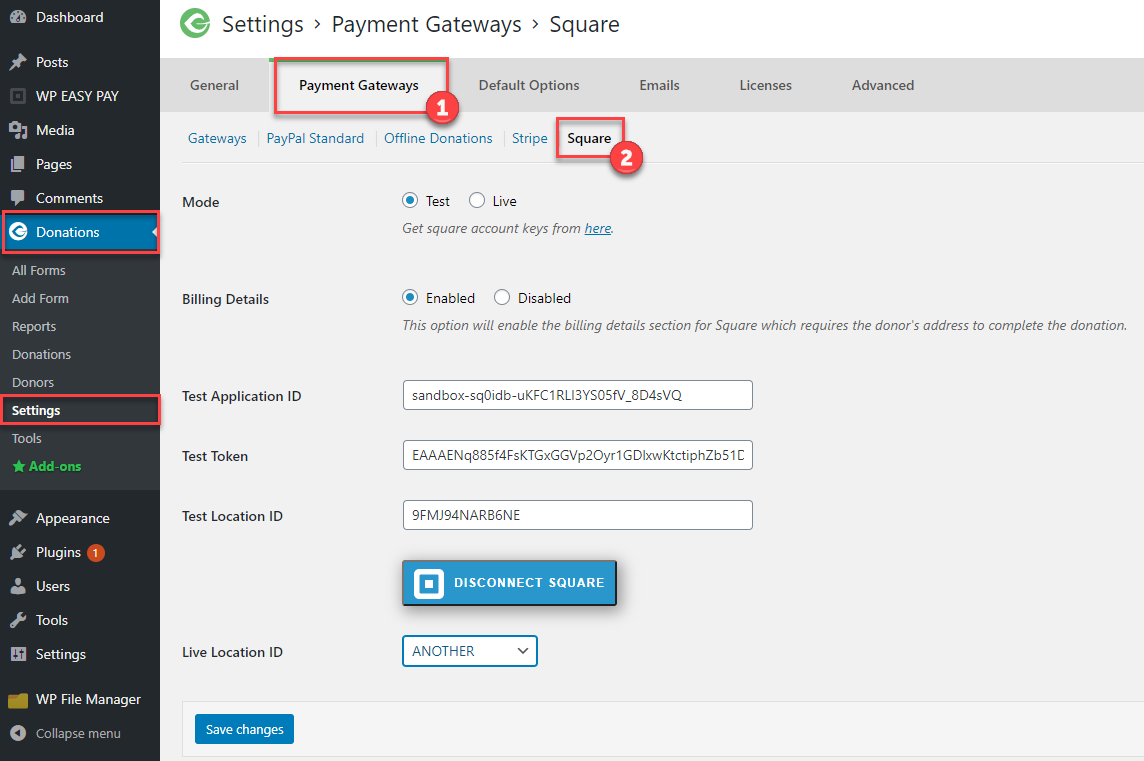
- Go to Donations(GiveWp) from the wordpress admin dashboard -> Settings -> Payment Gateways(Tab) -> Square(option)
and click on Connect with square button after connecting select your location and hit the save button. - Now you are ready to go!.
Frequently Asked Questions
Review feed
Screenshots
Changelog
1.0
- Intial Release.
1.1
*Added – Ireland Currency Support.
1.2
*Added – Location endpoint update.
*Fixed – Fixed some bugs.
*Added – France Currency Support.
1.3
*Added – New WebPaymentSDK.
*Fixed – Fixed some bugs.
1.3.1
*Security Improvement: Sanitized SQL queries suggested by Patchstack team.
1.3.2
*Fix: Source ID empty error on form
*Fix: Form was submitting without validating details in rear case.
*Improvement: Global & Individual settings inside the Individual form.