

WPF Force External Nofollow
Automatically inserts rel="nofollow" into all the external links on your wordpress posts or pages.
Maintenance 20/1004396d since update
Active installs
60
Downloads
2,356
Reviews
0
Age
12.0y
Plugin info
Total downloads: 2,356
Active installs: 60
Total reviews: 0
Average rating: 0
Support threads opened: 0
Support threads resolved: 0 (0%)
Available in: 1 language(s)
Contributors: 1
Last updated: 3/23/2014 (4396 days ago)
Added to WordPress: 3/23/2014 (12 years old)
Minimum WordPress version: 2.9.2
Tested up to WordPress version: 3.7.41
Minimum PHP version: f
Maintenance & Compatibility
Maintenance score
Possibly abandoned • Last updated 4396 days ago
20/100
Is WPF Force External Nofollow abandoned?
Possibly abandoned (last update 4396 days ago).
Compatibility
Requires WordPress: 2.9.2
Tested up to: 3.7.41
Requires PHP: f
Similar & Alternatives
Explore plugins with similar tags, and compare key metrics like downloads, ratings, updates, support, and WP/PHP compatibility.
Nofollow External Link
Rating 5.0/5 (1 reviews) • Active installs 20
Nofollow Shortcode
Rating 0.0/5 (0 reviews) • Active installs 10
Nofollow for external link
Rating 3.8/5 (36 reviews) • Active installs 10,000
DoFollow Case by Case
Rating 4.0/5 (8 reviews) • Active installs 1,000
Extend Link
Rating 3.0/5 (2 reviews) • Active installs 1,000
External & Affiliate Links Processor
Rating 4.0/5 (4 reviews) • Active installs 100
Description
If you need paid support to have this plugin installed or need to have a customized version please send an email to [email protected].
Simple, if you use this plugin, rel="nofollow" will be inserted automatically for all the external links on your wordpress posts or pages.
Feature
- Adds
rel="nofollow"to all external links in your wordpress posts/pages - Will not add
rel="nofollow"to any of the internal links of your wordpress posts/pages. - Will not add another
rel="nofollow"to links that already haverel=nofollow - Will remove existing
dofollowfromrel=""if it exists within the link
You can visit our blog blog.wordpressforge.com
Support
Donations
Are always welcome 😉
Installation
- Download the latest zip file and extract the ‘wpf-force-external-nofollow’ directory.
- Upload it to your ‘/wp-content/plugins/’ directory.
- Activate ‘WPF Force External Nofollow’ in the ‘Plugins’ menu in WordPress.
Frequently Asked Questions
No FAQ available
Review feed
No reviews available
Screenshots
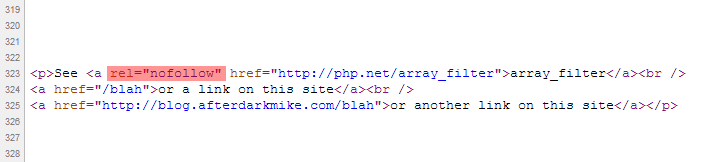
Example of how the
rel="nofollow"tag is inserted into all the external links.
Changelog
1.3
- Fixed readme.txt wording
1.2
- Fixed Typo
1.0
- First released version.