

Maintenance 20/1004226d since update
Active installs
10
Downloads
1,486
Reviews
0
Age
14.9y
Plugin info
Total downloads: 1,486
Active installs: 10
Total reviews: 0
Average rating: 0
Support threads opened: 0
Support threads resolved: 0 (0%)
Available in: 1 language(s)
Contributors: 1
Last updated: 9/6/2014 (4226 days ago)
Added to WordPress: 5/21/2011 (14 years old)
Minimum WordPress version: 2.8
Tested up to WordPress version: 4.0.38
Minimum PHP version: f
Maintenance & Compatibility
Maintenance score
Possibly abandoned • Last updated 4226 days ago
20/100
Is WPListCal JSON abandoned?
Possibly abandoned (last update 4226 days ago).
Compatibility
Requires WordPress: 2.8
Tested up to: 4.0.38
Requires PHP: f
Similar & Alternatives
Explore plugins with similar tags, and compare key metrics like downloads, ratings, updates, support, and WP/PHP compatibility.
No similar plugins found yet.
Description
View WPListCal plugin information using the JSON API plugin with this simple WordPress plugin.
After installing and activating you can use the upcomming events in your external applications.
Installation
The automatic plugin installer should work for most people. Manual installation is easy and takes fewer than five minutes.
- Create a wplistcal-json directory in your plugins directory. Typically that’s wp-content/plugins/wplistcal-json/.
- Into this new directory upload the plugin files (wplistcal-json.php, etc.)
- Activate the plugin through the ‘Plugins’ menu in WordPress.
- Activate the ‘WPListCal’ controller through the ‘JSON API’ options page.
Frequently Asked Questions
Does it work with older versions of WordPress?
I don’t know, try it and let me know.
Review feed
No reviews available
Screenshots
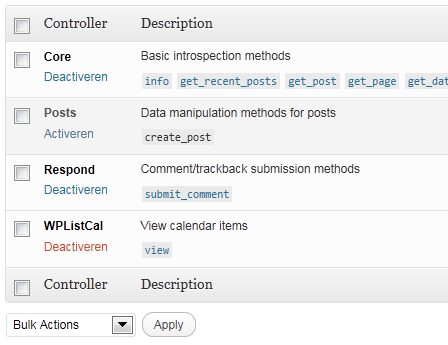
JSON API Settings: Activate WPListCal
Changelog
1.1
- Bugfix: Sorting results
1.0
- Initial release