

WP-MediaWiki
WP-MediaWiki is a plugin for WordPress. It adds a subset of MediaWiki markups to WordPress.
Plugin info
Maintenance & Compatibility
Maintenance score
Possibly abandoned • Last updated 6601 days ago
Is WP-MediaWiki abandoned?
Possibly abandoned (last update 6601 days ago).
Compatibility
Similar & Alternatives
Explore plugins with similar tags, and compare key metrics like downloads, ratings, updates, support, and WP/PHP compatibility.
Description
WP-MediaWiki adds a subset of MediaWiki markups to WordPress.
Currently, the following MediaWiki markups are supported.
- Bold
- Italic
- Heading
- Lists: Besides the list markups come from MediaWiki, I also added a continuation markup such that users can put preformatted text in a list item.
- Tables
- External links
- WikiLinks: the wikilink will link to Wikipedia by default, you can change the wiki site in the admin option page.
- Table of content
- Horizontal line
- Preformatted text
For more information about MediaWiki markups, please refer to http://meta.wikimedia.org/wiki/Help:Editing.
For a demo of this plugin, please refer to http://zechs.dyndns.org/wordpress/?page_id=152.
There is also a sandbox (http://zechs.dyndns.org/wordpress/wp-content/files/wp-mediawiki/sandbox/index.php) for you to preview the effect of this plugin.
Installation
- Please make sure you have PHP 5 installed.
- Upload
wp-mediawiki.phpand the folderwp-mediawikicontaining wp-mediawiki.css and wp-mediawiki.js to the/wp-content/plugins/directory. - Activate the plugin through the ‘Plugins’ menu in WordPress
- Complete options in the ‘Options’ page.
Frequently Asked Questions
Review feed
Screenshots
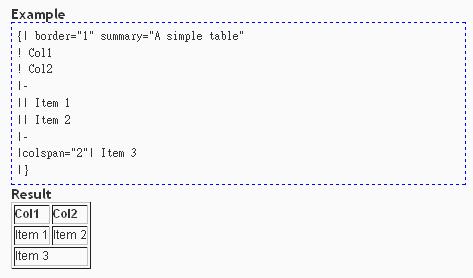
Creating a table.

Creating external links.
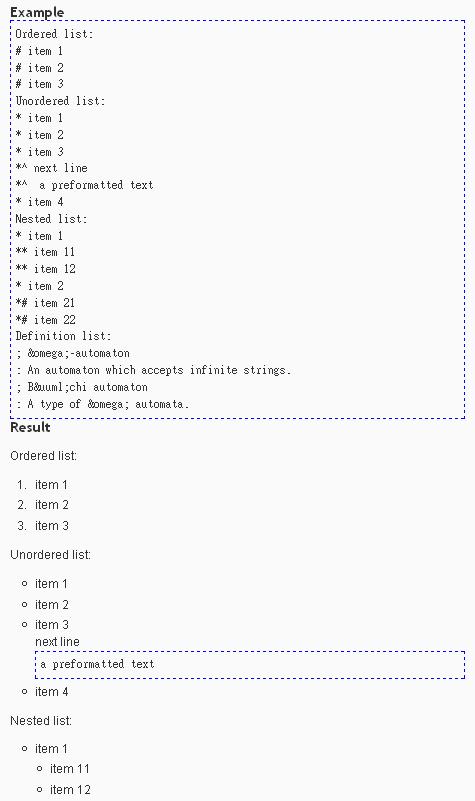
Creating lists.