

Wptobe-memberships
A membership plugin for WordPress. Wptobe helps you build any type of website, with member profiles, points and messaging.
Maintenance 22/1002534d since update
Active installs
10
Downloads
3,086
Reviews
1
Age
9.9y
Plugin info
Total downloads: 3,086
Active installs: 10
Total reviews: 1
Average rating: 5
Support threads opened: 0
Support threads resolved: 0 (0%)
Available in: 1 language(s)
Contributors: 1
Last updated: 4/25/2019 (2534 days ago)
Added to WordPress: 5/21/2016 (9 years old)
Minimum WordPress version: 3.0.1
Tested up to WordPress version: 3.4.2
Minimum PHP version: f
Maintenance & Compatibility
Maintenance score
Possibly abandoned • Last updated 2534 days ago • 1 reviews
22/100
Is Wptobe-memberships abandoned?
Possibly abandoned (last update 2534 days ago).
Compatibility
Requires WordPress: 3.0.1
Tested up to: 3.4.2
Requires PHP: f
Similar & Alternatives
Explore plugins with similar tags, and compare key metrics like downloads, ratings, updates, support, and WP/PHP compatibility.
myCred Rank Plus
Rating 0.0/5 (0 reviews) • Active installs 20
Init User Engine – Gamified, Fast, Frontend-First
Rating 0.0/5 (0 reviews) • Active installs 20
Data access levels
Rating 5.0/5 (1 reviews) • Active installs 10
User-Cats Manager
Rating 0.0/5 (0 reviews) • Active installs 10
WishList Member: Show All Levels
Rating 0.0/5 (0 reviews) • Active installs 10
Terror Alert Level Widget
Rating 0.0/5 (0 reviews) • Active installs 10
Description
A membership and private messaging plugin. Wptobe helps you build any type of website, with member profiles, points and messaging.
Membership:
- User registration and profile integrated into your theme
- Users can have multiple memberships
- Create custom registration and profile fields
- Set which fields display and which are required
- You can change the order the profile and registration fields appear on the profile and registration form by dragging.
Points:
- Each user on your websites gets their own point balance
- Award customers points for actions like signing up or writing a product review
Messaging:
- Users can privately message one another!
Plugin Support: If you have any issue with this plugin, please visit the plugin site and post it on the support forum : http://wptobe.com/forum/
Installation
- Put the plugin folder into [wordpress_dir]/wp-content/plugins/
- Go into the WordPress admin interface and activate the plugin
Frequently Asked Questions
- http://wptobe.com/
Review feed
No reviews available
Screenshots
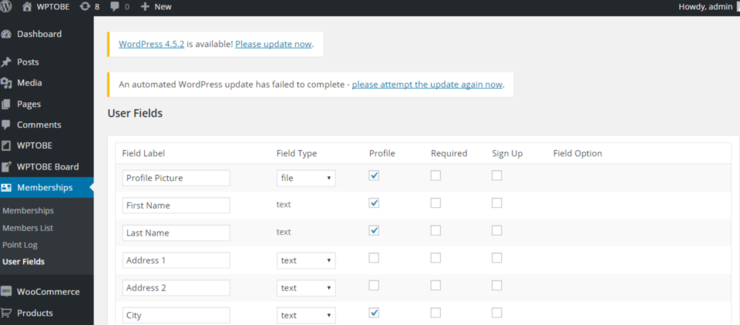
http://wptobe.com/user/


Changelog
1.0.0
- Initial version.
1.0.1
- Add a memberlist view page in admin panel.
1.0.3
- Add a option membership level name.
1.0.4
- Changed options page layout and design.
1.1.3
- Fixed Sign up page password type.
- Modified frontend.css for WPTOBE theme.
1.1.4
- Updated admin user interface.
1.2.68
- Updated captcha for signup.