

WPX Google Analytics
Activate asynchronous Google Analytics tracking code on your site. Just add your ID and the code appears on the right spot.
Maintenance 20/1004747d since update
Active installs
80
Downloads
6,318
Reviews
0
Age
13.4y
Plugin info
Total downloads: 6,318
Active installs: 80
Total reviews: 0
Average rating: 0
Support threads opened: 0
Support threads resolved: 0 (0%)
Available in: 1 language(s)
Contributors: 1
Last updated: 2/18/2013 (4747 days ago)
Added to WordPress: 10/8/2012 (13 years old)
Minimum WordPress version: 3.0.1
Tested up to WordPress version: 3.5.2
Minimum PHP version: f
Maintenance & Compatibility
Maintenance score
Possibly abandoned • Last updated 4747 days ago
20/100
Is WPX Google Analytics abandoned?
Possibly abandoned (last update 4747 days ago).
Compatibility
Requires WordPress: 3.0.1
Tested up to: 3.5.2
Requires PHP: f
Similar & Alternatives
Explore plugins with similar tags, and compare key metrics like downloads, ratings, updates, support, and WP/PHP compatibility.
No similar plugins found yet.
Description
Adding Google Analytics to your website never has been easier. Just add your analytics ID and the correct asynchronous Javascript code is added to every page. No fiddling around anymore with manually pasting the code in your template.
Installation
- Upload
wpx-google-analytics.phpto the/wp-content/plugins/directory - Activate the plugin through the ‘Plugins’ menu in WordPress
- Go to
Settings>WPX Google Analyticsand paste in your analytics ID
Frequently Asked Questions
No FAQ available
Review feed
No reviews available
Screenshots
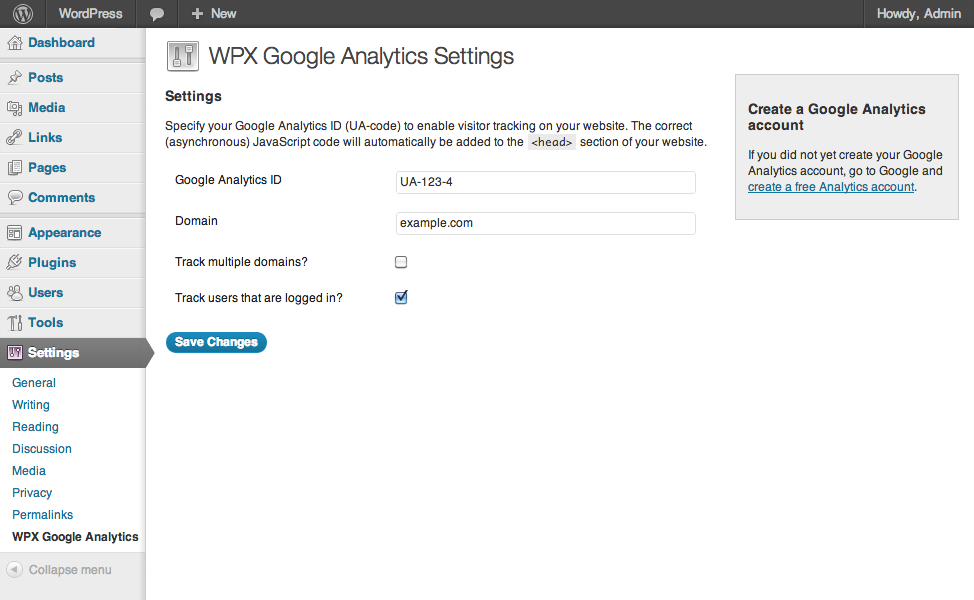
Google Analytics Settings
Changelog
1.1
- Language support added
1.0.2
- Cleaned up the code, removed debug statements that caused issues on certain installations.
1.0.1
- Added: Forbidden characters are stripped from the domain.
1.0
- First public release of the plugin.