
WYSIWYG Comments with Trix Editor
This replaces the WordPress comment submission form with a WYSIWYG rich-text editor.
Maintenance 38/100201d since update
Active installs
10
Downloads
1,588
Reviews
0
Age
3.7y
Plugin info
Total downloads: 1,588
Active installs: 10
Total reviews: 0
Average rating: 0
Support threads opened: 0
Support threads resolved: 0 (0%)
Available in: 1 language(s)
Contributors: 1
Last updated: 7/30/2025 (201 days ago)
Added to WordPress: 6/2/2022 (3 years old)
Minimum WordPress version: 2.7
Tested up to WordPress version: 6.8.3
Minimum PHP version: f
Maintenance & Compatibility
Maintenance score
Stale • Last updated 201 days ago
38/100
Is WYSIWYG Comments with Trix Editor abandoned?
Likely maintained (last update 201 days ago).
Compatibility
Requires WordPress: 2.7
Tested up to: 6.8.3
Requires PHP: f
Similar & Alternatives
Explore plugins with similar tags, and compare key metrics like downloads, ratings, updates, support, and WP/PHP compatibility.
No similar plugins found yet.
Description
This replaces the WordPress comment submission form with a WYSIWYG rich-text editor. It includes a toolbar for bold, italic, links, embeds, blockquotes, code, and lists.
The editor used is Trix, written by Sam Stephenson and Javan Makhmali for Basecamp. This WordPress integration is by Jamie Zawinski.
Installation
- Upload the
wysiwyg-comments-trixdirectory to your/wp-content/plugins/directory. - Activate the plugin through the “Plugins” menu in WordPress.
- Select the “Settings / Discussion” page to adjust the color scheme.
Frequently Asked Questions
No FAQ available
Review feed
No reviews available
Screenshots
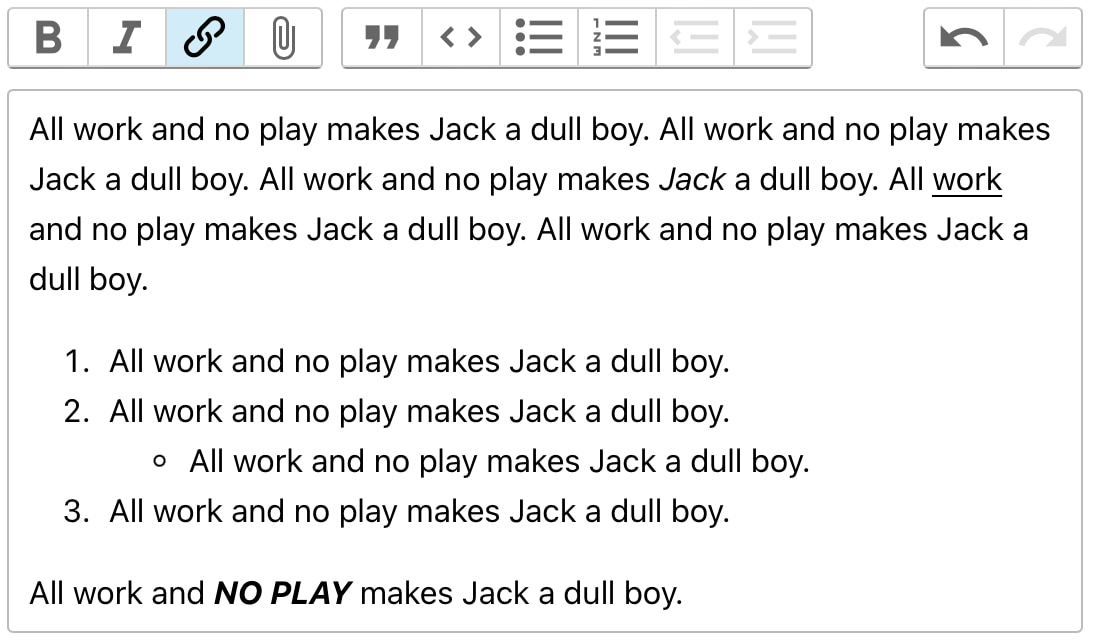
The rich-text comment edit field.
Changelog
1.0
- Created
1.1
- Reject comments that appear to have been typed using raw HTML. The elderly will get used to the new way eventually.
1.2
- Updated to Trix 2.0.10.
- Avoid race condition when initializing comment-reply JavaScript.
- Added a special case to make embedding Giphy images work.
1.4
- Oops, I forgot to include the CSS file in the distribution.
1.5
- Recent Firefox was spuriously triggering the “you are typing raw HTML” warning.
- Ensure that Light Theme has a white background for the textarea.