

Video Lightbox for YouTube/Vimeo
Embed YouTube/Vimeo videos in a lightbox popup. Easily create thumbnails and customize playback settings. Supports both platforms and is compatible wi …
Plugin info
Maintenance & Compatibility
Maintenance score
Possibly abandoned • Last updated 490 days ago • 7 reviews
Is Video Lightbox for YouTube/Vimeo abandoned?
Possibly abandoned (last update 490 days ago).
Compatibility
Similar & Alternatives
Explore plugins with similar tags, and compare key metrics like downloads, ratings, updates, support, and WP/PHP compatibility.
Description
Easy YouTube & Vimeo popups! Click thumbnails to watch videos in a sleek lightbox. Works with shortcodes in posts, pages & widgets.
The plugin now has support for the official AMP plugin.
    [youtube videoid="" height="" width=""]
    [youtube url=""]
in the backend you can generate shortcodes also you can set default height, width, and an option to play video automatically.
Now Supports Vimeo
    [vimeo videoid="" height="" width=""]
    [vimeo url=""]
Installation
- Upload
youtubefancyboxfolder to the/wp-content/plugins/directory - Activate the plugin through the ‘Plugins’ menu in WordPress
- Place shortcode like
[youtube videoid="<videoid goes here>"]in your page, post, text widget
Frequently Asked Questions
You need to add shortcode to your page, post, or your text widget
Yes, It does it’s in the plugin submenu named “YTubeFancyBox”.
You can set the default height and width on the admin side
You can set the default autoplay option at the backend
You can set height and width for each image thumbnail in shorcode [youtube videoid="<videoid>" height="<height>" width="<width>"]
You can find youtube video id at the backend by inserting youtube video URL
Yes, you can add [youtube url="<youtube video URL here>"]
Review feed
Good and Useful plugin!
Screenshots
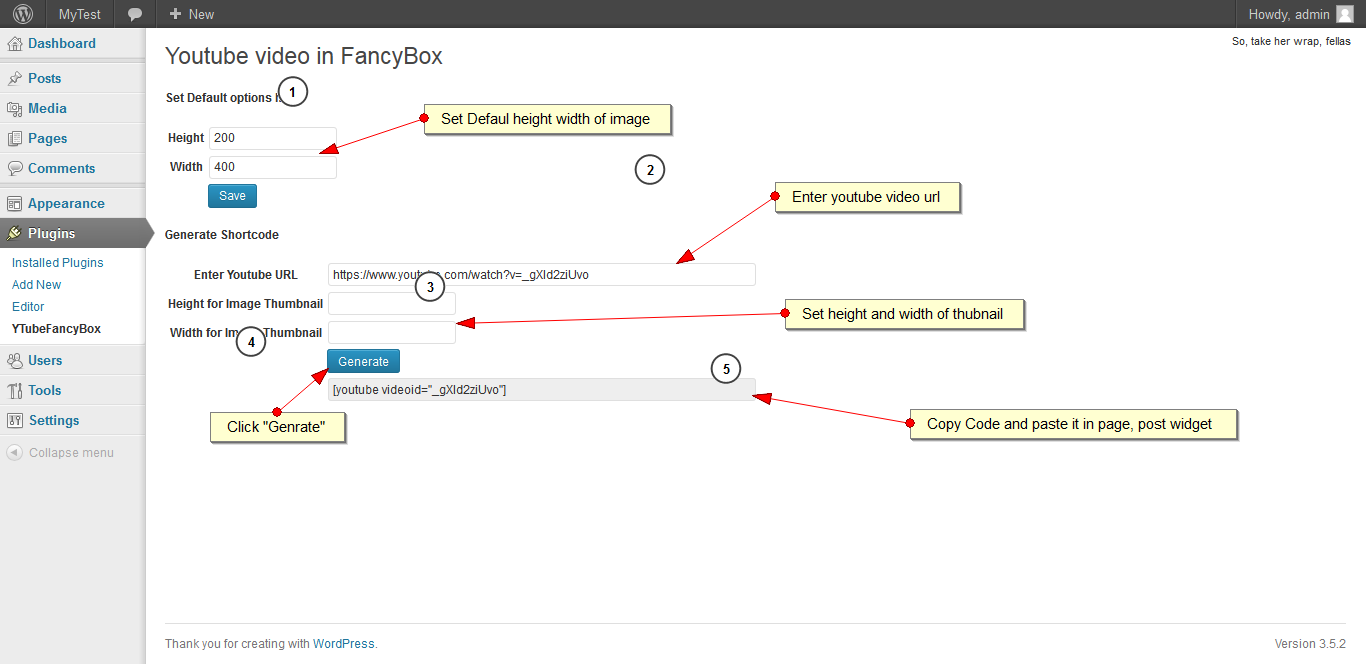
Backend of Plugin

add the shortcode on a page

Thumbnails generated from youtube video

Youtube Video in Lightbox
Changelog
2.7.1
Version update
2.7.0
Fix : Fixed error where the vimeo data was not reetrieved.
Updated Tested tag to 6.6.2
2.6.2
Fix: short code Generator.
Updated Tested Tag to 5.8
2.6.1
Renamed plugin and updated logo to avoid copyright violations.
2.6
Added Official AMP Plugin Support.
Tested up to 5.6
2.5
Tested up to 5.4.2
2.4
Fixes warning.
2.3
Fixed issue with directly redirecting to video.
Added Extended version of colorboxjs
2.2
Added muted autoplay for Chrome and Safari.
https://developers.google.com/web/updates/2017/09/autoplay-policy-changes
2.1
Fixes Widget text minor issue.
2.0
Updated colorboxjs
Now supports Vimeo.
1.6
Updated colorboxjs
Updated for WordPress 4.0
Now supports SSL (HTTPS)
Improved look and feel
Updated text domain to be the same as a slug
Updated code to make plugin translation ready, the latest version of colorboxjs updated.
Fixed shortcode inside shortcode bug with return output
Updated for WordPress 4.1
Fixed iPhone iPad bugs
1.0
First release. Compatible with IE9,IE10, Chrome, Firefox