

YT Portrait Video Embed
Easily embed portrait YouTube videos in WordPress with a shortcode.
Plugin info
Maintenance & Compatibility
Maintenance score
Possibly abandoned • Last updated 498 days ago
Is YT Portrait Video Embed abandoned?
Possibly abandoned (last update 498 days ago).
Compatibility
Similar & Alternatives
Explore plugins with similar tags, and compare key metrics like downloads, ratings, updates, support, and WP/PHP compatibility.
Description
Easily embed portrait YouTube videos using a simple shortcode. Perfect for embedding vertical videos on your WordPress posts and pages.
Use the following shortcode to embed your video: [cpve_portrait_youtube id="YOUR_VIDEO_ID"] (replace YOUR_VIDEO_ID with the actual video ID).
Third-Party Service
This plugin relies on the YouTube Data API, a third-party service provided by Google. The plugin registers the YouTube iframe API script to enable video embedding and playback.
Circumstances Under Which Data is Sent:
– When you use the shortcode to embed a video, the plugin makes a request to the YouTube API to fetch video data.
– The embedded iframe requests video content directly from YouTube.
Links:
– YouTube API Service: https://developers.google.com/youtube/v3
– YouTube API Terms of Service: https://developers.google.com/youtube/terms/api-services-terms-of-service
– YouTube Privacy Policy: https://www.youtube.com/t/privacy
License
This plugin is licensed under the GPLv2 or later. For more information, visit GPL License.
Installation
- Upload the plugin files to the
/wp-content/plugins/yt-portrait-video-embeddirectory, or install the plugin through the WordPress plugins screen directly. - Activate the plugin through the ‘Plugins’ screen in WordPress.
- Use the following shortcode to embed your video of choice:
[cpve_portrait_youtube id="YOUR_VIDEO_ID"](replaceYOUR_VIDEO_IDwith the actual video ID).
Frequently Asked Questions
You can install it through the WordPress plugins screen directly or by uploading the plugin files to the /wp-content/plugins/yt-portrait-video-embed directory.
Simply use [cpve_portrait_youtube id="YOUR_VIDEO_ID"] where you want to embed a portrait YouTube video.
Review feed
Screenshots
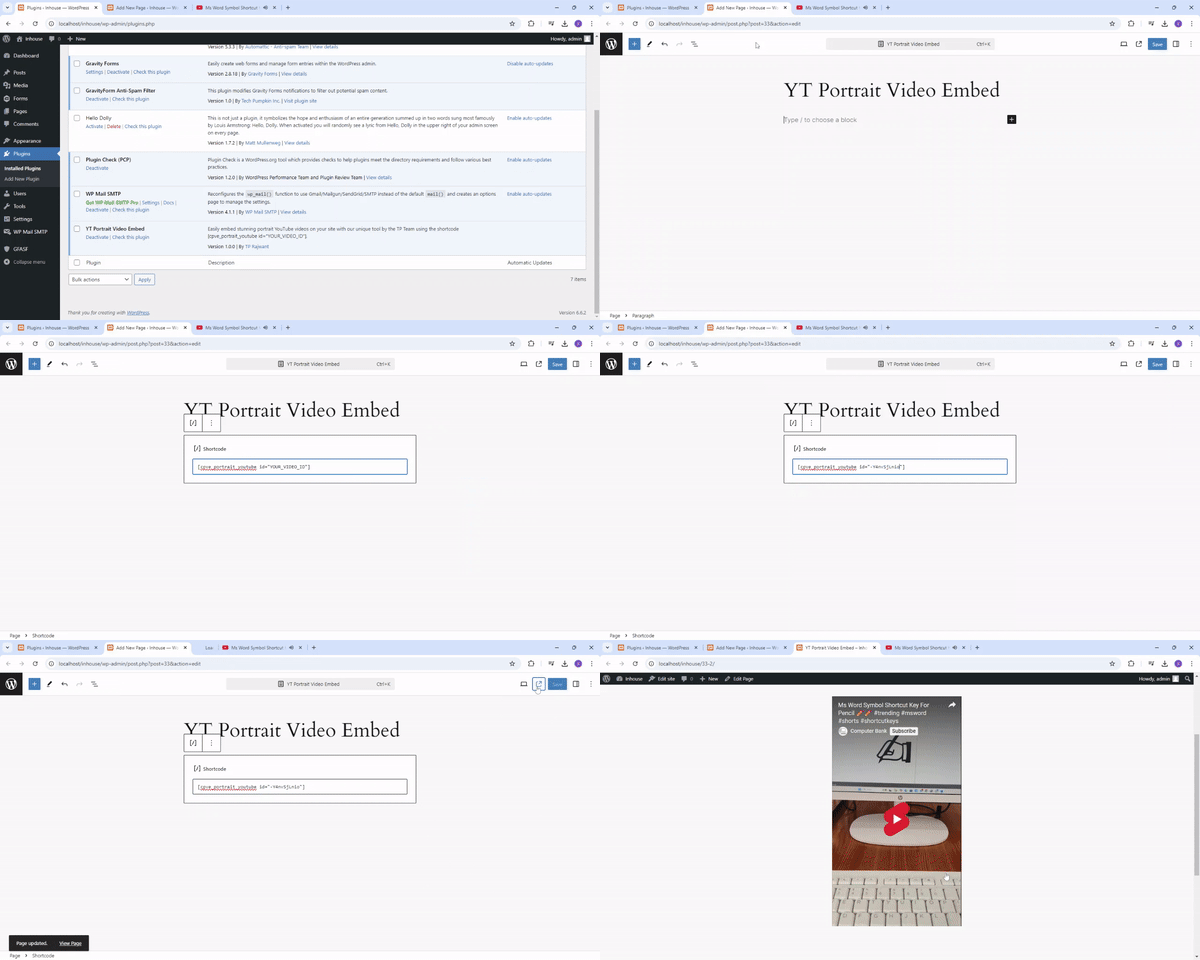
Steps to Use the Plugin

Before Using the Plugin

After Using the Plugin
Changelog
1.0.1
- Fix Bugs.
1.0.0
- Initial release.