

Zen
A distraction-free environment for blogging; inspired by Habari, OmmWriter, WriteRoom, and countless wasted hours of staring at blank screens.
Plugin info
Maintenance & Compatibility
Maintenance score
Possibly abandoned • Last updated 5596 days ago
Is Zen abandoned?
Possibly abandoned (last update 5596 days ago).
Compatibility
Similar & Alternatives
Explore plugins with similar tags, and compare key metrics like downloads, ratings, updates, support, and WP/PHP compatibility.
Description
A distraction-free environment for blogging; inspired by Habari, OmmWriter, WriteRoom, and the countless wasted hours I’ve spent staring at blank screens.
If you’re a fan of WriteRoom, OmmWriter, or similar tools that help you focus on your words instead of the tools you’re using, this plugin will soon make your wildest dreams come true (and give you a simple clean environment to write to your heart’s content)!
While Zen does not replace the existing Edit Post/Page screen, it provides a layer on top that allows you to focus on your writing. You get an input box for the title a regular ol’ textbox to add your post (feel free to use HTML).
NOTE: Zen requires PHP 5+. Not on PHP 5 yet? Talk to your hosting provider and get them to upgrade! You can thank me later.
If you’re a designer (or even just a regular Jane or Joe) and have any ideas for themes, please get in touch! I’d love to add it to Zen!
If you have any ideas for Zen or features you’d like to see included, please get in touch!
Zen was inspired by this post on Habari by ifranky.
Special thanks to Andrew Spittle for helping me out the with theme designs.
Installation
- Upload and extract the plugin to plugins directory
- Activate the plugin through the ‘Plugins’ menu in WordPress
- Specify your preferred options under Users > Your Profile
- Enjoy writing with WordPress once again (okay, okay, you always enjoyed writing with WordPress. Just enjoy it a little more okay?)
Frequently Asked Questions
Why can’t I use the HTML or visual editors in Zen mode?
There’s an issue with the HTML editor that’s breaks Zen. You get a simple ol’ textarea instead. Which, you know, may actually be better. Just sayin’…
What browsers does Zen support?
For best results, use a browser that supports basic CSS3. That includes Firefox 3.6+, Chrome 3+, Safari 4+, IE9+. Other browsers should work too, including IE, but will not have as awesome an experience.
Review feed
Screenshots
Zen gets rid of all the unnecessary modules on the Edit Post/Page screen and gives you the bare minimum needed to write.

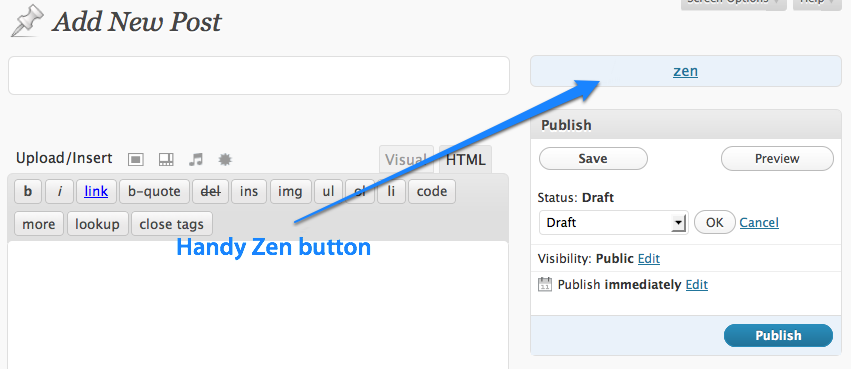
Zen adds a quick-access button to launch Zen mode from your Edit Post screen.

Zen has a couple of options

Zen provides multiple themes that can be easily switched on-the-fly using a keyboard shortcut.

Zen Dark Theme

Zen Sunset Theme

Zen Terminal Theme
Changelog
1.2
- A “Next Theme” link while in zen mode to easily change the current theme
- Under-the-hood changes to prevent potential issues with other plugins
- Added screenshots for themes on user profile page
- Small improvements to some of the themes
1.1
- Increased the size of the content textbox. Thanks to Mike Smith for the suggestion
- Added New Themes!
** Zen Sunset
** Zen Sea & Sky
** Zen Foiled Again
1.0
- First release
- Includes basic themes
- Option to automatically open Zen when adding or editing a post/page
- Autosave selected theme and open that one by default next time
- Basic keyboard shortcuts
- See blog post for details