

Zoom OpenSeadragon
Create zoomable galleries from standart wordpress images as well as from deepzoom images.
Plugin info
Maintenance & Compatibility
Maintenance score
Possibly abandoned • Last updated 3147 days ago • 5 reviews
Is Zoom OpenSeadragon abandoned?
Possibly abandoned (last update 3147 days ago).
Compatibility
Similar & Alternatives
Explore plugins with similar tags, and compare key metrics like downloads, ratings, updates, support, and WP/PHP compatibility.
Description
Zoom OpenSeadragon is an implementation of OpenSeadragon, an open-source, web-based viewer for high-resolution zoomable images, implemented in pure JavaScript, for desktop and mobile.
It allows to create zoomable galleries from standart wordpress images as well as from deepzoom images.
You can see live demo here
Zoom OpenSeadragon is released under the New BSD license
Installation
Extract the zip file and just drop the contents in the wp-content/plugins/ directory of your WordPress installation and then activate the Plugin from Plugins page.
To replace wordpress gallery with Zoom OpenSeadragon gallery you need to add openseadragon="true" to gallery shortcode. You can also use Media options to replace all galleries with Zoom OpenSeadragon gallery.
To show zoomable images, e.g. Deep Zoom images, you need to add paths of them to zoomimages attribute of shortcode, for example
[gallery openseadragon="true" zoomimages="/example.com/zoom/zoom1.dzi,/example.com/zoom/zoom2.dzi"]
Other attributes:
width– width of Seadragon Zoom, 600px by defaultheight– height of Seadragon Zoom, 600px by defaultcolumns– number of columns in grid viewnoattachments– do not use images, attached to post (for example, when you need to display only DeepZoom images)captions– display captions
Several OpenSeadragon parameters are also supported, see http://openseadragon.github.io/docs/OpenSeadragon.html#Options for description of these parameters.
shownavigationcontrol– show zoom in/out/home/full buttons, true by defaultshowzoomcontrol– show zoom buttons, true by defaultshowhomecontrol– show home button, true by defaultshowfullpagecontrol– show fullscreen button, true by defaultshowrotationcontrol– show rotation buttons, false by defaultsequencemode– display pictures in sequence mode, one by one instead of gridshowsequencecontrol– show next/prev buttons for sequence mode, true by defaultshownavigator– show navigator minimapnavigatorid– id of navigator div, autocreated if left emptynavigatorposition– position of navigator minimap, TOP_RIGHT is defaultshowreferencestrip– show thumbnails of images, false by defaultreferencestripsizeratio– ratio of thumbnails sizes to deepzoom size, 0.2 by defaultreferencestripposition– position of reference strip, BOTTOM_LEFT by defaultreferencestripscroll– type of reference scroll, ‘horizontal’ by default
Frequently Asked Questions
Installation Instructions
Extract the zip file and just drop the contents in the wp-content/plugins/ directory of your WordPress installation and then activate the Plugin from Plugins page.
To replace wordpress gallery with Zoom OpenSeadragon gallery you need to add openseadragon="true" to gallery shortcode. You can also use Media options to replace all galleries with Zoom OpenSeadragon gallery.
To show zoomable images, e.g. Deep Zoom images, you need to add paths of them to zoomimages attribute of shortcode, for example
[gallery openseadragon="true" zoomimages="/example.com/zoom/zoom1.dzi,/example.com/zoom/zoom2.dzi"]
Other attributes:
width– width of Seadragon Zoom, 600px by defaultheight– height of Seadragon Zoom, 600px by defaultcolumns– number of columns in grid viewnoattachments– do not use images, attached to post (for example, when you need to display only DeepZoom images)captions– display captions
Several OpenSeadragon parameters are also supported, see http://openseadragon.github.io/docs/OpenSeadragon.html#Options for description of these parameters.
shownavigationcontrol– show zoom in/out/home/full buttons, true by defaultshowzoomcontrol– show zoom buttons, true by defaultshowhomecontrol– show home button, true by defaultshowfullpagecontrol– show fullscreen button, true by defaultshowrotationcontrol– show rotation buttons, false by defaultsequencemode– display pictures in sequence mode, one by one instead of gridshowsequencecontrol– show next/prev buttons for sequence mode, true by defaultshownavigator– show navigator minimapnavigatorid– id of navigator div, autocreated if left emptynavigatorposition– position of navigator minimap, TOP_RIGHT is defaultshowreferencestrip– show thumbnails of images, false by defaultreferencestripsizeratio– ratio of thumbnails sizes to deepzoom size, 0.2 by defaultreferencestripposition– position of reference strip, BOTTOM_LEFT by defaultreferencestripscroll– type of reference scroll, ‘horizontal’ by default
How to replace specific gallery with Zoom OpenSeadragon gallery?
To replace wordpress gallery with Zoom OpenSeadragon you need to add openseadragon=”true” to gallery shortcode.
How to replace all galleries with Zoom OpenSeadragon gallery?
Use Zoom OpenSeadragon Options section in Settings => Media.
How to create really big zoomable image?
See http://openseadragon.github.io/examples/creating-zooming-images/
Review feed
Screenshots

Options for Zoom OpenSeadragon galleries. First gallery links to precreated DeepZoom image, second and third use standart wordpress media files

Single zoomable image
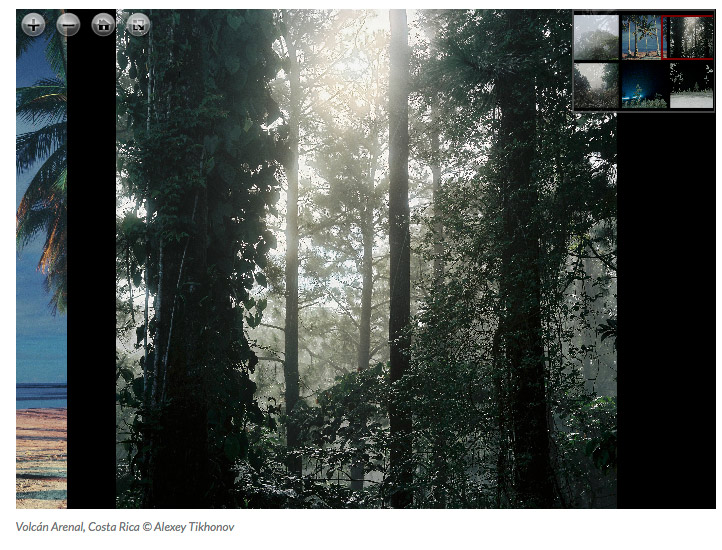
Tiled gallery, collection mode

Sequence mode
Changelog
1.4
- Updated OpenSeadragon library to version 2.3.0 and changed script to go to photo in multiimage configuration accordingly
1.3
- Updated OpenSeadragon library to version 2.2.0
1.2
- Fixed reading of attachment sizes
1.1
- Updated Russian localization
1.0
- Initial release