

Zotero Notes
This plugin adds references and citations functionalities (in a wikipedia-like style) from a Zotero account.
Plugin info
Maintenance & Compatibility
Maintenance score
Possibly abandoned • Last updated 537 days ago • 1 reviews
Is Zotero Notes abandoned?
Possibly abandoned (last update 537 days ago).
Compatibility
Similar & Alternatives
Explore plugins with similar tags, and compare key metrics like downloads, ratings, updates, support, and WP/PHP compatibility.
Description
This plugin allows references and citations in your posts. If you find issues or if you think it lacks some features, please contact me.
To use it, simply add your reference using a shortcode you can choose (‘zref’ by default), and a item ID (a reference ID from a Zotero library you have to declare in the admin part if the plugin).
Because it’s a minimal implementation, you need to add the reference ID manually in the code. Maybe later I’ll do better 😉
Then a list of all references will be added automatically at the end of the post.
Here are some examples:
- [zref]VP5PKI56[/zref]
- [zref name=’numref’]VP5PKI56[/zref]
- [zref name=’numref’ /]
You can optionnaly add a name to the citation, so you can reuse it in your post. Important note: the displayed attributes will be the attributes of the FIRST reference with that name. Any other attribute will be ignored.
Installation
Just get the plugin and activate it. You can choose in the admin section the text of the shortcode you’ll use for your citations. By default it’s ‘zref’.
Remember that when you change it, all posts written with the old shortcode won’t be parsed anymore.
You need a Zotero account to use the plugin. That implies that you have a user ID (of your Zotero account) and a private KEY (for using the Zotero’s API). Just fill the form (in the admin page, below the shortcode) with those credentials.
Frequently Asked Questions
Let me know if you have some. I will add them here!
An answer to that question.
Review feed
Screenshots
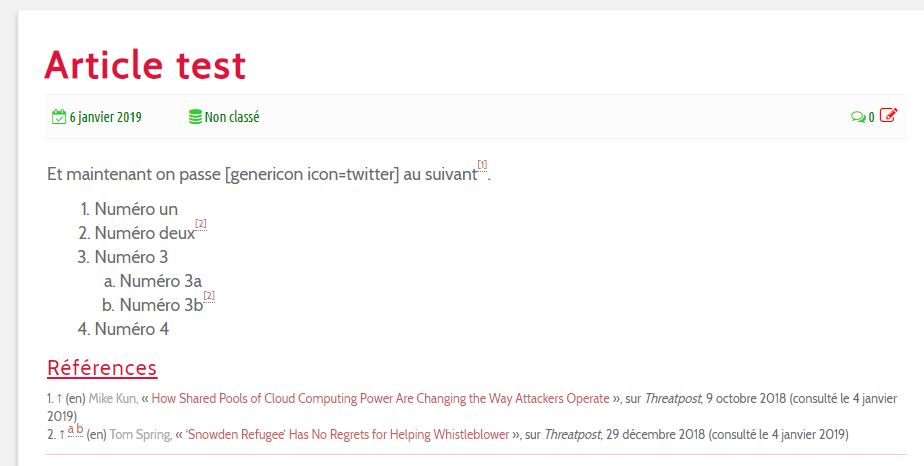
This is a very simple example with a reference used twice.

The corresponding post (in the new WordPress Editor). The 1st reference is used once, the 2nd twice (with a reference name).
Changelog
1.2.3
Securing the plugin (sanitazing, escaping, etc.)
1.1.1
Display rules modified.
1.0.3
Language parameter updated
1.0.2
Added to pages (not only posts)
1.0.1
Some caching added (to prevent too frequent curl calls).
1.0.0
- First public release
- Minimalist settings and features but fully functionnal (I hope)