

ZYX Classical Circular Clock
A simple and configurable Flash clock. There is a widget, a shortcode and a template tag.
Plugin info
Maintenance & Compatibility
Maintenance score
Possibly abandoned • Last updated 5656 days ago
Is ZYX Classical Circular Clock abandoned?
Possibly abandoned (last update 5656 days ago).
Compatibility
Similar & Alternatives
Explore plugins with similar tags, and compare key metrics like downloads, ratings, updates, support, and WP/PHP compatibility.
Description
The ZYX Classical Circular Clock allows a clock to be displayed in three different ways:
* Sidebar widget (the ZYX Analog Clock).
* The template tag the_clocked_time.
* The analog_clock shortcode.
You can configure every element in different ways.
- You can set width and height for the clock (it can actually be an elliptical clock!)
- You can adjust type/style, color, opacity, length and width of the all the dials.
- You can adjust color, opacity, length and number of all the marks.
- You can adjust color and opacity of the sphere.
- You can adjust width, color and opacity of the outline.
- You can add background images to the clock with CSS styles.
Translations
The plugin is localized, so it can be translated to any language with the usual tools. Included are the translations to Catalan and Spanish (Spain). If you have a translation to another language and want it to be distributed, please contact us.
Installation
- Upload the full (unzipped) directory to your /wp-content/plugins/ directory
- Activate the plugin through the ‘Plugins’ menu in WordPress
Now you can drag the Analog Clock widget to your sidebar, and use the analog_clock shortcode in your posts
and the_clocked_time for your templates.
Frequently Asked Questions
Review feed
Screenshots
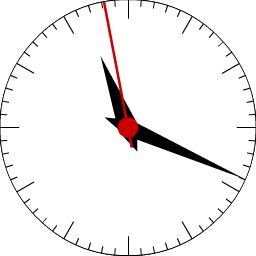
The default clock.
Changelog
0.9
- First release version