

ACF Stylizer
Simple plugin that stylizes Advanced Custom Fields meta boxes to make them more obvious.
Plugin info
Maintenance & Compatibility
Maintenance score
Possibly abandoned • Last updated 478 days ago
Is ACF Stylizer abandoned?
Possibly abandoned (last update 478 days ago).
Compatibility
Similar & Alternatives
Explore plugins with similar tags, and compare key metrics like downloads, ratings, updates, support, and WP/PHP compatibility.
Description
Simple plugin that stylizes Advanced Custom Fields meta boxes to make them more obvious. It works with both the free and the pro versions of ACF. You now have the option to make seamless meta boxes stand out better as well.
Installation
From Your WordPress Dashboard
- Log into the WordPress admin
- Go to Plugins > Add New
- Search for ACF Stylizer
- Click Install Now for the “ACF Stylizer” plugin
- Click Activate
From WordPress.org
- Download the plugin
- Log into the WordPress admin
- Go to Plugins > Add New
- Click Upload Plugin
- Click Browse and select the downloaded ZIP file
- Click Install Now
- Click Activate Plugin
Via File Transfer
- Download the plugin
- Extract the ZIP file
- Upload the contents of the ZIP file to wp-content/plugins/
- Log into the WordPress admin
- Go to Plugins
- Click Activate under “ACF Stylizer”
What’s Next?
Once the plugin is active, simply visit Settings > ACF Stylizer and enable the settings appropriate for this site.
Frequently Asked Questions
Review feed
Screenshots
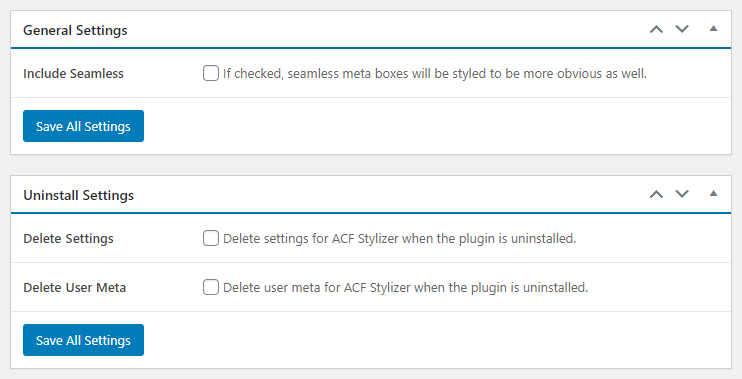
Plugin settings

Stylized standard and seamless meta boxes
Changelog
2.1.5
- Verified: Functionality for WordPress 6.7
2.1.4
- Verified: Functionality for WordPress 6.5
2.1.3
- Verified: Functionality for WordPress 6.2
2.1.2
- Updated: Third-party scripts
- Improved: Query arguments
- Improved: jQuery selectors
- Removed: Meta box styling for field groups
- Removed: PHP_INT_MAX fallback
2.1.1
- Improved: Asset generation
2.1.0
- Added: Form data validation
2.0.4
- Added: Support back to WordPress 5.0.*
- Improved: AJAX handling
2.0.3
- Added: AJAX capability check
- Improved: Knowledge base
- Improved: Option storage and retrieval
- Removed: Deprecated jQuery functionality
2.0.2
- Added: Help tabs and knowledge base
- Improved: Admin URLs throughout
2.0.1
- Added: Modern color scheme
- Improved: Value collection functionality
- Removed: Legacy body class
2.0.0
- Improved: Complete plugin overhaul
Check changelog.txt for changes to earlier versions of the plugin.