

Easy Image Filters
Add cool filters and effects to images without leaving site admin screen. Save new image without loosing original.
Plugin info
Maintenance & Compatibility
Maintenance score
Possibly abandoned • Last updated 698 days ago • 2 reviews
Is Easy Image Filters abandoned?
Possibly abandoned (last update 698 days ago).
Compatibility
Similar & Alternatives
Explore plugins with similar tags, and compare key metrics like downloads, ratings, updates, support, and WP/PHP compatibility.
Description
Apply variety of filters and effects to image from Media library. Easy Image Filters allow you to easily manipulate images from your library.
Saves new images directly to media library without affecting original image.From variety of available filters and presets you can create cool effects on images.
Features
- Easy image manipulation without leaving your site admin area.
- Plenty of filter options.
- Choose preset to quickly apply predefined effects.
- Save manipulated image directly to Media Library.
- Simple interface to efficiently manipulate on image.
This plugin is implemented using CamanJS.
Installation
- Upload
easy-image-filtersfolder to the/wp-content/plugins/directory - Activate the plugin through the ‘Plugins’ menu in WordPress
Frequently Asked Questions
Only png and jpeg image formats are supported.
Review feed
Screenshots
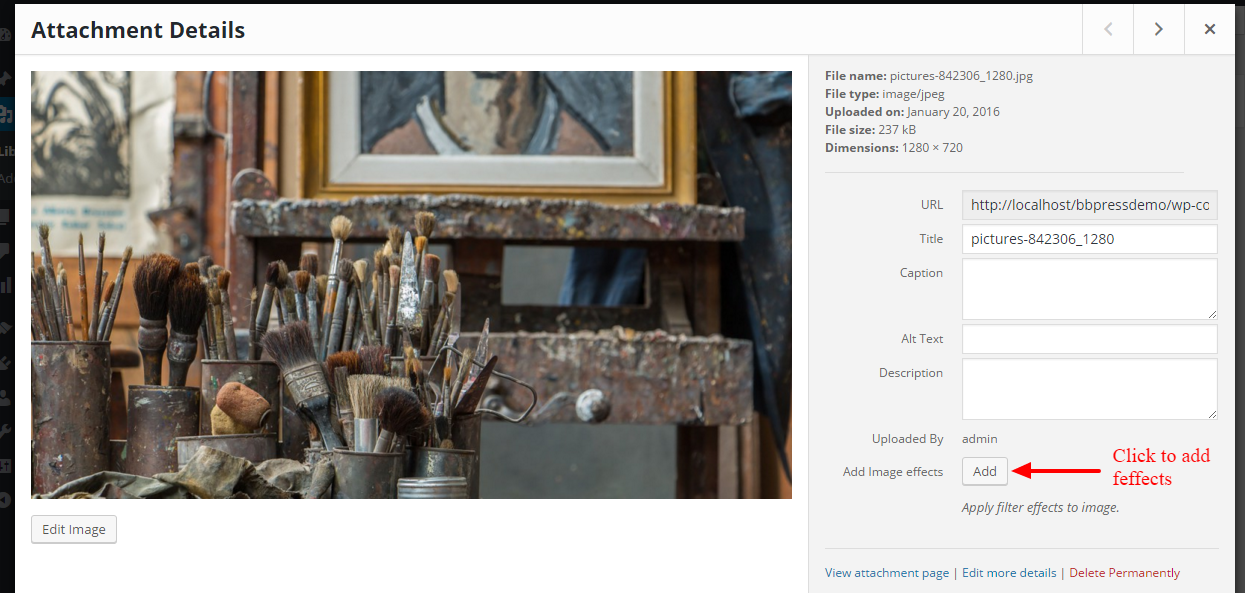
Add Filters button on Media edit screen.

Image manipulation interface.
Changelog
1.0.3
- PHPCS Fixes.
1.0.2
- Fix image generation.
- Improve security.
1.0.1
- Tested upto WordPress 4.8.
1.0
- Plugin Released.