

Advanced Custom Fields: reCAPTCHA Field
Prevent spam on your Advanced Custom Fields (ACF) v5 frontend forms with Google reCAPTCHA.
Plugin info
Maintenance & Compatibility
Maintenance score
Possibly abandoned • Last updated 2637 days ago • 12 reviews
Is Advanced Custom Fields: reCAPTCHA Field abandoned?
Possibly abandoned (last update 2637 days ago).
Compatibility
Similar & Alternatives
Explore plugins with similar tags, and compare key metrics like downloads, ratings, updates, support, and WP/PHP compatibility.
Description
ACF reCAPTCHA brings Google reCAPTCHA to Advanced Custom Fields, to be used on frontend forms.
Features include:
- ACF reCAPTCHA Protection ensures that spambots cannot circumvent reCAPTCHA to submit forms on the server-side
- ACF-compliant client-side validation which prompts the user if reCAPTCHA is not clicked or had expired
- Customizable reCAPTCHA options, including theme (light/dark), type (image/audio) and size (normal/compact)
- Compatible with ACF Conditional Logic feature, which allows hiding/showing certain fields until the reCAPTCHA has been passed
For more detailed setup instructions, or to report an issue, please head over to the GitHub repository here.
ACF Frontend Forms
ACF reCAPTCHA is meant to be used only on frontend forms, in order to protect them from spam by spambots.
To create a frontend form programmatically, please view the official documentation on the ACF website here.
ACF Compatibility
ACF reCAPTCHA is currently only compatible with ACF v5 at the moment. If you would like to help to add support for v4, do submit a PR on GitHub.
GitHub
Installation
In order to use ACF reCAPTCHA, you need to generate your reCAPTCHA API keys for your domain at the Google reCAPTCHA Dashboard first.
- In the ACF field group edit page, click Add Field to add a new field.
- Find the reCAPTCHA field type under Custom.
- Enter your site key and secret key that was generated previously.
- (optional) Configure the theme, size and type of the reCAPTCHA widget.
- Important: Scroll down to the bottom of the page, and enable ACF reCAPTCHA Protection for the field group.
Frequently Asked Questions
Review feed
Works out of the box (when the keys are entered)
Kinda works
Screenshots
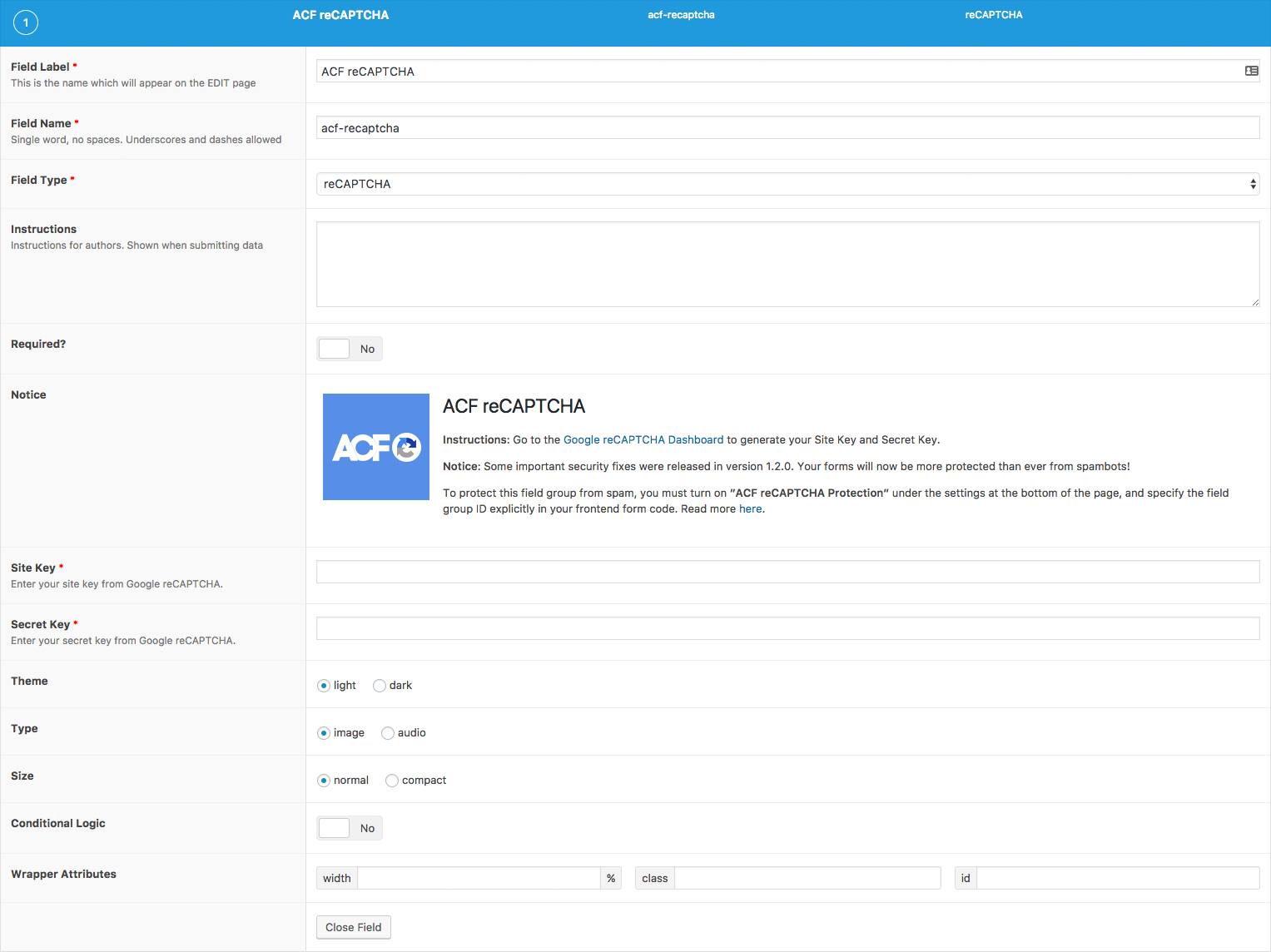
ACF reCAPTCHA customization in the ACF backend page. Enter your site and secret keys here.

ACF reCAPTCHA Protection toggle under Field Group Settings. Use this to ensure that your forms are fully protected against spambots.

Example frontend form with ACF reCAPTCHA used with Conditional Logic. The textarea is only displayed when the reCAPTCHA is solved.
Changelog
1.3.3
- Fix undefined index errors
1.3.2
- Disable plugin on ACF versions which are not supported (e.g. ACF v4)
1.3.1
- Fixed settings page link from the Plugins page
- Removed shorthand array syntax (not supported on PHP < 5.4)
1.3.0
- Added settings page to configure site-wide default reCAPTCHA keys, if not specified
1.2.1
- Better handling of server-side reCAPTCHA verification errors
- Accepted ‘true’ as a string value when using acf_form() to set the flag directly
- Perform server-side verification of recaptcha fields in form even if recaptcha flag is not set (to catch misconfigurations)
1.2.0
- Fixed an important security bug, which allowed bots to bypass reCAPTCHA. Read more here
- Multiple reCAPTCHA widgets will be able to render on the same page
- Removed AJAX verification of reCAPTCHA values and instead perform it only during form submission
- Expiry of reCAPTCHA value will trigger an ACF validation error on the client side
- Made help text and links available in the Field Group settings page to reference ACF reCAPTCHA Protection easily
1.1.1
- Added an Upgrade Notice box for future important upgrade notices
- Make Google reCAPTCHA API JS load asynchronously to prevent possible race conditions
1.1
- Bump to version 1.1 (no changes since 1.0.8), as the plugin was not following semantic versioning earlier. Revamped the README and added a fresh new icon to celebrate! 🙂
- Summary of new features since 1.0:
- Removed requirement for cURL to be used
- Add support for ACF conditional logic
- Numerous other bugfixes
1.0.8
- Fixes bug in not allowing Options Page to save.
1.0.7
- Fix regression caused in 1.0.6.
1.0.6
- Add support for ACF conditional logic.
1.0.5
- Uses
wp_remote_postmethod for the reCAPTCHA POST request. This removes the need for cURL on your server.
1.0.4
- Fix WSOD errors
1.0.3
- Added fixes for some issues
1.0.2
- Prevent reCAPTCHA from showing up on backend
1.0.1
- Support translation of error messages
- Fix for reCAPTCHA API not being enqueued in certain themes
1.0
- Initial version