

Quantity Field on Shop Page for WooCommerce
This plugin displays the quantity field on the shop page of WooCommerce stores so customers can change the quantity before adding to cart.
Plugin info
Maintenance & Compatibility
Maintenance score
Possibly abandoned • Last updated 548 days ago • 17 reviews
Is Quantity Field on Shop Page for WooCommerce abandoned?
Possibly abandoned (last update 548 days ago).
Compatibility
Developers
Similar & Alternatives
Explore plugins with similar tags, and compare key metrics like downloads, ratings, updates, support, and WP/PHP compatibility.
Description
This plugin displays the quantity field on the shop page of WooCommerce stores so customers can change the quantity before adding to cart.
Installation
Installation via WordPress Dashboard
-
Go to your WordPress Dashboard and click on “Plugins”
-
Click on “Add New” and search for “Quantity Field on Shop Page for WooCommerce”.
-
Click on Install and activate the plugin.
Installation via FTP
-
Download the plugin files and extract to the ‘/wp-content/plugins/’ directory.
-
Go to your WordPress Dashboard, and activate the plugin from the Plugins page.
-
Plugin should work out of the box, no settings necessary.
Frequently Asked Questions
No, the plugin was created to work only with WooCommerce.
There is no settings page. The quantity field should be visible on your store the moment you activate the plugin.
Review feed
Screenshots
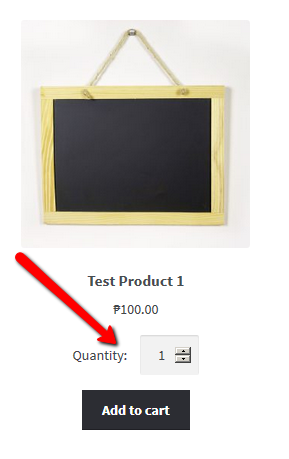
This is where the quantity field would appear
Changelog
1.4.2
- updated WordPress stable version
1.4.1
- fixed bug where quantity of all items in a grouped product cannot be set to zero thus preventing customization of the bundle
1.4.0
- added min and max limits based on stock
1.3.0
- updated old codes
1.2.0
- fixed compatibility with WooCommerce 4.0
1.0.0
- Initial release