

Advanced Post Manager
Turbo charge your posts admin for any custom post type with sortable filters and columns, and auto-registration of metaboxes.
Plugin info
Maintenance & Compatibility
Maintenance score
Stale • Last updated 218 days ago • Support resolved 0% • 11 reviews
Is Advanced Post Manager abandoned?
Likely maintained (last update 218 days ago).
Compatibility
Languages
Similar & Alternatives
Explore plugins with similar tags, and compare key metrics like downloads, ratings, updates, support, and WP/PHP compatibility.
Description
This is a tool for developers who want to turbo-charge their custom post type listings with metadata, taxonomies, and more. An intuitive interface for adding (and saving) complex filtersets is provided, along with a drag-and-drop interface for choosing and ordering columns to be displayed. Metaboxes are also automatically generated for all your metadata-entry needs.
- Add columns to the post listing view
- Filter post listings by custom criteria
- Easily add metaboxes to custom post types
- Automatically add registered taxonomies to post listings
- Sort by post metadata
See docs/documentation.html in the plugin directory for full documentation.
The team at The Events Calendar stands by our work and offers light support every Wednesday to the community via the WordPress.org support forums. Feel free to ask a question if you’re having a problem with implementation or if you find bugs.
SUBMITTING PATCHES
If you’ve identified a bug and want to submit a patch, we’d welcome it at our GitHub page for Advanced Post Manager. Simply cue up your proposed patch as a pull request, and we’ll review as part of our monthly release cycle and merge into the codebase if appropriate from there. (If a pull request is rejected, we’ll do our best to tell you why). Users whose pull requests are accepted will receive credit in the plugin’s changelog. For more information, check out the readme at our GitHub page. Happy coding!
Add-Ons
But wait: there’s more! We’ve got a whole stable of plugins available to help you be awesome at what you do. Check out a full list of the products below, and over on our website.
Our Free Plugins:
Our Premium Plugins and Services:
Installation
Frequently Asked Questions
This plugin is for developers. Nothing will happen until you write some code to take advantage of the functionality it offers.
Make sure you are reporting in a safe and responsible way. We take security very seriously. If you discover a security issue, please bring it to our attention right away! Below you will find all the methods to report security vulnerabilities:
- Report security bugs through the Patchstack Vulnerability Disclosure Program
- Check our Bug Bounty Program
- Reach out directly to us on
security [at] stellarwp.com.
Many thanks to all our translators! You can grab the latest translations or contribute at translations.theeventscalendar.com.
Review feed
Should Be Removed
Screenshots
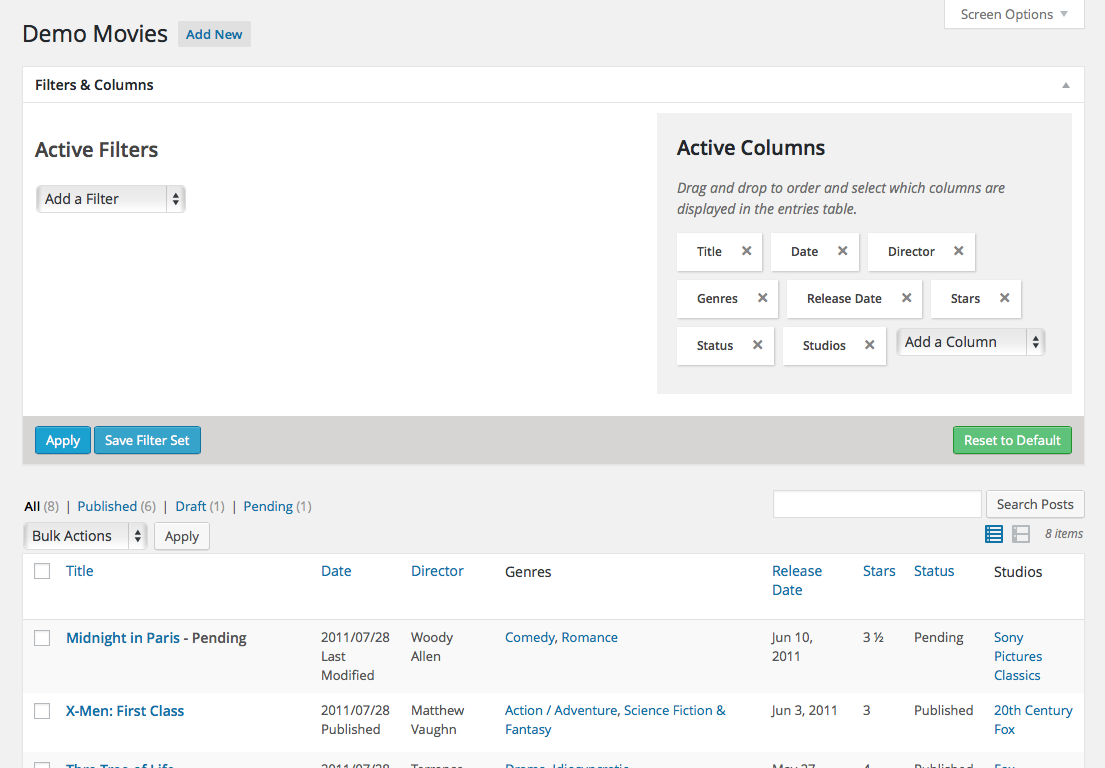
The filters and columns in action
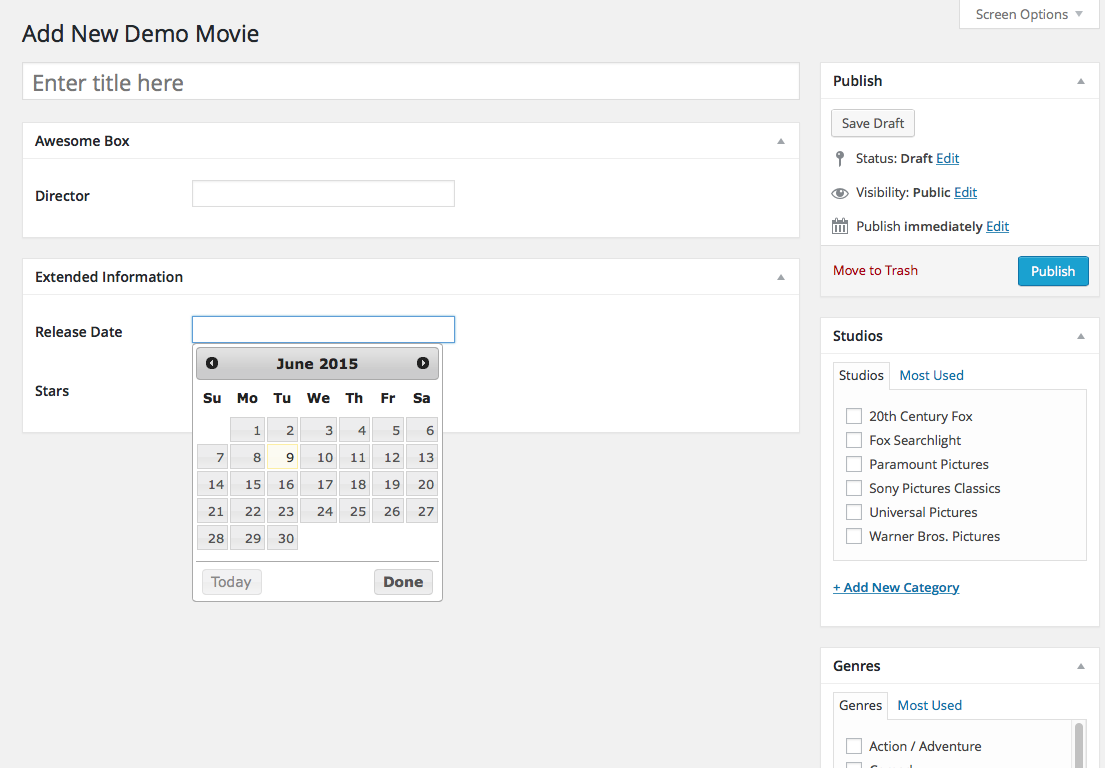
Automatically registered metaboxes for data entry
Changelog
[4.5.5] 2025-08-25
- Fix – Ensure Advanced Post Manager initialization timing can handle switching between
admin_initandcurrent_screen. [ECP-1915] - Tweak – PHP 8.3 compatibility fixes.
[4.5.4] 2023-02-22
- Version – Advanced Post Manager 4.8.5 is only compatible with The Events Calendar 6.0.10 and higher.
- Fix – Resolve error thrown by JSON decode issue. [APM-5]
- Tweak – PHP version compatibility bumped to PHP 7.4
- Tweak – Version Composer updated to 2
- Tweak – Version Node updated to 18.13.0
- Tweak – Version NPM update to 8.19.3
[4.5.3] 2022-08-05
- Fix – Resolve issue where filters that were being set were being lost after editing posts.
[4.5.2] 2022-07-14
- Security – Store filter data using JSON rather than serialized strings for safer and smaller strings.
[4.5.1] 2021-12-03
- Fix – Use WP-provided jQuery UI datepicker to resolve JS error when interacting with filters. (props to @ethanclevenger91)
[4.5] 2019-02-14
- Tweak – Change the required Version of PHP to 5.6
[4.4] 2017-01-09
- Tweak – Text domain modified to “advanced-post-manager” in line with plugin directory standards [42328]
[4.3.1] 2016-10-20
- Tweak – Added VERSION constant and registered plugin as active with Tribe Common.
[4.3] 2016-10-13
- Tweak – 4.3 compatibility updates
[4.2.2] 2016-07-06
- Fix – Html code in column list is now stripped in place of being escaped
- Fix –
wysiwygfield type in meta box will now render a TinyMCE editor and not a text area [15185]
[4.2] 2016-06-22
- Fix – Avoid errors and UI cruft when deactivating a plugin that added custom filters in use
[4.1.1] 2016-04-11
- Tweak – Improve security on permissions for AJAX requests
[4.1] 2016-03-15
- Tweak – Improve the documentation files to make sure it’s clear on how to use templates with Custom Post Types
- Fix – Removed stray characters that were hanging around for no reason
[4.0] 2015-12-02
- Fix – improved code standardization to bring this up to The Events Calendar standards
- Feature – increased language support including Catalan, Czech, French, and Portuguese (Portugal)
[3.12] 2015-09-08
- Fix – Don’t translate SQL “LIKE”. That’s just silly
[3.11]
- Feature – Completed compatibility work with Events Calendar PRO
- Bug – Prevent wp.template JS error from being thrown by setting wp-util as a dependency when enqueuing
[3.10] 2015-06-09
- Bug – fixed escaping throughout
- Bug – fixed comments bubbles when they exist in the table
- Tweak – Brought version in line with other The Events Calendar plugins
- Tweak – Added some changelog formatting enhancements after seeing keepachangelog.com 🙂
- Feature – added translation support
- Feature – Added Brazilian Portuguese translation files, courtesy of Gustavo Bordoni
- Feature – Added Spanish translation files, courtesy of robotic translation
- Feature – Partial language support for Afrikaans, Bulgarian, Chinese (Taiwan), Czech, Danish, Dutch, English (UK), Estonian, Finnish, French (France), German, Greek, Hungarian, Icelandic, Indonesian, Italian, Latvian, Lithuanian, Portuguese (Portugal), Romanian, Russian, Serbian, Slovak, Slovenian, Swedish, Turkish, and Ukrainian imported from Events Calendar PRO
2.0
- New design plus tons of fixes
1.0.9
- Increase the version of the included demo plugin in order for it’s update nag to go away
1.0.8
- Fix PHP notice regarding the $screen object
1.0.7
- Fix for loading JS/CSS on Windows-based servers
- Ensure the demo plugin checks that the main plugin is active to prevent white screens
1.0.6
- Add
class_exists()conditionals to allow inclusion in 3rd-party code - Fix a PHP notice
1.0.5
- Fix undefined indices
- Add an action for when active columns are determined
1.0.4
- CSS tweak for long select/input fields in filters
- More thorough gettext, including filterable textdomain
- Fix column bug introduced in 1.0.3
1.0.3
- Extra checks to ensure no empty columns
1.0.2
- Fix filter initialization bug
1.0.1
- Un-hide some UI elements that should show.
- Metabox HTML tweaks.
1.0
- Initial Release