

AI Assistant: GPT ChatBot
The AI Assistant WordPress plugin integrates an AI-driven chat feature on your WordPress site.
Plugin info
Maintenance & Compatibility
Maintenance score
Maintained • Last updated 160 days ago
Is AI Assistant: GPT ChatBot abandoned?
Likely maintained (last update 160 days ago).
Compatibility
Similar & Alternatives
Explore plugins with similar tags, and compare key metrics like downloads, ratings, updates, support, and WP/PHP compatibility.
Description
The AI Assistant WordPress plugin integrates an AI-driven chat feature on your WordPress site, offering visitors an engaging and interactive experience. By artificial intelligence technology provided by OpenAI, AI Assistant can proficiently answer visitors’ inquiries and offer instant support and assistance.
BENEFITS
- Enhanced user engagement with instant, AI-powered responses.
- 24/7 availability to provide constant assistance.
- Improved user experience by offering quick and accurate information.
- Increased conversion rates by addressing visitors’ concerns in real-time.
KEY FEATURES
- AI Chat Integration: Engage with visitors in real-time.
- API Key Management: Easily configure your OpenAI API key.
- Model Selection: Select from a range of OpenAI models to tailor the chat experience to your preferences
Configuration
To effectively use the AI Assistant plugin, you need to generate a new API key on OpenAI. Here are the steps to obtain your key:
- Visit https://openai.com/ and sign in or register for a new account.
- Navigate to the API section of your OpenAI account and create a new API key.
- Copy the generated API key and paste it into the settings page of the AI Assistant plugin on your WordPress site.
Usage
Upon setup, the AI chat feature will be available for visitor interaction.
Contribute to AI Assistant
If you’re interested in contributing to the AI Assistant plugin, please visit AI Assistant GitHub repository
License
This plugin is licensed under the GPL v3 or later.
License URI: GPL v3
Installation
- Download the AI Assistant plugin from the WordPress repository or upload the plugin files to the
/wp-content/plugins/directory of your site. - Activate the plugin through the ‘Plugins’ menu in WordPress.
- Navigate to the plugin’s settings page (accessible from the admin menu) to enter your OpenAI API key.
Frequently Asked Questions
Visit https://openai.com/, sign up or log in, navigate to the API section, and create a new API key.
Review feed
Screenshots
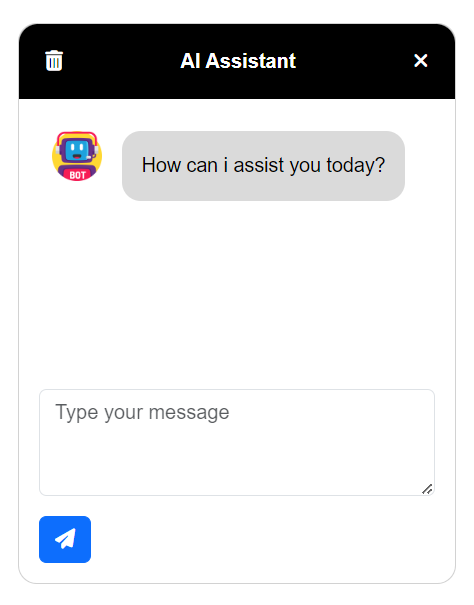
AI Assistant ChatBot

AI Assistant Settings

AI Assistant Screenshot
Changelog
1.1.0
- Rate limit .
1.0.8
- Update packages.
1.0.7
- Update packages.
1.0.6
- Update default OpenAI model.
1.0.5
- Update packages.
1.0.4
- System role.
1.0.3
- Update default OpenAI model.
1.0.2
- Set welcome message from admin page.
- Custom chat style.
1.0.1
- Added feature to copy messages to clipboard.
- Increased max user message length.
1.0.0
- Initial release.