

Alemha watermarker
Allow to add your watermark or signature to your website images both of text and image watermark are enabled
Plugin info
Maintenance & Compatibility
Maintenance score
Possibly abandoned • Last updated 3266 days ago • 1 reviews
Is Alemha watermarker abandoned?
Possibly abandoned (last update 3266 days ago).
Compatibility
Similar & Alternatives
Explore plugins with similar tags, and compare key metrics like downloads, ratings, updates, support, and WP/PHP compatibility.
Description
Alemha is wordpress plugin Allow to add your watermark or signature to your website images
both of text and image watermark are enabled you can add multi-watermarks or signatures.
unique feature of our plugin is that all watermarks created as custome post you can deal with any
watermark as any post type.
you can make more than watermarek or signature for single site and categorize your watermarks to catagories .
you can use text watermark or image watermark or to combine both of them in thsame watermark.
Plugin Features
1.Image sizes and font settings
- Watermark text
- Image sizes
- Font type (6 diffrent fonts)
- Font size
- Font color
2.position settings
- Rotation of watermark (angel with degree)
- Transparency (0% -100% )
- Position (top- bottom)
- The Horizontal distance (distance from left edge of image with pixles or percetage)
- The vertical distance (distance from top edge of image with pixles or percetage)
3.Watermark background settings
- option to use background or not
- The Horizontal distance (width of background)
- The vertical distance (hight of background)
- Background color
4.Image watermark
- upload watermark image or use image from media
- image rotation with degree
- Image Transparency (0%- 100%)
- Image postion (top- bottom)
- Image size (0.25 – 0.33 – 0.50- fullsize)
- The Horizontal distance (distance from left edge of image in pixles or percentage )
- The vertical distance (distance from top edge of image in pixles or percentage )
Installation
1.Upload Alemha-watermarker zip file to the /wp-content/plugins/ directory
2.Activate the plugin through the ‘Plugins’ menu in WordPress
Frequently Asked Questions
Installation Instructions
1.Upload Alemha-watermarker zip file to the /wp-content/plugins/ directory
2.Activate the plugin through the ‘Plugins’ menu in WordPress
Review feed
cant use it , doesnt say how to apply the watermark
Screenshots

screenshot-1.png Image sizes and font settings

screenshot-2.png Watermark position settings

screenshot-3.png Background settings
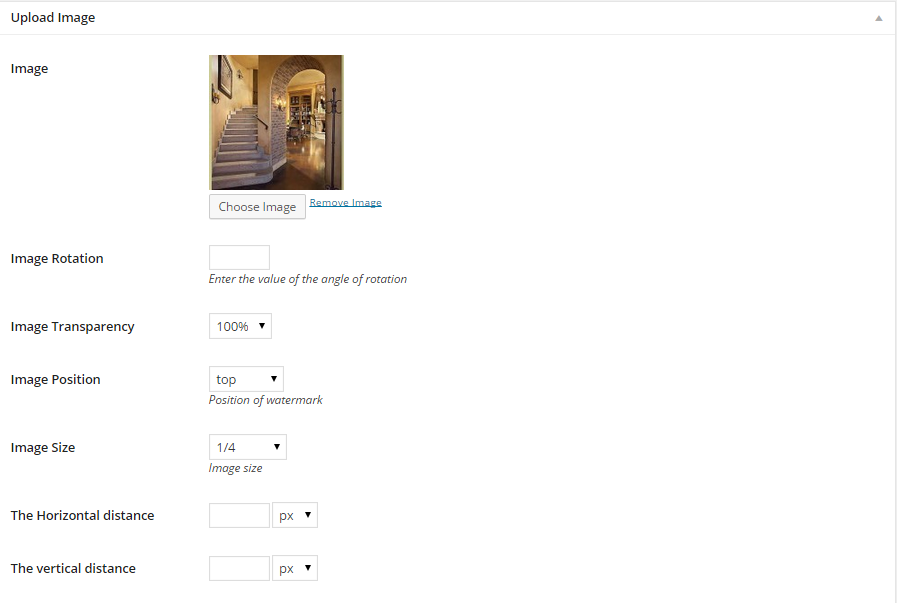
screenshot-4.png Image watermark settings

screenshot-5.png Watermark custome post
Changelog
1.3.1
- WordPress 4.7.4 compatibility
1.3
- wordpress 4.2 version compatibility.
1.2
- fix watermarking issue
1.1
- watermark categories
- text rotation
- text transparency
- text position
- 6 different fonts
- image rotation
- add watermark when insert image to post
1.0
- adding text signature
- adding image signature.
Translations
- English
- Arabic
If you have made a translation and want to contribute with it to Alemha watermarker, please e-mail us.