

allow-reinstalls
Allows plugins and themes to be updated using the standard WordPress plugin or theme update process.
Plugin info
Maintenance & Compatibility
Maintenance score
Stale • Last updated 344 days ago • 1 reviews
Is allow-reinstalls abandoned?
Likely maintained (last update 344 days ago).
Compatibility
Similar & Alternatives
Explore plugins with similar tags, and compare key metrics like downloads, ratings, updates, support, and WP/PHP compatibility.
Description
Allows plugins and themes to be updated using the standard WordPress plugin or theme update process.
When you want to update a custom plugin or theme but don’t have an automated process
then you can use this plugin to allow you to install a new version of a plugin or theme
without having to delete the existing plugin or theme.
Tested with WordPress 6.4 and WordPress MultiSite.
Note: This plugin is no longer necessary. WordPress core functionality allows you to update existing plugins and themes.
Installation
- Upload the contents of the allow-reinstalls plugin to the
/wp-content/plugins/allow-reinstallsdirectory - Do nothing until you want to update another plugin or theme.
If you’ve attempted to upload a plugin and you’ve received the message that says
Destination folder already exists. path-to/wp-content/plugins/your-plugin/

Plugin install failed.
or you’ve attempted to upload a theme and got
Destination folder already exists. path-to/wp-content/themes/your-theme/

Theme install failed.
then you need to
- Activate the allow-reinstalls plugin through the ‘Plugins’ menu in WordPress.
- Upload the plugin or theme you want to replace.
- Deactivate the allow-reinstalls plugin.
Frequently Asked Questions
Yes. Use it as a super administrator.
You’ll be able to do it, but whether or not the system works afterwards depends on the plugin or theme.
No point.
It does now.
Safety and security; just in case you overwrite the latest version with a back level.
WordPress expects to receive most of its updates automatically, not via a manual upload process.
Review feed
Screenshots
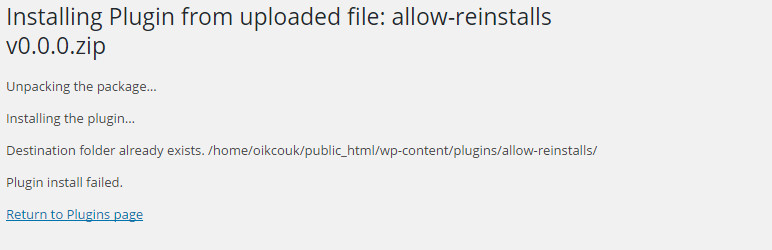
Upload fails when allow-reinstalls is already installed but inactive
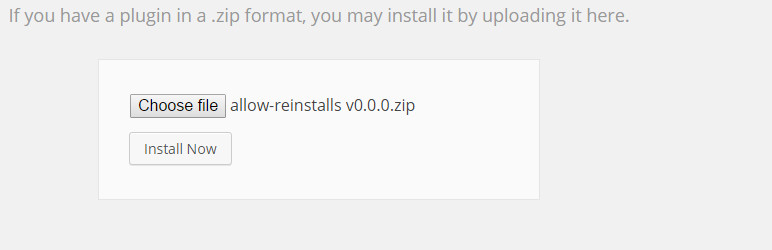
Try again after activating the allow-reinstalls plugin
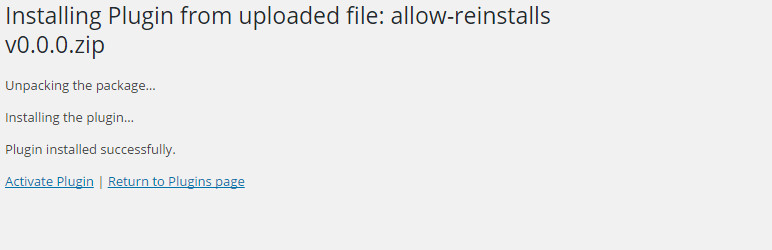
Upload succeeds this time.
Changelog
0.1.0
- Changed: Update .gitignore. #2
- Changed: Update PHPUnit tests for PHPUnit 10 & 11 #2
- Tested: With WordPress 6.8 and WordPress Multisite
- Tested: With PHP 8.3 and PHP 8.4
- Tested: With PHPUnit 9, 10, & 11
0.0.5
- Tested: With PHP 8.1 and PHP 8.2 #2
- Tested: With WordPress 6.4 and WordPress Multisite
- Tested: With PHP Unit 9.6
0.0.4
- Tested: With WordPress 6.3
- Tested: With PHPUnit 9
- Tested: With PHP 8.0
0.0.3
- Tested: With PHPUnit 8
- Tested: With WordPress 5.3
- Tested: With PHP 7.3 and PHP 7.4
0.0.2
- Changed: The PHPUnit tests in the GitHub version for WordPress 4.7 compatibility. See [github bobbingwide oik-batch issue 16]
- Tested: With WordPress 4.7
0.0.1
- Changed: Added PHPUnit tests in the GitHub version [github bobbingwide allow-reinstalls issues 1]
- Tested: With WordPress 4.6
0.0.0
- Added: New plugin – to allow oik-weightcountryshipping-pro to be updated using WordPress Plugin Install