

Plugin Name: Always valid lightbox mod
Always Valid Lightbox Mod is a Lightbox plugin which adapts to site's DOCTYPE and provides a valid HTML markup.
Plugin info
Maintenance & Compatibility
Maintenance score
Possibly abandoned • Last updated 4544 days ago
Is Plugin Name: Always valid lightbox mod abandoned?
Possibly abandoned (last update 4544 days ago).
Compatibility
Similar & Alternatives
Explore plugins with similar tags, and compare key metrics like downloads, ratings, updates, support, and WP/PHP compatibility.
Description
This plugin is a modification of the “Always valid lightbox” plugin created by Joffrey Quillet. This mod contains a fix for the buggy image resizing and for the description text inside the lightbox popup. Also, it uses only the built-in jQuery library. More info.
Always Valid Lightbox is a Lightbox plugin whose markup adapts to the WP site’s Doctype, in order to always provide a valid HTML markup.
Also, AVL allows the user to chose the attributes he wants inserted on his image links, depending on the Doctype declaration used in the website header.php template.
This way, the lightbox never generates markup validation errors at the W3C Validator test.
The jQuery lightbox effect is an adaptation based on David Ryan’s jQuery lightbox tutorial : http://dryan.com/articles/jquery-lightbox-tutorial/
Installation
- Unzip the plugin and upload the ‘always-valid-lightbox-mod’ directory to your
/wp-content/plugins/directory - Activate the plugin through the ‘Plugins’ menu in WordPress
- Configure the plugin in the Always Valid Lightbox configuration section of your administration panel.
Frequently Asked Questions
I do not understand the plugin configuration page
Here’s an explanation for each option :
“Automatically detect the image links in your posts and apply the lightbox attribute to them” : “Yes” allows the plugin to work in automatic mode. This means the plugin will automatically detect your images and trigger the lightbox effect when you click on them. If you choose “No”, you will have to manually edit your site contents and mark all the links which should trigger a lightbox effect with the ‘data-lightbox=”true”‘ or the ‘rel=”lightbox”‘ attributes.
“If you chose yes, select which attribute should be inserted in your code (choose accordingly with your doctype declaration)” : only available if you chose ‘Yes’ to the previous option. It allows you to choose the kind of markup the plugin will automatically insert in your page to trigger the lightbox effect. No matter what choice you make, the lightbox will work. However, the W3C validity of your page will depend on it, so you should choose your markup in accordance with the DOCTYPE declaration found in your site header.
“Lightbox skin” : choose the appearance of your lightbox effect
For more information about HTML validation and Doctypes, please consult the following page : http://validator.w3.org/docs/help.html#validation_basics
How do I display an image title under my lightbox images ?
The lightbox effect automatically takes the HTML “title” attribute of your images in order to display image titles. If it is not set, it will use the “alt” attribute instead, so the “title” attribute is not really required.
Review feed
Screenshots
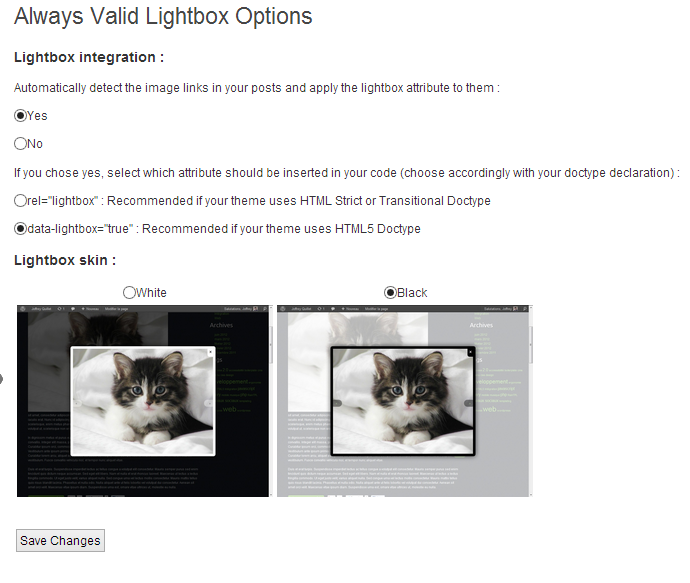
Settings page

Effect in action
Changelog
1.0
- Initial release of the mod