

Ez Overlay
A simple lightbox plugin designed to enable you to display html content within a popup window using just about any html element as a trigger.
Plugin info
Maintenance & Compatibility
Maintenance score
Possibly abandoned • Last updated 5628 days ago
Is Ez Overlay abandoned?
Possibly abandoned (last update 5628 days ago).
Compatibility
Similar & Alternatives
Explore plugins with similar tags, and compare key metrics like downloads, ratings, updates, support, and WP/PHP compatibility.
Description
This plugin is an alternative to the jQuery based lightbox systems. It was created using pure Javascript and has no dependencies on any other libraries. I created this simple lightbox after weeks of dealing with jQuery conflicts within Buddypress and WordPress. Many of the existing jQuery type lightboxes do not stop audio playback for flash/.swf playback when closing the lightbox. This plugin completely removes the overlay content from the dom to make absolutely sure your .swf file playback is stopped in all browsers.
Help
How to implement the Ez Overlay lightbox:
- Copy the code for this example into the WordPress editor in the HTML window or start from scratch and go to step 2.
- Create an Ez Overlay Div element by assigning it a with the class=”ez-overlay”, to avoid css conflicts add your target div to the body of your html and not within a sidebar or another div.
- Assign the new Div a unique CSS Id so it can be activated by the trigger. Ie: id=”my-overlay”.
- Put whatever Html content within the Ez Overlay Div.
- Create a trigger for the overlay, it can be just about any Html element but needs an ‘onlclick’ attribute to activate the lightbox. See the ezFade() function below.
Tips:
- Ie7 will render text elements within this overlay at a different size than Ie8. If this is an issue, just assign a width and height to your Ez Overlay target div using an inline style.
- Avoid padding or adding margins to the Ez Overlay target div. Padding adds to a div’s width and height and will throw your overlay off-center. Just add a margin to the elements within the target div instead.
- In the folder named ‘uncompressed-js’, there is a file named ‘ez-overlay.js’ which is a readable copy of the compressed code for tinkering.
- The plugin removes the overlay div’s from the dom when you exit out of them, this is so that .swf playback will be halted on all browsers. Don’t panic, the plugin immediately returns them to the body of your html document at the very end.
ezFade Function:
onclick="ezFade('my-overlay4',800,true,100,100);"
The ezFade() function accepts five arguments, the first being the target lightbox to be triggered, the second is the fade time. The third argument is to activate "fixed mode", and finally the x/y coordinates if you want you overlay to be fixed in a certain position.
Installation
- Upload the entire ‘ez-overlay’ folder to the
/wp-content/plugins/directory - Activate the plugin through the ‘Plugins’ menu in WordPress
- Create your overlay’s and triggers with html using the examples included in the plugin folder.
- Example overlay div to be put in the body of your html:
<div id="my-overlay1" class="ez-overlay"><h2>Ez Overlay</h2></div> - Example trigger to be put anywhere in your html code:
<span style="cursor:pointer; color:#036;" onclick="ezFade('my-overlay1');">Open Overlay1</span>
Frequently Asked Questions
Review feed
Screenshots
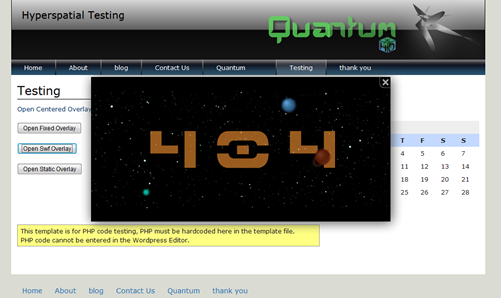
A Swf overlay in action
Changelog
1.0
- Hello WordPress World!