
Plugin info
Maintenance & Compatibility
Maintenance score
Maintained • Last updated 122 days ago • Support resolved 100% • 26 reviews
Is Animations for Blocks abandoned?
Likely maintained (last update 122 days ago).
Compatibility
Similar & Alternatives
Explore plugins with similar tags, and compare key metrics like downloads, ratings, updates, support, and WP/PHP compatibility.
Description
Lightweight plugin that adds additional inspector controls to block editor blocks that allow to animate the block once it becomes visible to the user during scrolling. The controls can be used to select an animation type (fade, flip, slide, zoom), variation (different directions), as well as delay, duration and more advanced settings. Upon changing an option the animation can be immediately previewed in the editor.
This plugin uses AOS – Animate on scroll library and adds its’ stylesheet (2.8 kB) and script (5.2 kB) to the front end as well as a script that initializes the animations (1.3 kB).
Installation
Install via admin dashboard
- Go to your WordPress admin dashboard -> Plugins.
- Click “Add New”.
- Click “Upload Plugin”.
- Select the
animations-for-blocks.zipfile. - Click “Install Now”.
- Activate the plugin from WordPress admin dashboard -> Plugins.
Manual install via FTP upload
- Upload the folder “animations-for-blocks” from
animations-for-blocks.zipfile to your WordPress installations../wp-content/pluginsfolder. - Activate the plugin from WordPress admin dashboard -> Plugins.
Frequently Asked Questions
In your selected block’s inspector controls (block settings) open the “Animation” panel and select an animation. The current block should display a preview of the selected animation and further options related to that animation will become available below.
Animations for Blocks plugin works by using the Animate on Scroll (AOS) library that is mostly CSS-based with some JavaScript to handle initialization. The plugin adds attributes to block’s root element that tell the AOS library how to animate it. Loading the necessary styles and scripts is also handled automatically by the plugin.
By default the plugin will not play animations for users that have the “prefers-reduced-motion” setting enabled for their device. This functionality can be turned off by enabling the “Ignore reduced motion preference” plugin option, how ever it’s not recommended. Other users that don’t have reduced motion preference enabled will still see the animations.
Since some elements are initially placed off-screen to then animate back to their normal position it can cause a scrollbar to appear. To prevent this the overflow should be hidden on one of the parent elements. Which element you should target is specific to your site. For example, you can try adding custom CSS: .wp-site-blocks { overflow: hidden; }, but you have to make sure that this doesn’t break any other features on your site that require overflow being visible.
It should work with normal blocks that render a valid WP Element that can utilize the blocks.getSaveContent.extraProps filter as well as dynamic blocks that utilize a render_callback. Third party blocks that do something unorthodox may not work.
Known unsupported blocks
The anfb_unsupported_blocks filter can be used in your child theme’s functions.php file to disable block animation support.
add_filter('anfb_unsupported_blocks', function($blocks) {
    $blocks[] = 'core/button';
    return $blocks;
});
After disabling this plugin blocks with animations can become invalid. From there you can attempt to recover the block by clicking “Attempt Block Recovery” which should remove the custom animation attributes. If you don’t want to risk blocks becoming invalid you need to disable all animations before disabling the plugin.
When none of the animated elements show up on your site it’s possibly due to a JavaScript error preventing the initialization of AOS. Please open the Developer Tools (F12 on Chrome/Firefox) and look for any errors in the Console tab. You can contact support with the error message, include your site link if possible.
Review feed
Simple. That's why it's good.
This is how you do it.
Amazing plugin!
Great plugin
Screenshots
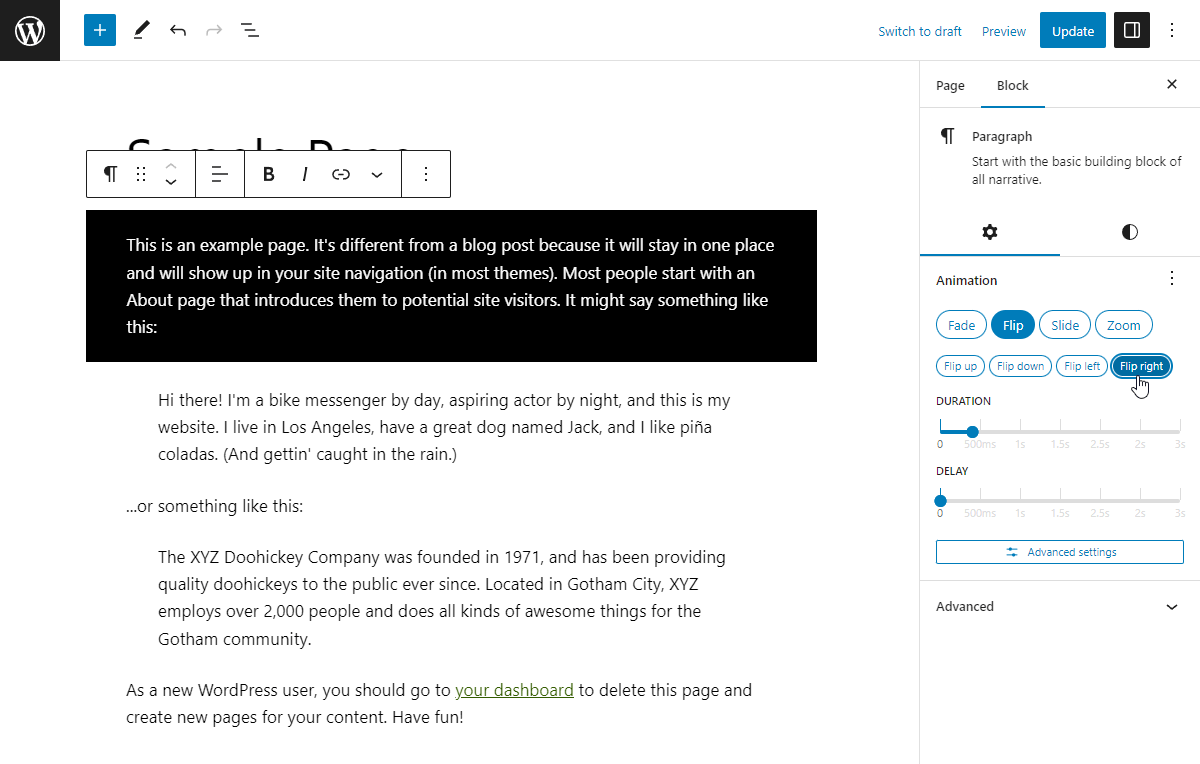
Adding an animation
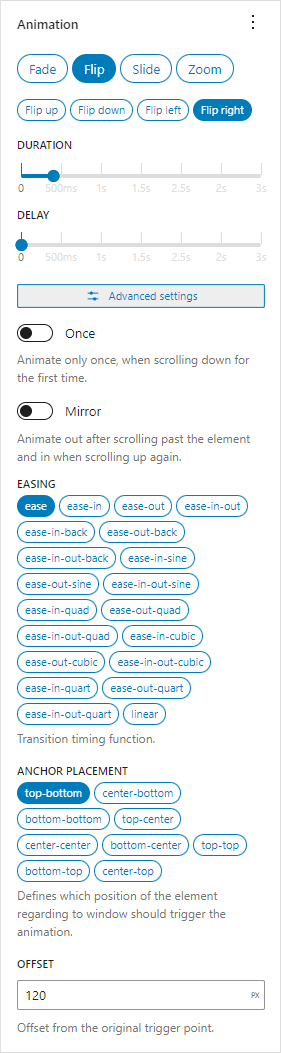
Animation controls
Changelog
1.2.5
- Tested with WordPress 6.9.
- Update Lenis to 1.3.15.
- Update
@wordpress/*packages.
1.2.4
- Added a donate link on the plugin page – supporters get a 50% off coupon for my brand new WordPress theme.
- Added notice that lets you know when your device has
prefers-reduced-motionenabled. - Added plugin option “Ignore reduced motion preference”.
- Improved help text and FAQs.
- Update Lenis to 1.3.11.
- Update
@wordpress/*packages. - Tested with Gutenberg 21.7.0.
1.2.3
- Change Animate on Scroll front end style media from
alltoscreen and (prefers-reduced-motion: no-preference).
1.2.2
- Fix
Warning: Undefined array key "attrs"when a parsed block doesn’t have attributes. - Fix
Incorrect use of <label for=FORM_ELEMENT>. - Replace deprecated
wp.components.ButtonGroup. - Update Lenis to 1.3.8.
- Update
@wordpress/*packages.
1.2.1
- WP 6.8.
- Update Lenis to 1.2.3.
- Update
@wordpress/*packages.
1.2
- Front end scripts are now deferred.
- Lazyload assets option now defaults to true.
- Added new animation – “Scale”, a subtle animation which starts from a slightly scaled up/down state with opacity 0 and transforms into its’ initial size while fading in.
- Added new animation – “Default”. Plugin settings now allow to configure an animation that will be used for any block that has selected the “Default” animation.
- Added new animation – “Inherit”. The “Animation container” block now has an option to become an “Animation provider”, in which case all the blocks nested inside of it that use the “Inherit” animation will use the animation of the provider block. The provider block can also stagger each subsequent animation by a specified amount.
- Bundled Lenis – a lightweight smooth scroll library – can be enabled in plugin settings.
- AOS is now exposed to window object on the front end (
window.AOS). - Tested up to WordPress 6.7.1.
- Requires WordPress 6.6.
- Requires PHP 8.1.
- Update
@wordpress/*packages.
1.1.6
- Tested up to WordPress 6.6.
- Update
@wordpress/*packages. - Use
block.jsonfor Animation container block. - Move block styles to separate stylesheet.
- Fix label and value mix up in RangeControl.
- Remove some defunct code.
- Bundled
react-jsx-runtimeto keep the plugin working with WP < 6.6.
1.1.5
- Tested up to WordPress 6.5.
- Added option to choose where to display the animation controls – you can move them to the “Styles” tab or to “Advanced” inspector controls area.
- Update
@wordpress/*packages.
1.1.4
- Accidentally a version.
1.1.3
- Fix for crash with latest Gutenberg plugin due to
__unstableElementContextbeing removed. - Update
@wordpress/*packages.
1.1.2
- Add option to disable automatic animation preview.
- Add option to lazyload assets when an animated block is preset on the current page.
- Update
@wordpress/*packages. - Update screenshots.
1.1.1
- Use
WP_HTML_Tag_Processorfor adding HTML attributes. - Blocks that render multiple root elements are no longer wrapped automatically. Use Animation container block to do it.
- Move all PHP code to main file for simplicity.
1.1.0
- Animation preview works in iframe-d block editors.
- Rework controls.
- Add ability to copy-paste animation settings.
- Update Animation container block to API version 2.
- Use
render_blockfilter to apply animation attributes instead of overriding block’srender_callback. - Add
anfb_aos_attributesfilter that can modify attributes that are added to animated HTML elements. - Convert some code to typescript.
- Update
@wordpress/*packages. - Test with WordPress 6.2-RC1.
1.0.6
- Fix
onceandmirroroptions detection in dynamic blocks. - Update
@wordpress/*packages. - Test with WordPress 6.1.1.
1.0.5
- Update
@wordpress/*packages. - Test with WordPress 6.0.
- Add GitHub link.
- Remove
srcfolder from plugin.
1.0.4
- Update block anchor selector.
1.0.3
- Use generated version number for AOS library.
1.0.2
- Fix encoding for dynamic blocks.
1.0.1
- Add more unsupported blocks.
- Move Animation Container block to “Design” category.
1.0.0
- Initial release.