

annouoncement
Do you wanna inform any important news or message to your readers ? You can use this plugin.
Plugin info
Maintenance & Compatibility
Maintenance score
Possibly abandoned • Last updated 5247 days ago
Is annouoncement abandoned?
Possibly abandoned (last update 5247 days ago).
Compatibility
Similar & Alternatives
Explore plugins with similar tags, and compare key metrics like downloads, ratings, updates, support, and WP/PHP compatibility.
Description
You can set your message /news here.You visitors can now see your announcement. The Plugin is created with light window support. The animated effect on announcement will give a pleasant effect for your blog/website. It will be displayed only one time for a particular user . The plugin is created with cute design and animation. It will never interrupt your blog reader.
Features:
- Navigation: You can navigate your reader into a particular event
- Message Passing: You can announce any event information here
- Html content: You can add images, links, color just like a post (RTE).
For Example and Details Visit : http://www.sajithmr.com/wordpress-announcement-plugin/
My Technical Blog is : http://www.sajithmr.com/
Arbitrary section
If you have any queires / complaints regarding this plugin, please feel free to mail me at [email protected]. Thank you
See my blog for technical updates http://www.sajithmr.com .
Use announcement and improve your website quality. Happy Blogging
Installation
- Unzip the files
- Upload announcement directory (containing announcement.php file with image directory to the
/wp-content/plugins/directory - Activate the plugin through the ‘Plugins’ menu in WordPress
3.Click the Edit announcement link for adding your content. It is a Rich text editor - After that, go to options and select Announcement. By default the plugin will be inactive. You have to set your announcement and activate the announcement by checking ‘Active’ checkbox.
Frequently Asked Questions
No need to edit any template files. What you have to do is set your announcement from plugin option menu.
Make sure the path to main plugin file is /wp-content/plugins/announcement/annoucement.php
Review feed
Screenshots
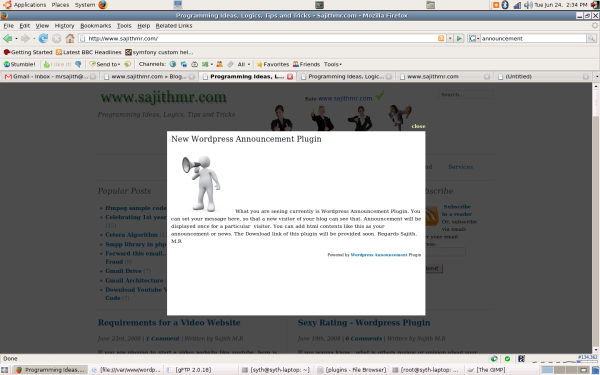
screen shot