

Announcements Ticker
Provides a shortcode and custom post type to display announcements using a jQuery news ticker.
Plugin info
Maintenance & Compatibility
Maintenance score
Possibly abandoned • Last updated 4867 days ago • 1 reviews
Is Announcements Ticker abandoned?
Possibly abandoned (last update 4867 days ago).
Compatibility
Similar & Alternatives
Explore plugins with similar tags, and compare key metrics like downloads, ratings, updates, support, and WP/PHP compatibility.
Description
Easily create an announcements news ticker on your website. Put up new announcements just like how you would put up a blog post. Use the [announcements] shortcode to display all your announcements in a page or post.
Customize the look of your ticker from the WordPress administration screens. An options page allows you to change the colours and size.
Installation
- Upload the
announcements-tickerfolder to the/wp-content/plugins/directory - Activate the plugin through the ‘Plugins’ menu in WordPress
- Create announcements like how you would create a blog post. Set the post date to the future time when the announcement expires.
- Add the shortcode [announcements] in the post or page content where you want the announcements to show.
Frequently Asked Questions
I created a new announcement but it’s not showing up in the ticker. Why??
Make sure you set the post date to a time in the future. WordPress should report it as a scheduled post. The ticker is designed to pick up future posts so that they expire and disappear automatically.
The options page is broken!
The dynamic preview and color pickers don’t seem to work in Internet Explorer. However, you can change the settings using the sliders and textboxes. Save the changes and they should show up on the front end.
For best results, use Google Chrome. Or if you know how to improve IE compatibility, let me know.
Sliders? What sliders? There’s nothing so cool on the options page.
Unforunately, Mozilla Firefox renders the sliders as textboxes. You can key in the values for text size and ticker height directly, but they will be reset to the default options if they are out of the permitted range.
Wait for a new version of Mozilla Firefox which will render the sliders, or use Google Chrome. Safari works too.
What are these mysterious permitted ranges?
Minimum ticker height: 32px
Maximum ticker height: 400px
Minimum text size: 8px
Maximum text size: 32px
I don’t like your ranges, they’re not suitable for my site.
All the ranges can be filtered with WordPress filters. Add the code into your theme’s functions.php to modify the values. Take a look from line 314 of announcements.php to find the filter hooks.
Review feed
Screenshots
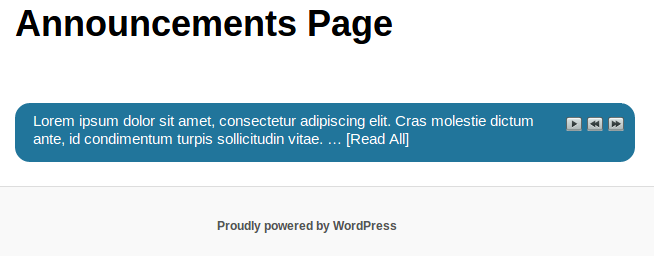
Announcements ticker with automatically generated excerpt for long announcements

Options page with dynamic ticker preview
Changelog
0.3
- (27 Nov 2012) Changed query so it no longer looks for future posts. Post dates greater than now will show up in the ticker.
- Added filter so announcement custom post types will have the post status of future changed to publish when created or updated. This allows non admin users to see the full text after clicking on the Read All link.
0.2
- (27 Aug 2012) Changed hardcoded development name used in the folder paths to the actual plugin name of announcements-ticker. Also renamed the main plugin file.
0.1
- (26 Aug 2012) First Release.