

Antispam Collateral Condolences
Notifies people when their comment is moderated or caught as spam, so they aren't left wondering.
Plugin info
Maintenance & Compatibility
Maintenance score
Possibly abandoned • Last updated 6050 days ago
Is Antispam Collateral Condolences abandoned?
Possibly abandoned (last update 6050 days ago).
Compatibility
Similar & Alternatives
Explore plugins with similar tags, and compare key metrics like downloads, ratings, updates, support, and WP/PHP compatibility.
Description
This plugin notifies people when the comment they just left is moderated or marked as spam. The method of notification can be either a Javascript popup, or an HTML notification in the comment area. You can choose whether spam comments, moderated comments, or both will result in the notification. This is especially useful for spam comments, as the human author will know to contact you and have you rescue the comment from the spam bin.
Installation
- Upload the
antispam-collateral-condolencesfolder to the/wp-content/plugins/directory - Activate the plugin through the ‘Plugins’ menu in WordPress
- Go to Options > Antispam Collateral Condolences to change the options
Frequently Asked Questions
Can I customize the text that is shown to the user?
Not yet… the next version will allow that.
Review feed
Screenshots
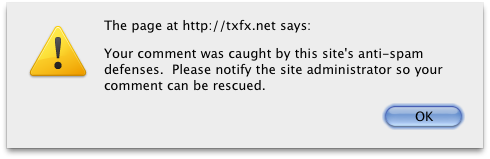
A Javascript alert in action

The settings page
Changelog
0.3
- First release in plugin repository
- Added options page