

Manage Notification E-mails
Enable and disable email notifications that WordPress sends to the admin and user. Works perfectly with many other plugins!
Plugin info
Maintenance & Compatibility
Maintenance score
Stale • Last updated 309 days ago • Support resolved 0% • 54 reviews
Is Manage Notification E-mails abandoned?
Likely maintained (last update 309 days ago).
Compatibility
Developers
Similar & Alternatives
Explore plugins with similar tags, and compare key metrics like downloads, ratings, updates, support, and WP/PHP compatibility.
Description
With this plugin you can switch the different WordPress notification e-mails on and off, like options as the new user and password change notifications send by WordPress to the administrator and user. Works perfectly in combination with a lot of other plugins!
Watch this nice tut made by Robert Orzanna:
The options you can manage are:
- New user notification to admin
- New user notification to user
- Notify post author
- Notify moderator
- Password change notification to admin
- Password change notification to user
- E-mail address change notification to user
- Forgotten password e-mail to user
- Forgotten password e-mail to administrator
- Automatic WordPress core update e-mail
- Automatic WordPress plugin update e-mail
- Automatic WordPress theme update e-mail
- Send admin notifications to extra admin e-mail addresses (1.7.0)
- Send an e-mail to administrators after a user requested to update his or her e-mail address (1.7.0)
- Send an e-mail to administrators after a user successfully updated his or her e-mail address (1.7.0)
- Multi-site support! Now you can manage your notification settings in one single environment (1.8.0)
- Export and import settings (1.8.0)
The automatic core, plugin, and theme updates have a special built-in feature. When one of these options is disabled, successful e-mails don’t get send out, but failed updates still will send an e-mail to the admin.
This version contains some nice new stuff. If you find any issues, let me know. If you like the new features, please be so kind to give this plugin a good rating! It will help me to keep up the good work for you 🙂
Want regular updates? Feel free to support me with a small donation 🙂
Installation
- Upload
manage-notification-emails.zipvia the plugins menu - Activate the plugin through the ‘Plugins’ menu in WordPress
- Use the settings-page to enable or disable sending of notifications
Frequently Asked Questions
Yes, after activating you can go to the settings page and disable or enable the notification e-mails that suits you.
Yes! starting from version 1.8.0 multi-site is supported.
Some other plugins also use their custom notifications which overwrite the core notifications of WordPress. To be sure, please first try the plugin without other plugins installed or at least temporarily disable them.
Review feed
Screenshots

Settings view: Core options.
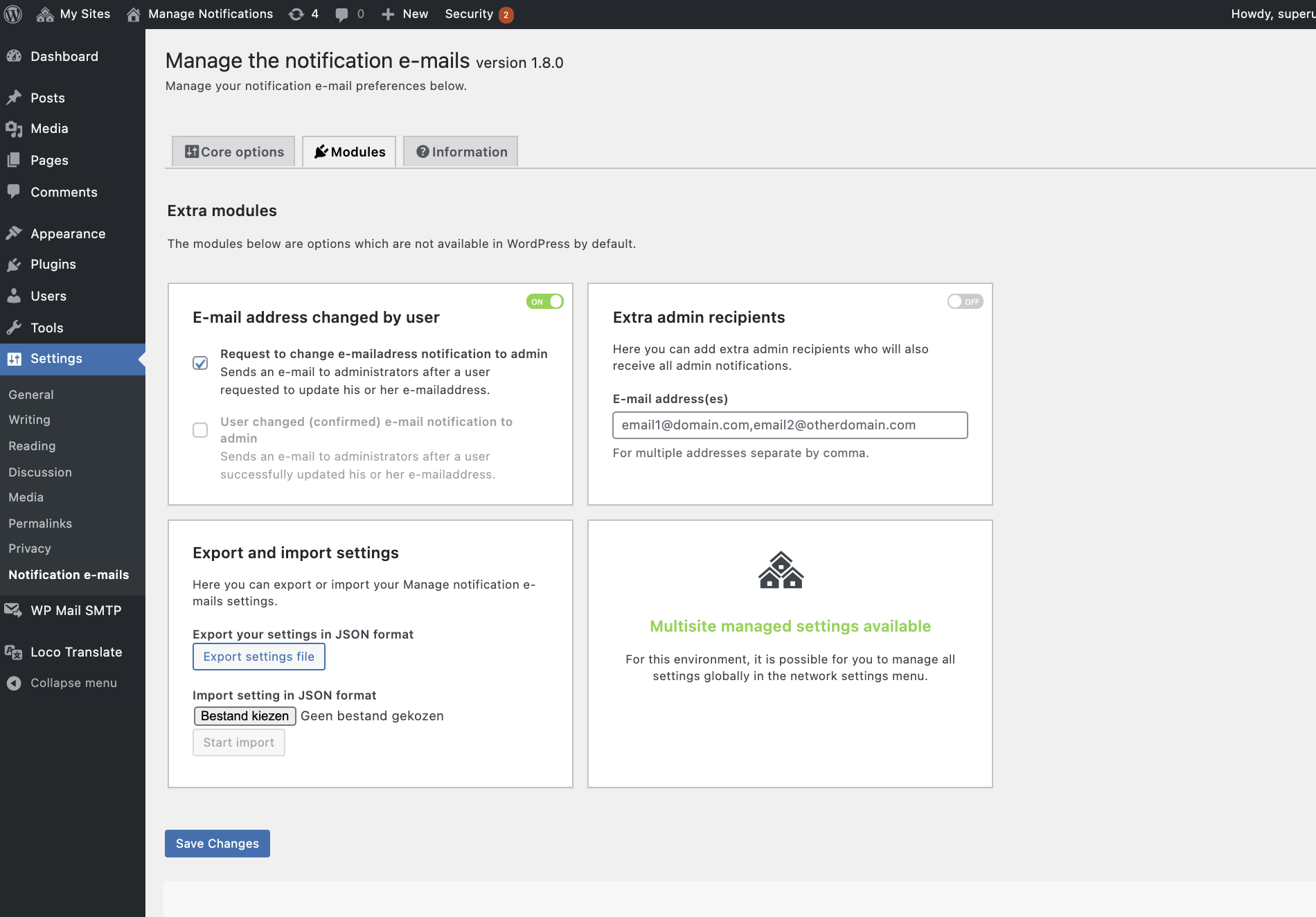
Settings view: Available modules.
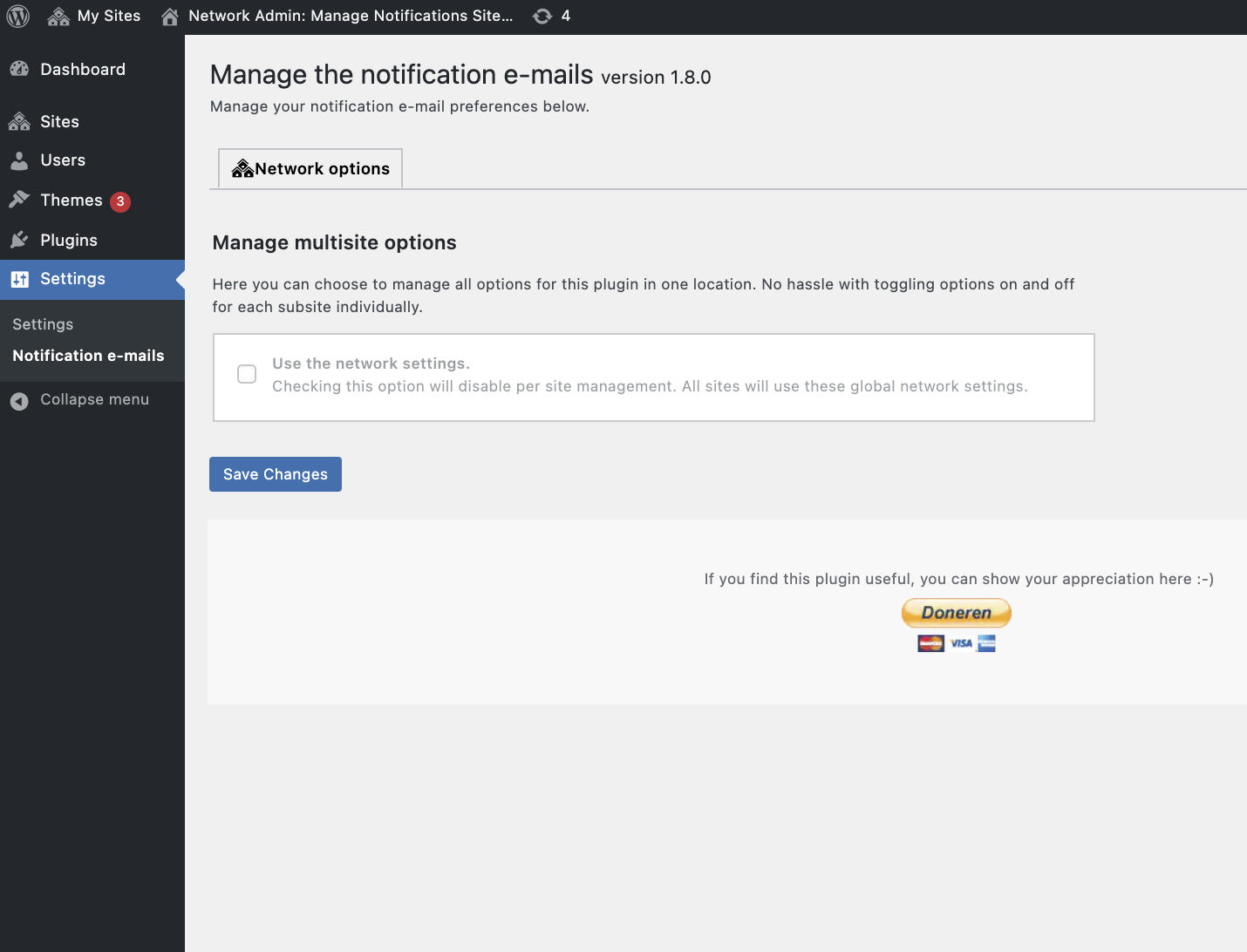
Settings view: Multi-site network settings.
Changelog
1.8.6
FIXED: Medium vulnerability in settings module. Thanks to Wordfence for reporting this.
UPDATED: Lowered the priority to 99 in the filters fixing some issues where plugins overwrite the disabling of sending the e-mails.
1.8.5
UPDATED: Compatibility fix with WP 6.1+ where new user notifications are managed by filters.
1.8.4
UPDATED: Refactoring.
1.8.3
FIXED: (CSRF) Security fix. Special thanks to Muhammad Daffa (Patchstack Alliance) for reporting this.
1.8.2
FIXED: fixed an issue with automatic plugin update notification.
FIXED: fixed issues with not correct activating options in multisite environment.
UPDATED: language corrections.
1.8.0
ADDED: Multi-site support.
ADDED: Import and export of settings.
UPDATED: A lot of files are refactored and added some more comments along with it.
1.7.1
FIXED: Email automatic plugin update notification to admin sometimes still send out.
1.7.0
UPGRADED: Refactored the plugin and added a more suitable modular system for adding new features.
ADDED: Send admin notifications to extra admin e-mail addresses
ADDED: Send an e-mail to administrators after a user requested to update his or her e-mail address
ADDED: Send an e-mail to administrators after a user successfully updated his or her e-mail address
1.6.1
FIXED: Email automatic plugin update notification to admin sometimes still send out.
1.6.0
ADDED: Automatic WordPress plugin, and theme update e-mail options.
1.5.1
FIXED: php-notice for missing $deprecated variable.
1.5.0
UPGRADED: Upgraded the pluggable functions file. Fixing the missing PassWordHash Class bug.
1.4.2
FIXED: Loading local language.
1.4.1
ADDED: Manage sending e-mail after a successful automatic WordPress core update to administrators. E-mails about failed updates will always be sent to the administrators and will not be disabled.
1.4.0
ADDED: Multi-language support
1.3.0
ADDED: passing through the $notify variable, available sinds 4.6. This is for other plugins to override default sending to admin or user. Only useful if sending within this plugin is activated.
UPDATED: updated with the newer pluggable send functions of WordPress 4.7.
FIXED: Missing blogname in user email
1.2.0
ADDED: Manage sending password forgot e-mail to registered user.
ADDED: Manage sending password forgot e-mail to administrator.
1.1.0
FIXED: Checking password change notification to admin now works.
ADDED: Splitted the manage option for new user notification e-mail into user and admin e-mail.
UPDATED: Clarified some comments and fixed some typo’s.
1.0
- It all starts here.