AutoComplete Address Checkout For woocommerce
Improve user experience with WooCommerce checkout address autocomplete. Speed up checkout, reduce errors, and enhance convenience with real-time addre …
Plugin info
Maintenance & Compatibility
Maintenance score
Stale • Last updated 306 days ago
Is AutoComplete Address Checkout For woocommerce abandoned?
Likely maintained (last update 306 days ago).
Compatibility
Similar & Alternatives
Explore plugins with similar tags, and compare key metrics like downloads, ratings, updates, support, and WP/PHP compatibility.
Description
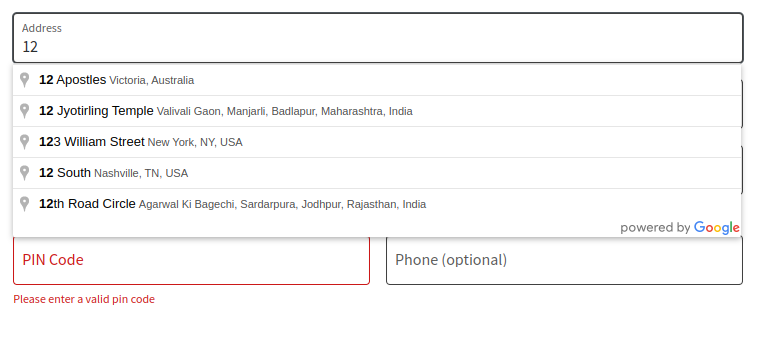
Improve user experience with WooCommerce checkout address autocomplete. Speed up checkout, reduce errors, and enhance convenience with real-time address suggestions.
Learn how to implement Google Maps Autocomplete for address fields in WooCommerce checkout. Enhance your store’s user experience with automatic address suggestions and streamlined form filling, ensuring accurate and efficient customer data entry.
Features
- One-Click Installation – Set up quickly and effortlessly.
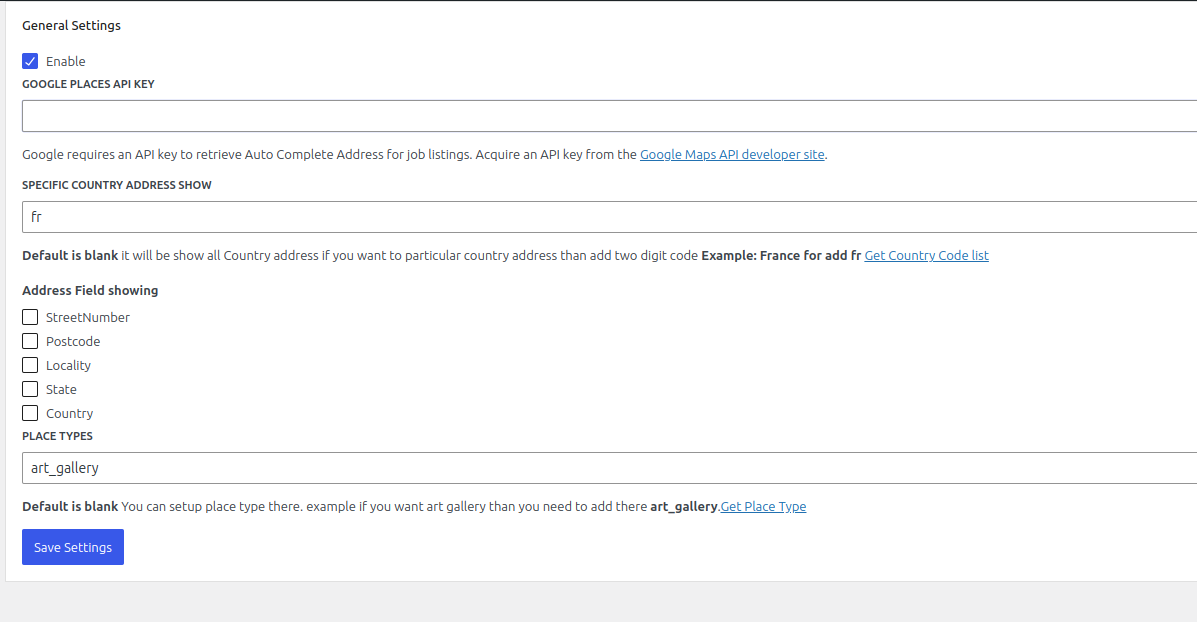
- Google Address Autocomplete – Auto-fills address fields for faster checkout.
- Country-Specific Address Filtering – Show addresses only from selected countries (US, AU).
- Map Integration – Enable an interactive map for better accuracy.
- Customizable Address Fields – Show or hide street number, postcode, locality, state, and country.
- Place Types Support – Compatible with specific location types (e.g., art galleries).
- Checkout Block Support – Fully compatible with the latest WooCommerce checkout block.
- Easy to Use – Intuitive and hassle-free setup.
WooCommerce Checkout Autofill Address is a WordPress plugin designed to streamline the checkout process by enabling real-time address auto-completion. Powered by Google Places API or similar services, it simplifies address input for customers, reducing errors and ensuring accurate shipping details. This feature enhances user experience, minimizes abandoned carts, and ensures efficient order processing.
External Services
This plugin relies on third-party services to provide the autocomplete functionality. Details of the service are as follows:
Service Name: Google Maps JavaScript API
– What the service is and what it is used for:
The Google Maps JavaScript API is used to enable the autocomplete functionality for address fields in the WooCommerce checkout form.
– What data is sent and when:
The plugin sends partial address input entered by the user to Google’s servers to fetch autocomplete suggestions in real time. No additional personal or sensitive data is sent.
– Terms of Service and Privacy Policy:
– https://cloud.google.com/maps-platform/terms
– https://policies.google.com/privacy
Installation
Frequently Asked Questions
Yes, you need a valid Google Maps API key to enable the autocomplete functionality.
No, the plugin does not store or transmit user data beyond the partial address input required for the autocomplete feature.
No consent is required as the data transmitted is minimal and strictly necessary for the functionality. However, you can provide a notice about the use of Google services in your store’s privacy policy.